


You've increased paid spend, but the numbers don't agree. Meta reports one purchase count, GA4 reports another, and Shopify shows the only figure tied directly to completed orders. The differences may come from attribution rules, consent choices, browser restrictions, duplicate events, or a purchase tag that stopped working after a theme update. Yet campaigns keep optimizing against whichever dashboard the team checks most often.
That's the wrong order of operations. Conversion tracking setup starts with measurement planning, not pixel installation. You need a clear event model, defined ownership across browser and server systems, consent-aware data flows, and a reconciliation process that compares platform events with Shopify's order records. Google describes conversion tracking as a tool for identifying customer actions after ad interaction, including purchases, app downloads, sign-ups, and calls, while distinguishing primary actions from broader “All conversions” signals in reporting (Google Ads conversion tracking documentation).
Why Most Shopify Conversion Tracking Is Lying to You
A Shopify store can show a completed order while GA4 misses the purchase and Meta reports a different result. That disagreement does not automatically mean one platform is broken. Each system measures a different part of the journey, with different attribution rules, consent signals, and identifiers.
Pixel-only tracking produces a polished report from incomplete evidence. Browser scripts can fail when visitors use ad blockers, privacy-focused browsers, restricted cookies, or consent banners that block marketing tags. Safari's tracking protections and iOS consent controls make the gap easier to see, but the underlying issue is broader: the browser may not have permission or the technical ability to report every customer action.
Shopify records the order as the commerce system. GA4 processes events through its own collection and attribution logic. Advertising platforms assign credit based on their settings and the signals they receive. Treating those outputs as interchangeable creates false confidence.
Practical rule: Use Shopify order data as the reconciliation baseline, not as another opinion in a dashboard debate.
Google's reporting distinction also affects optimization. The “Conversions” column counts primary conversion actions, while “All conversions” can include primary and secondary actions along with view-through conversion sources (Google Ads' explanation of conversion tracking). If a team imports every useful interaction as a conversion, automated bidding can optimize toward signals that describe interest rather than revenue.
The scale of Google Conversion Tracking makes implementation discipline more important. BuiltWith reports 2,366,563 live websites using it and 6,890,203 additional websites that used it historically, from 9,256,766 observed customer websites. It also identifies 130,837 tracked sites in Brazil (BuiltWith Google Conversion Tracking usage data). Widespread adoption does not validate an individual store's setup.
A reliable Shopify measurement plan should:
- Define outcomes: Separate revenue events from intent, audience, and diagnostic events.
- Standardize events: Keep names and parameters consistent across GA4, Google Ads, Meta, and backend systems.
- Assign ownership: Decide which events come from the browser, server, or both.
- Respect consent: Pass consent state before downstream tags process customer data.
- Reconcile orders: Compare platform events with Shopify order records and investigate meaningful gaps.
Server-side and consent-aware collection should be the default architecture, with browser tags providing useful context rather than carrying the entire measurement burden. Every purchase event still needs a check against Shopify's order data. Adding another pixel cannot repair an undefined event, a duplicated purchase trigger, or a missing reconciliation process.
Build Your Event Map Before Touching a Single Pixel
Most tracking rework starts with an event that was never properly defined. A developer fires a custom event called checkout, an app sends begin_checkout, and a theme script sends a third purchase signal from the thank-you page. The tags may all be “working,” but the data model is fragmented.
Start with a one-page event map. List the actions that matter to the store, then document the trigger, parameters, destination platforms, and business role for each one. Shopify stores commonly need product views, cart additions, checkout starts, payment information, and completed purchases. Subscription businesses may also need events that distinguish an initial subscription from a recurring renewal, depending on how the subscription application exposes those transactions.
Separate optimization events from diagnostic events
Not every useful event should become a primary conversion. A product view can support audience analysis, a cart addition can help diagnose funnel friction, and a purchase can feed bidding and revenue reporting. Those roles aren't interchangeable.
Google Ads supports this distinction through primary and secondary conversion actions. Make the purchase event primary when it represents the business outcome you want automated bidding to pursue. Keep lower-intent events available for analysis or audiences unless there's a clear reason to optimize toward them.
Use the official GA4 ecommerce naming pattern wherever possible. Consistent names make downstream reporting easier and reduce the need to translate custom events before exporting data to tools such as BigQuery. Parameters must be equally consistent. A purchase should carry value, currency, and transaction_id, alongside item data such as product identifiers, prices, and quantities.
| Event Name | Trigger Location | Key Parameters | Primary or Secondary |
|---|---|---|---|
view_item | Product detail page | item_id, item_name, price, currency | Secondary |
add_to_cart | Successful add-to-cart action | items, value, currency | Secondary |
begin_checkout | Checkout initiation | items, value, currency | Secondary |
add_payment_info | Payment information submitted | value, currency, items | Secondary |
purchase | Confirmed order event | transaction_id, value, currency, items | Primary |
The table is a starting point, not a universal template. A lead-generation store might make a qualified form submission primary instead. A subscription store may need a separate business event for a new subscription, with renewals handled through backend data rather than browser behavior.
Lock the parameters before implementation
Avoid vague names such as conversion or sale. One event should represent one business action. Don't fire a purchase on page load unless the implementation has a reliable transaction check, because a customer refreshing the confirmation page can create a duplicate. Google Tag Manager guidance also emphasizes a structured implementation, ecommerce parameters, real-time testing, and marking events as conversions only after the event instrumentation has been verified (Google Tag Manager conversion tracking guidance).
The final event map should name every event, its trigger, required parameters, consent requirement, browser or server owner, and destination tags. Store it with the theme and GTM documentation. That document becomes the control point when a new developer, app, checkout extension, or agency changes the storefront.
Wiring Up GA4 and Google Tag Manager the Right Way
GA4 and Google Tag Manager provide a flexible foundation because the team can separate event design from tag deployment. The mistake is installing multiple containers or app snippets without deciding which system owns the event. Shopify then sends the same purchase through a theme script, an app, and a native channel integration.
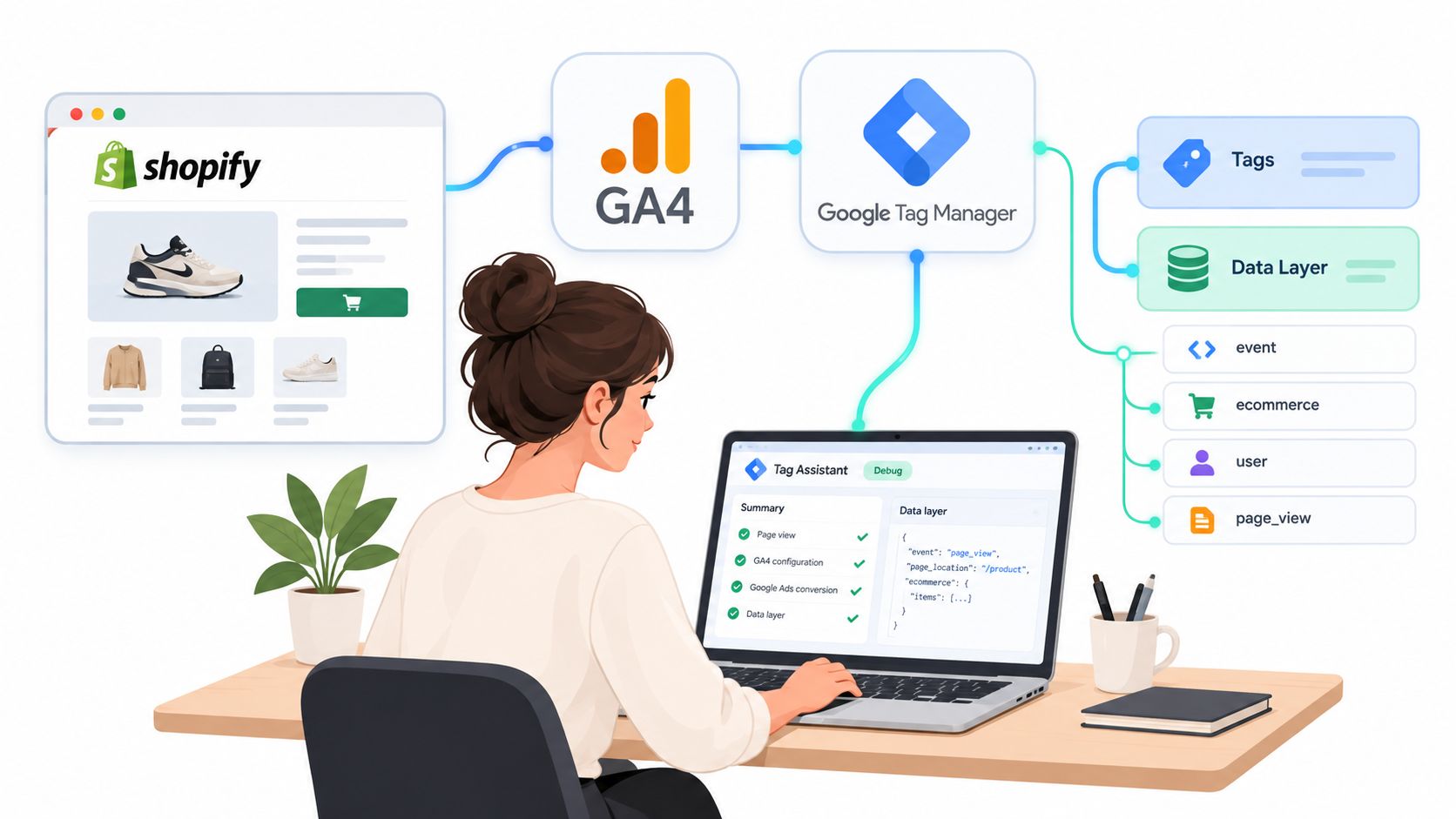
Install Google Tag Manager once. Depending on the store's setup, that may happen through the Google & YouTube channel or through a carefully managed theme implementation. Confirm that one web container loads, then build the data layer around structured ecommerce events rather than scraping visible page text or DOM elements.
A DOM-based purchase tag is fragile. Theme markup changes, checkout extensions alter page behavior, and localized formatting can turn a numeric value into an unusable string. A structured data layer or server-side order source is more durable because the purchase payload comes from transaction data, not presentation markup.
Start with the core ecommerce flow
Build and test the four most important events first:
view_itemshould fire when a product detail view is meaningful, with item data attached.add_to_cartshould fire after the add action succeeds, not merely when a button is clicked.begin_checkoutshould fire when the customer enters checkout.purchaseshould fire only after the order is confirmed and should include a stable transaction identifier.
Create the GA4 configuration or Google tag at the container level, then add event tags that read values from the data layer. Map value and currency dynamically. For ecommerce reporting, pass the items array in the expected structure, including product identifiers, names, prices, and quantities.
The purchase tag needs special care. Use transaction_id for deduplication, and make sure the value represents the same revenue concept across Shopify and GA4. If Shopify records discounts, taxes, shipping, or refunds separately, document which components are included in the reported purchase value. Otherwise, the dashboards may differ even when every event fires correctly.
A practical implementation order is:
- Web container: Capture browsing and interaction signals that require the browser.
- Google tag or GA4 configuration: Establish the measurement foundation.
- Ecommerce event tags: Send structured product and funnel events.
- Purchase event: Read the confirmed transaction payload from the data layer or a server-side source.
- Validation: Test the event before configuring it as a primary conversion.
For stores undergoing a broader analytics rebuild, document the event model before changing the existing implementation. The GA4 migration guidance from ECORN is useful context for teams replacing older Universal Analytics assumptions with an event-based structure.
The browser container should handle browsing signals, but purchase truth shouldn't depend entirely on the DOM. Shopify webhooks or a server-side order pipeline can provide a stronger source for completed orders, refunds, and subscription events. The browser remains valuable for immediate interaction data, while the backend protects the revenue record from client-side interruptions.
Use GTM Preview to check trigger conditions, variable values, and firing order. Then inspect GA4 DebugView to confirm that the received event contains the expected parameters. A green tag status only proves that a request fired. It doesn't prove that the request carried the right order ID, currency, items, or value.
Pairing Meta Pixel With Conversions API on Shopify
Meta Pixel and Conversions API should be designed as one measurement system. The pixel captures browser-side activity, including page views and product engagement. Conversions API sends selected events from a server or trusted integration, reducing dependence on a browser that may block scripts, restrict cookies, or lose the session before the purchase request completes.
For Shopify, the native Facebook & Instagram channel is a reasonable starting point for many stores. A customer data platform such as Elevar or Analyzely can provide more control over routing and parameter governance. Larger implementations may use direct server-side forwarding through a GTM server container or another event gateway.
The ownership decision should be explicit. Let the server own commercial events that must be tied to an order, such as purchase and, where the business logic supports it, checkout and payment milestones. Let the browser continue to own immediate page and interaction signals that aren't available from the backend.
| Event | Primary Source | Secondary Source | Dedupe Key |
|---|---|---|---|
PageView | Browser pixel | None required | Browser event identifier |
ViewContent | Browser pixel | Server only if needed | Shared event identifier |
InitiateCheckout | Server or trusted integration | Browser pixel | Shared event_id |
AddPaymentInfo | Server or trusted integration | Browser pixel | Shared event_id |
Purchase | Server order event | Browser pixel | Shared event_id, tied to order |
The most important implementation detail is deduplication. If the browser and server both send a purchase, Meta needs the same event_id and matching event details to recognize that the two requests represent one conversion. A randomly generated browser ID and an unrelated server ID won't deduplicate reliably.
Keep these values aligned across both paths:
order_id: The commerce identifier used to identify the transaction.content_ids: Product or variant identifiers that match the catalog.value: The order value under a documented revenue definition.currency: The actual currency associated with the order.content_type: The product or product-group classification used by the account.
Parameter mismatches cause silent drift. A purchase can appear in Test Events while still failing to match the catalog or reconcile with Shopify. Check the server payload and browser payload side by side, not just the event status.
Consent must also govern both routes. The browser should not send marketing data without the required permission, and the server must not become a way to bypass the customer's consent choice. Pass consent state into the server-side event flow and suppress or adapt downstream processing when the state doesn't allow the destination tag to receive the data.
Choosing Between Client-Side, Server-Side, and Hybrid Tracking
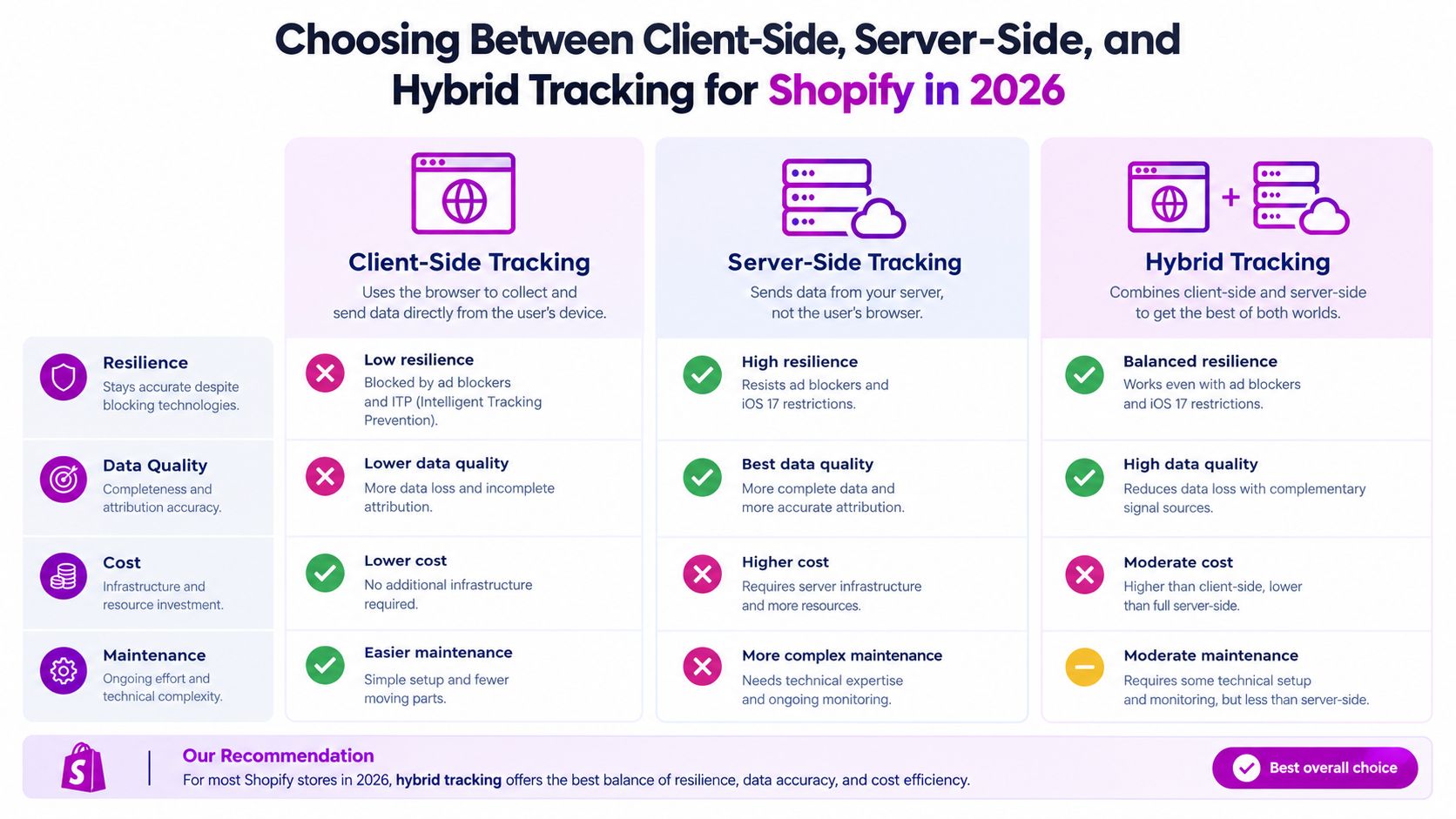
A client-side architecture sends events from the shopper's browser to GA4, Meta, Google Ads, and other platforms. It's easy to launch and useful for diagnosing onsite behavior, but it relies on JavaScript execution, browser storage, network availability, and permission to fire marketing tags. Ad blockers and browser privacy controls can interrupt the path.
A server-side architecture routes events through a server container or trusted integration before forwarding them to platforms. It gives the team more control over payload validation, consent enforcement, enrichment, and routing. It also introduces infrastructure, maintenance, vendor, and implementation costs. Server-side tracking cannot automatically see every interaction that happens in the browser, so it shouldn't replace all client-side signals.
A hybrid model assigns each event to the environment best suited to capture it. The browser handles page and interaction context. Shopify orders, webhooks, or a server event pipeline handle completed transactions. Consent state travels from the consent management platform to the browser layer and then into any server container that forwards events.
Client-side tracking
Client-side is useful as a diagnostic baseline. GTM Preview, GA4 DebugView, and Meta Test Events can show whether the storefront produces the expected event at the moment of interaction. It remains valuable for view_item, merchandising behavior, and other signals that exist only during browsing.
Its weakness is resilience. A visitor can decline cookies, block a script, leave before a network request completes, or browse in an environment that limits cross-site measurement. The resulting data can still look clean while missing a meaningful share of activity.
Server-side tracking
Server-side tracking is strongest for events backed by commerce records. The server can validate order IDs, apply consistent revenue rules, handle refunds, and send a controlled payload to advertising platforms. It also gives the team a clear location for consent checks and data governance.
The trade-off is complexity. Someone must own the server container, event credentials, monitoring, schema changes, and platform-specific requirements. A server cannot infer every product interaction unless the browser sends that information first.
Hybrid tracking
Hybrid is the practical default for most Shopify stores. It avoids asking one layer to do everything. The browser supplies context, while the server protects the commercial events that matter most to revenue reporting and bidding.
Consent-aware server-side tracking shouldn't be treated as a premium add-on. Guidance on server-side tracking increasingly connects it with consent propagation and measurement reliability, not only performance. Google's Consent Mode modeling also has volume requirements that smaller stores may not meet. One 2026 guide describes modeled recovery of 60–70% of consent-lost conversions only after roughly 1,000 or more daily non-consenting events for 7 consecutive days (consent-aware server-side GA4 guidance). If a store doesn't reach that volume, backend validation and a correctly wired consent management platform become even more important.
Testing, Debugging, and Reconciling Against Real Orders
Testing doesn't end when GTM says “fired.” A complete test follows the event from the storefront to the platform, then compares the result with Shopify's order record. That sequence catches failures that individual debugging tools can't expose.
Begin in GTM Preview. Use a test session to perform a product view, add an item, begin checkout, submit payment information where appropriate, and complete a test order. For every event, inspect the trigger, variables, tag firing order, and payload. Confirm that the purchase event isn't firing from both a theme script and a native app integration.
Then inspect GA4 DebugView. Check the event name, transaction_id, value, currency, and item array. A purchase without an order ID is difficult to deduplicate and reconcile. A purchase with the wrong currency or a string-formatted value can enter reports while corrupting revenue analysis.
Meta requires a separate verification step. Use Test Events to inspect:
- Event receipt: Did Meta receive the browser event, server event, or both?
- Deduplication: Did the shared
event_idcombine duplicate paths into one event? - Parameter consistency: Do
order_id,content_ids,value,currency, andcontent_typematch? - Consent behavior: Did the event respect the customer's consent state?
- Event timing: Did the server event arrive after the browser event without creating a second purchase?
Use Shopify as the final gate
Export Shopify orders for a defined reporting window. Pull GA4 purchase events and Meta purchase events for the same window, then join them using the order ID or transaction ID. Count the orders present in Shopify but absent from each platform, and separately identify platform events that don't map to an actual order.
Calculate the gap as a delta between the commerce record and the platform record. Don't apply one universal tolerance to every channel. Break the comparison down by device, browser, consent state, payment route, currency, and event source. Independent guidance suggests investigating a GA4-to-backend gap above about 20%, while another source describes 5–10% divergence between GA4 and Google Ads as healthy and 15% or more as a defect signal (conversion tracking reconciliation guidance). These figures are investigation prompts, not guarantees. Your acceptable range depends on attribution settings and the scope of the comparison.
A green test event proves delivery. A Shopify reconciliation proves usefulness.
Repeat the comparison after theme releases, app installations, checkout extensibility changes, payment-provider changes, and GTM publishes. Common regressions include missing purchase parameters, duplicate thank-you-page fires, altered currency formatting, refund events that never reach analytics, and a stale container version that overwrites a fix.
Turning Clean Tracking Into CRO Decisions
Clean tracking only matters if it changes what the team does. Once the event map and reconciliation process are stable, build a weekly operating rhythm around funnel behavior and commercial outcomes.
Start with one primary question for each stage:
- Product discovery: Are qualified visitors reaching product pages and viewing the intended items?
- Cart intent: Are shoppers adding products after seeing the offer, price, merchandising, and social proof?
- Checkout progression: Are customers moving from cart into checkout and payment?
- Revenue: Are completed purchases and order values consistent across Shopify and the advertising platforms?
GA4 Explorations can show movement between ecommerce events, item performance, device behavior, and landing-page paths. Meta Ads Manager can compare campaign and creative performance against the purchase event, but its numbers shouldn't override Shopify order reconciliation. Google Ads should optimize toward the primary actions that represent meaningful business outcomes, not a large collection of low-intent events.
Set review thresholds from your own baseline rather than copying a benchmark from another store. A change in checkout completion may reflect a genuine UX problem, a payment issue, a consent configuration change, or a broken trigger. The number alone isn't the diagnosis.
Keep the stack under review
Create a release checklist for every storefront change:
- Theme updates: Test product views, cart actions, and purchase payloads after deployment.
- App installations: Check whether the new app adds its own pixel or ecommerce events.
- Checkout changes: Revalidate checkout and payment events when extensions or payment flows change.
- Container publishes: Record the version, owner, change reason, and post-release test result.
- Monthly audits: Compare Shopify orders with GA4 and advertising platform events, then investigate unexplained deltas.
Avoid three recurring anti-patterns. Don't optimize bidding toward micro-conversions because they have more volume. Don't treat delayed attribution as a tracking failure before the reporting window has matured. Don't use pixel-side numbers as ground truth when Shopify order data is available.
ECORN offers Shopify analytics and marketing reports, along with tracking solutions such as TrackPixel, for teams that need help connecting conversion data with store performance. Use any implementation partner or tool only if it supports the same discipline: documented events, consent-aware routing, deduplication, and order-level reconciliation.
Every CRO test should end with a measurement check. If a new product-page layout increases reported add_to_cart events but Shopify orders remain unchanged, the result isn't a win. If purchase volume changes after a theme release, verify the event payload and order match before changing budgets. CRO decisions become credible when the event says what happened and the order record confirms it.
If your Shopify tracking numbers disagree, ECORN can audit the event map, GA4 and GTM implementation, Meta Pixel and Conversions API flow, consent handling, and Shopify order reconciliation. Visit ECORN to discuss a focused tracking project or an ongoing Shopify analytics and CRO engagement.


Shopify Inventory Tracking App: How to Set It Up Right

Shopify Volume Pricing: How to Set Up Tiered Discounts
How Does Shopify Work for Sellers? a Practical Guide

Shopify Theme ZIP: How to Upload and Install It
Shopify Plus Organization Admin: Roles and Access Guide

How to Build a Drop Down Menu in Shopify: Steps and Fixes
Shopify Plus Integration Services Guide

Shopify Customer Experience: A 2026 Guide

Shopify Plus Expansion Stores: Limits and Setup
Shopify Theme Update: Safe Steps, Backups and Rollback

Shopify Website Design Packages: What You Actually Get

How to Choose a Shopify Plus Web Design Agency in 2026
Shopify Plus Ecommerce Agency: How to Pick the Right One

Shopify Themes Retina: How to Serve 2x Images

How to Cross Sell on Shopify Without Friction

Best Shopify Theme for Custom Products Compared
Multi Store Inventory Management: A Practical Guide

SEO Consulting for Ecommerce: A Practical Guide
Shopify Theme Updater App: A Safe Update Playbook
Shopify Git Integration: A Developer's Guide to 2026
Headless Ecommerce Development Services Explained

How to Build a Shopify Clothing Website That Converts

How to Launch a Box Subscription Business in 2026

Luxury Skincare Branding Playbook That Converters

10 Best Podcast Ecommerce Shows for Store Growth in 2026
Shopify Developer Hourly Rate: What to Pay in 2026

Critical Shopify Setup Errors That Are Secretly Sabotaging Your Store

Ecommerce Conversion Tracking: The Complete How-To Guide

Shopify Design Agency: How to Pick the Right Partner

Mastering Multi Store Management on Shopify

Scale Shopify Store

10 Shopify App Ideas Worth Building in 2026

Conversion Rate Optimization for Landing Pages: The Playbook

Shopify Plus Automation: A Guide for 2026

10 Social Selling Platforms for Shopify Merchants

Shopify Website Design Examples: 7 Stores Worth Studying

7 Ecommerce Newsletter Examples for Shopify Brands

One Product Shopify Store: Build and Scale

Mobile Pop Up Strategy for Shopify Stores That Converts

Sitemap for Shopify: How to Find, Optimize, and Submit It

7 Single Product Websites Worth Emulating

Product Variants Shopify: The Complete 2026 Guide

Ecommerce Analytics Consulting for Growth

What Is AI Integration for eCommerce

How to Choose the Right eCommerce Website Development Firm

E Business Strategy Implementation

BigCommerce vs Shopify Plus Which Enterprise Wins in 2026

Shopify Theme Kit: Setup, Commands, and Migration Guide

Shopify Extension Development: A Practical 2026 Guide

Shopify Speed Score Explained and How to Improve It

Shopify Mobile Optimization: The 2026 Playbook

How to Add Subcategory in Shopify for Better UX

How to Implement Structured Data for Ecommerce in 2026

SEO App Mobile: Shopify Store Optimization Guide

Shopify Plus Support: What It Includes and How to Choose

Google Ads for Shopify: The Complete 2026 Playbook

Shopify New York: How to Find and Hire the Right Agency

Google Search Console for Shopify: The Complete Setup

First Party Data Collection for eCommerce Growth

FAQ Online Store Guide: Build and Measure It Right

Do FB Ads Work for eCommerce in 2026?

One Page Checkout for Shopify: Design and Implementation

Shopify GraphQL vs REST: The 2026 Developer Decision

Shopify Ecommerce Consulting: Strategy, Pricing &

Are Reddit Ads Worth It for eCommerce Brands

Shopify Title and Meta Description: A Practical 2026 Guide

Product Video Best Practices for Shopify Brands

Real-Time Inventory Management: A 2026 Guide

AI Chatbot Integration for Shopify Stores

Affiliate Program Management: A Shopify Guide

10 Best Performance Monitoring Tools for Shopify in 2026

Digital Asset Management for eCommerce Brands in 2026

Every Type of Facebook Ads Explained for eCommerce Growth

Product Information Management Explained for Shopify Brands

Support Ticket System: A Guide for Shopify Stores

10 Best Customer Service Tools for Shopify in 2026

Can I Start a Business with No Money? a 2026 Blueprint

What Sells Good on Etsy: Best Niches for 2026

Shopify Add to Cart Button: A Practical 2026 Guide

Customer Feedback Automation: A Practical eCommerce Guide

Critical Rendering Path: A Guide for Shopify Stores

How to Promote on TikTok for eCommerce in 2026

B2B eCommerce Consulting That Drives Real Revenue

10 Best Practices for Site Navigation in 2026

Return vs Refund for Shopify Stores: A Practical Guide

What Is Customer Lifetime Value and Why It Matters

What Is Voice of Customer Research for eCommerce

SMS Marketing for Ecommerce That Actually Converts

Master How to Improve Email Deliverability in 2026

Top 8 eCommerce Partners NYC for Shopify Brands in 2026

Machine Learning for Ecommerce: Boost Your Shopify Store

Beauty Market Research: Your 2026 Growth Guide

Shopify International Expansion: A 2026 Roadmap

What Does CRO Stand for in Business: Understanding CRO

Shopify Visual Merchandising: A Playbook for Higher Sales

Shopify Landing Page Design: Master Conversion in 2026

10 Best AI SEO Optimization Tools for Shopify in 2026

Agentic AI for Ecommerce: Boost Your Sales in 2026
Mastering Email Marketing Data for eCommerce Growth

Conversion Rate Optimisation Australia: Boost Your Sales


newsletter in your inbox