

The usual advice is to install a Shopify inventory tracking app and turn on real-time sync. That's the wrong starting point. If your warehouse count is wrong, faster synchronization just publishes the wrong number sooner. Start by checking what Shopify already covers, identify where stock movements go unrecorded, and establish a physical baseline before you connect another system.
What Shopify Tracks Natively and Where It Stops
Shopify's native inventory tools handle straightforward stock control well. You can track quantities by product variant and location, distinguish available inventory from stock committed to orders, and make manual adjustments in the admin. For a team with a simple receiving and fulfillment process, that may be enough.
The important distinction is between recording a quantity and controlling how staff arrived at it. A count tells you what the system believes is available. It doesn't establish whether someone inspected a return, recorded damaged goods, or completed a transfer correctly.
Historical reporting also has a boundary. Shopify's inventory-report documentation states that historical inventory-based metrics extend back to October 1, 2023. Check that boundary before promising your purchasing team a longer inventory history.
Where native tracking needs operational support
Say a beverage brand holds stock in a dispatch warehouse, an overflow warehouse, and a retail counter. A staff member moves cases from overflow to the counter but records only the destination receipt. The total looks inflated because the source location still shows those cases.
No forecasting feature fixes that transaction. Someone must record both sides of the movement and distinguish stock in transit from stock ready to sell.
For beverage operators planning channel expansion, Carbon 6 Brewing Pty Ltd's guide to direct to consumer sales for craft breweries provides useful commercial context. Translate that channel plan into stock ownership and allocation rules before connecting the storefront.
Native Shopify inventory versus common app needs
| Need | Built into Shopify | Usually needs an app |
|---|---|---|
| Stock counts per location | Yes, per location in admin | Consolidating counts from external warehouses |
| Manual stock adjustments | Yes, with basic adjustment context | Enforced reason codes and user attribution across systems |
| Low-stock visibility | Inventory views and reports; verify alert availability | Custom alerts and thresholds per SKU and location |
| Reorder points and purchase orders | Basic purchasing capabilities; verify your setup | Automated reorder suggestions and advanced PO workflows |
| Sync with ERP or 3PL | Supported connections require configuration | Two-way sync with warehouse systems |
| Historical inventory reports | Metrics from the documented historical boundary | Longer retained history and forecasting inputs |
An app becomes useful when you need enforced workflows, not merely another screen displaying the same quantities. Approval rules, exception queues, and external warehouse reconciliation are different requirements from editing a count.
Practical rule: Native tools are often sufficient when one person controls stock at one location. When several people move inventory between locations, evaluate the controls around those movements.
Signs Your Store Needs a Tracking App
Repeatedly apologizing for an unavailable product is a stronger buying signal than a crowded spreadsheet. But first establish whether you're missing software or missing a warehouse procedure. Those problems can look identical from the customer-service inbox.
In its 2024 Ecommerce Performance Report, Katana Cloud Inventory reported that 83% of surveyed Shopify SMB merchants faced operational challenges keeping inventory, manufacturing, and accounting data synchronized. That finding describes a coordination problem, not proof that every merchant needs another app.
Check the operational triggers
Use these conditions to identify where your current setup is breaking:
- External stock ownership: A 3PL, supplier, or warehouse maintains quantities outside Shopify.
- Channel disagreement: Your storefront, POS, and marketplaces show conflicting availability.
- Repeated overselling: Staff regularly cancel orders because promised stock isn't sellable.
- Catalogue relationships: Bundles, components, and variants require linked deductions that staff can't reliably maintain.
- Purchasing complexity: Reordering requires supplier lead times, purchase orders, or demand planning rather than a simple shelf check.
An inventory dashboard can make these conditions visible, but someone still needs responsibility for investigating exceptions.
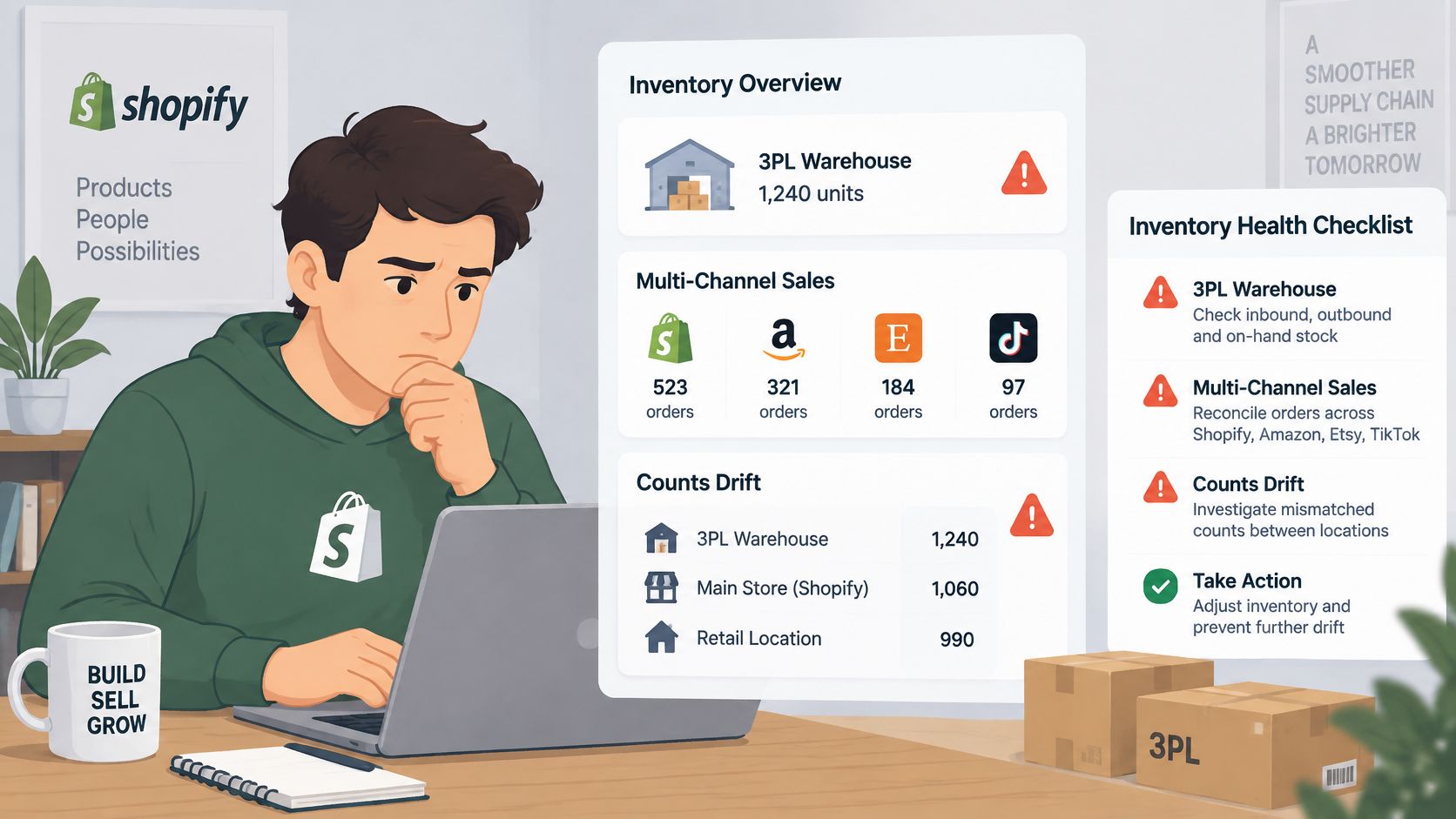
Consider a hypothetical candle brand producing across separate kitchens. Its catalogue includes individual candles, gift sets, and seasonal variants. Staff move finished candles between kitchens, but nobody logs the transfer before the next online order arrives.
The immediate fix is a transfer procedure with a named sender and receiver. An app earns its place only if it makes that procedure easier to follow and exposes incomplete transfers.
Don't buy software solely because your catalogue is growing. A single-location operation with disciplined receiving, manageable counts, and manual purchasing can stay native. Conversely, a small catalogue can require integration when several channels sell the same scarce stock.
If multiple triggers apply, use the evaluation scorecard to test candidates. If none apply, improve counting and adjustment discipline before adding a subscription.
Evaluation Criteria for Features, Integrations and Multilocation
A useful shortlist starts with your stock movements, not an app's feature grid. Write down how goods arrive, become sellable, move between locations, get reserved, and leave through each channel. Then require the vendor to demonstrate those transactions.
Can the app preserve location-level inventory? A global SKU total isn't enough when your retail counter can't fulfill warehouse orders. Test transfers, reservations, and unavailable stock separately. Our guide to multi-location inventory management can help you define those operational requirements before a trial.
Does each integration support the transactions you need? A connector might import orders without returning cancellations, transfers, or receiving adjustments. List your ERP, 3PL, accounting platform, POS, and marketplaces, then identify which system owns each field.
Test recovery, not just the happy path
Ask what happens when Shopify rejects a request or a warehouse connection goes offline. Shopify's API limits documentation describes rate limiting and throttling, so a connector must queue work and recover rather than assume every request succeeds immediately. Require the vendor to explain its current API implementation instead of relying on a generic compatibility badge.
A useful trial includes representative live-product configurations in a development or sandbox environment: bundles, shared components, reserved units, and an item held across warehouses. Simulate a cancellation and an interrupted connection. Check whether the resulting quantities and movement history are understandable without vendor intervention.
If you also sell through Amazon fulfillment, Online Brand Growth's comparison of top software for managing FBA inventory offers an additional shortlist lens. Keep marketplace-specific stock states separate from inventory your Shopify warehouse can dispatch.
Evaluation scorecard for inventory tracking apps
| Criterion | What to verify | Red flag |
|---|---|---|
| Locations | Quantities per location, transfers, and reserved stock | One global quantity per SKU |
| Sales channels | Sync with Online Store, POS, and each marketplace you use | Sync delay longer than your reorder cycle |
| Integrations | Native connectors to your ERP, 3PL, and accounting tools | CSV import only, with no export |
| Sync method | Webhooks plus scheduled full reconciliation | Polling only, or no retry logic |
| Reporting | Accuracy by SKU and location, stockout rate, reconciliation time | Aggregate dashboards only |
| Plan fit and cost | Works on your Shopify plan, store count, and SKU volume | SKU-based pricing without stated limits |
The table sets minimum checks, not an automatic purchasing decision. For a fast-selling item, a delay shorter than your reorder cycle can still be unacceptable. Set your acceptable latency against the time it takes customers to consume available stock.
A successful demo proves the app can process a transaction. A useful trial proves your team can recover when that transaction fails.
Compare the complete operating cost: subscription, connector work, onboarding, exception handling, and ongoing maintenance. A cheaper app that requires daily spreadsheet repairs isn't necessarily the cheaper setup.
How to Set Up Tracking From Audit to Go-Live
Count before connecting. An empirical study published in Management Science examined nearly 370,000 inventory records across 37 stores and found 65% inaccurate, with auditing practices associated with lower inaccuracy. That's a reason to establish a baseline, not to assume your own store has the same error rate.
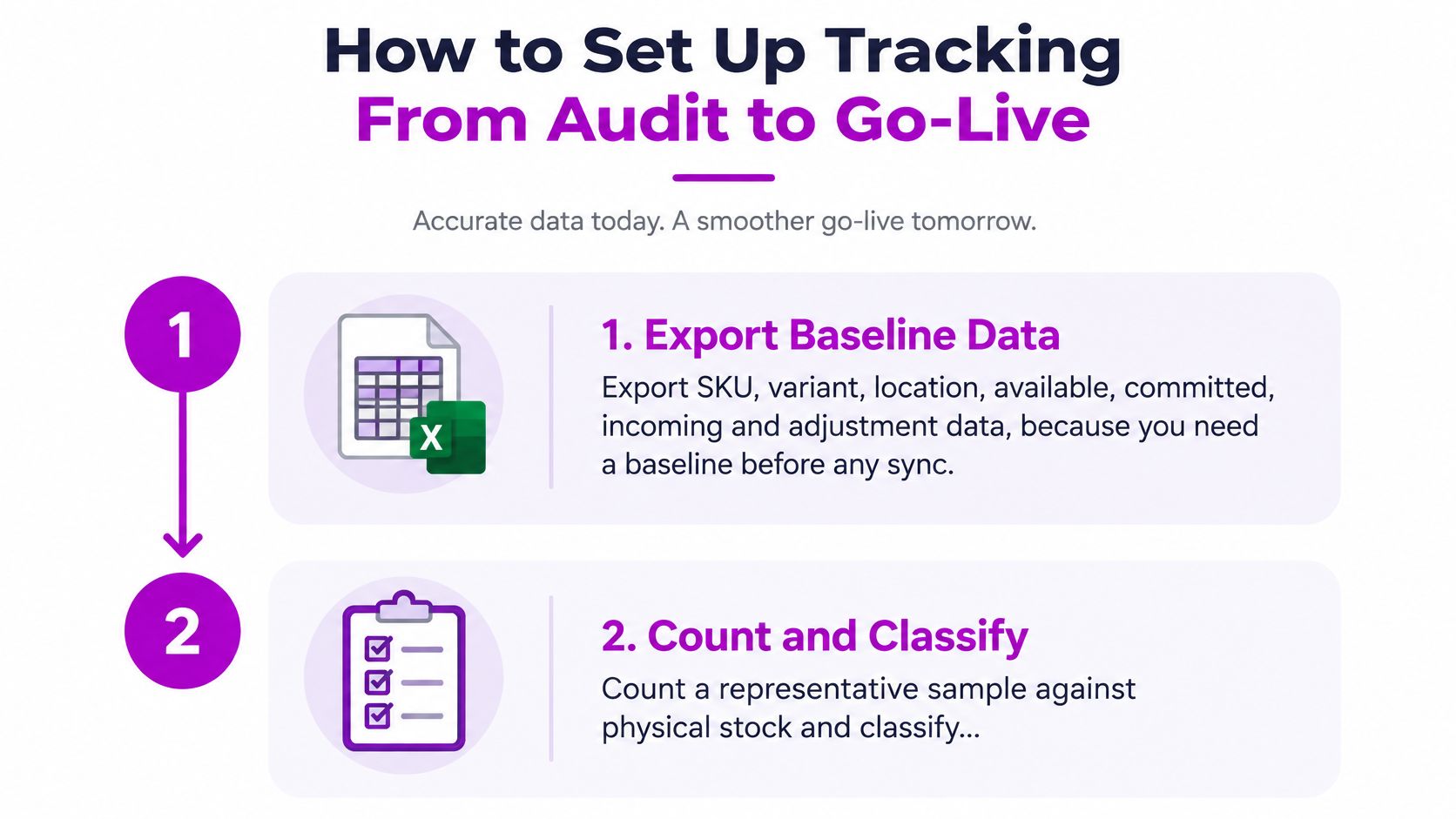
Start with the export and physical verification shown below.
Build a baseline you can defend
Export the existing records. Capture SKU, variant, location, available, committed, incoming, and adjustment data. Preserve the original files separately from your working spreadsheet so later edits don't erase the baseline.
Count and classify discrepancies. Choose a stratified sample covering high-value, fast-moving, bundled, and multi-location SKUs, rather than selecting only convenient shelves. Record each difference by SKU, location, cause, and inventory value.
Normalize identifiers. Match SKUs and barcodes across Shopify, warehouse software, and supplier records. Resolve duplicate identifiers and pack-size differences before importing quantities, especially where suppliers ship cases but you sell individual units.
Map locations and ownership. Match each physical warehouse to its Shopify location ID and name a responsible owner. Write down who records dispatch, receipt, damage, and returned stock.
These controls work best as part of a documented operating routine. Use our inventory management best practices guide to make the procedures usable beyond the implementation team.
The accompanying walkthrough provides another reference while you configure tracking.
Control the cutover
Set exception thresholds. Define which unit or value differences require review before the connector writes a correction. Apply tighter controls to expensive, scarce, or repeatedly discrepant products.
Require adjustment accountability. Record a reason code, user identity, and supporting reference for each correction. Separate receiving mistakes, damage, returns, and transfer errors so supervisors can address their causes.
Run a parallel validation period. Compare app records with physical counts before granting unrestricted write access. Cut over during a low-sales window, pause manual adjustments during the baseline import, and log unavoidable movements for controlled replay.
Schedule counts by risk. Count high-value, fast-moving, and frequently discrepant inventory more often than stable stock. Assign the work to named staff rather than leaving it as an optional warehouse task.
Measure accuracy after launch. Track exact-match rate, the share of checked records that match, alongside absolute unit variance, the sum of unsigned differences. Don't net positive and negative errors together, and report overstatement and understatement separately.
Keep previous counts and original exports through the stabilization period. Go-live has worked when variance remains within your agreed thresholds across repeated count cycles, not merely when the import finishes without an error.
Sync Errors and Accuracy Problems, Diagnosed
The storefront shows stock, but the shelf is empty. Start with the physical SKU and its movement history, not the app's refresh interval. Check receiving, damaged goods, returns awaiting inspection, and unrecorded removals before changing integration settings.
A physical discrepancy needs evidence from the warehouse. A synchronization discrepancy needs evidence from event logs. Mixing them leads to unnecessary adjustments that can conceal the original fault.
Match the symptom to the failure
Last-write-wins logic is particularly dangerous in a multi-location setup. A delayed warehouse update can replace a newer balance if the connector treats incoming quantities as unquestionable truth. Preserve location identity and process movements with ordering or version checks instead of accepting whichever total arrives last.
For duplicated or missing changes, inspect event IDs, processing timestamps, retry attempts, and reconciliation results. A green connection indicator only tells you the systems can communicate; it doesn't prove every movement reached its destination correctly.
Sync and accuracy symptoms, causes and fixes
| Symptom | Likely cause | Fix |
|---|---|---|
| Storefront shows stock but shelf is empty | Unrecorded receiving error, damage, or shrinkage | Cycle count the SKU and adjust with a reason code |
| Oversold at one location | Last-write-wins overwrote a newer quantity | Store per-location quantities and use movement records |
| Quantities drift after busy hours | Webhooks delayed, duplicated, or missed | Run a scheduled full reconciliation |
| Sync lags or stops | API throttling returning HTTP 429 | Queue writes and retry with Retry-After and backoff |
| Stock deducted twice | Retries applied without idempotency | Make every write idempotent |
| Overall accuracy looks fine, stockouts continue | Aggregate figure hides one location's errors | Measure accuracy by SKU and location separately |
An idempotent write can be retried without applying the same stock movement again. Require that protection for deductions and adjustments, then verify it by replaying a test event.
For small, explained differences within your approved threshold, make an attributed system adjustment. Large, unexplained, or recurring differences should trigger a warehouse recount and transaction review. Never automatically accept a discrepancy merely because it falls below a unit threshold when the item's value or scarcity makes the error significant.
Don't mistake unavailable stock for weak demand
Stockouts also corrupt purchasing decisions. Fabrikator's retail inventory statistics review summarizes fresh-commerce research in which reconstructing demand hidden by stockouts improved prediction accuracy by 2.73%. That result doesn't promise the same improvement for your catalogue, but it illustrates why recorded sales aren't always a complete demand signal.
Mark unavailable periods before reviewing sales velocity. Separate a product that received traffic while unavailable from one that remained available but attracted no purchases.
When sales fall during a stockout, don't cut the next order solely on that sales figure. Estimate lost demand using comparable available periods and campaign context, or retain the purchasing assumption until you have a complete replenishment cycle with sellable stock.
Choose Your Tracking Setup Before Migrating Stock
Stay with native tools when one team controls one location and can make purchasing decisions manually. Add a Shopify inventory tracking app when your channels, locations, or external systems require controls your existing setup can't enforce.
Custom connectors change the decision. Someone must maintain them when APIs, warehouse processes, or product structures change. ECORN's Shopify outstaffing service develops and maintains clients' Shopify stores, and our Shopify Expertise packages start from 35 hours per month for teams that need ongoing specialist capacity.
Make the next action a count
Before migrating, assign an owner to approve the opening balances and another to verify the import. Preserve the old records, choose a quiet trading window, and keep a rollback procedure available until the new setup is stable.
This week, export your SKU and location records and select a manageable sample covering your riskiest inventory. Count it physically, explain the differences, and use those findings to decide which app capabilities you need.
Count first, sync second.
We offer Shopify app development and ongoing store development and maintenance for teams that need more than a standard connector. Visit ECORN to discuss your warehouse systems, location structure, and the integration work needed to support a reliable inventory setup.



Shopify Volume Pricing: How to Set Up Tiered Discounts

How Does Shopify Work for Sellers? a Practical Guide

Shopify Theme ZIP: How to Upload and Install It
Shopify Plus Organization Admin: Roles and Access Guide
How to Build a Drop Down Menu in Shopify: Steps and Fixes
Shopify Plus Integration Services Guide

Shopify Customer Experience: A 2026 Guide

Shopify Plus Expansion Stores: Limits and Setup
Shopify Theme Update: Safe Steps, Backups and Rollback

Shopify Website Design Packages: What You Actually Get

How to Choose a Shopify Plus Web Design Agency in 2026

Shopify Plus Ecommerce Agency: How to Pick the Right One

Shopify Themes Retina: How to Serve 2x Images

How to Cross Sell on Shopify Without Friction

Best Shopify Theme for Custom Products Compared
Multi Store Inventory Management: A Practical Guide

SEO Consulting for Ecommerce: A Practical Guide

Shopify Theme Updater App: A Safe Update Playbook
Shopify Git Integration: A Developer's Guide to 2026
Headless Ecommerce Development Services Explained

How to Build a Shopify Clothing Website That Converts

How to Launch a Box Subscription Business in 2026

Luxury Skincare Branding Playbook That Converters

10 Best Podcast Ecommerce Shows for Store Growth in 2026
Shopify Developer Hourly Rate: What to Pay in 2026
Critical Shopify Setup Errors That Are Secretly Sabotaging Your Store
Ecommerce Conversion Tracking: The Complete How-To Guide

Shopify Design Agency: How to Pick the Right Partner
Mastering Multi Store Management on Shopify

Scale Shopify Store

10 Shopify App Ideas Worth Building in 2026

Conversion Rate Optimization for Landing Pages: The Playbook
Shopify Plus Automation: A Guide for 2026

10 Social Selling Platforms for Shopify Merchants

Shopify Website Design Examples: 7 Stores Worth Studying

7 Ecommerce Newsletter Examples for Shopify Brands

One Product Shopify Store: Build and Scale

Mobile Pop Up Strategy for Shopify Stores That Converts

Sitemap for Shopify: How to Find, Optimize, and Submit It

7 Single Product Websites Worth Emulating

Product Variants Shopify: The Complete 2026 Guide

Ecommerce Analytics Consulting for Growth

What Is AI Integration for eCommerce

How to Choose the Right eCommerce Website Development Firm
E Business Strategy Implementation
Conversion Tracking Setup for Shopify Stores

BigCommerce vs Shopify Plus Which Enterprise Wins in 2026
Shopify Theme Kit: Setup, Commands, and Migration Guide

Shopify Extension Development: A Practical 2026 Guide

Shopify Speed Score Explained and How to Improve It

Shopify Mobile Optimization: The 2026 Playbook

How to Add Subcategory in Shopify for Better UX
How to Implement Structured Data for Ecommerce in 2026

SEO App Mobile: Shopify Store Optimization Guide

Shopify Plus Support: What It Includes and How to Choose

Google Ads for Shopify: The Complete 2026 Playbook

Shopify New York: How to Find and Hire the Right Agency

Google Search Console for Shopify: The Complete Setup

First Party Data Collection for eCommerce Growth
FAQ Online Store Guide: Build and Measure It Right

Do FB Ads Work for eCommerce in 2026?

One Page Checkout for Shopify: Design and Implementation
Shopify GraphQL vs REST: The 2026 Developer Decision
Shopify Ecommerce Consulting: Strategy, Pricing &

Are Reddit Ads Worth It for eCommerce Brands

Shopify Title and Meta Description: A Practical 2026 Guide

Product Video Best Practices for Shopify Brands
Real-Time Inventory Management: A 2026 Guide

AI Chatbot Integration for Shopify Stores
Affiliate Program Management: A Shopify Guide
10 Best Performance Monitoring Tools for Shopify in 2026

Digital Asset Management for eCommerce Brands in 2026

Every Type of Facebook Ads Explained for eCommerce Growth
Product Information Management Explained for Shopify Brands
Support Ticket System: A Guide for Shopify Stores

10 Best Customer Service Tools for Shopify in 2026

Can I Start a Business with No Money? a 2026 Blueprint

What Sells Good on Etsy: Best Niches for 2026

Shopify Add to Cart Button: A Practical 2026 Guide

Customer Feedback Automation: A Practical eCommerce Guide
Critical Rendering Path: A Guide for Shopify Stores

How to Promote on TikTok for eCommerce in 2026

B2B eCommerce Consulting That Drives Real Revenue

10 Best Practices for Site Navigation in 2026
Return vs Refund for Shopify Stores: A Practical Guide

What Is Customer Lifetime Value and Why It Matters

What Is Voice of Customer Research for eCommerce

SMS Marketing for Ecommerce That Actually Converts

Master How to Improve Email Deliverability in 2026

Top 8 eCommerce Partners NYC for Shopify Brands in 2026

Machine Learning for Ecommerce: Boost Your Shopify Store

Beauty Market Research: Your 2026 Growth Guide

Shopify International Expansion: A 2026 Roadmap

What Does CRO Stand for in Business: Understanding CRO

Shopify Visual Merchandising: A Playbook for Higher Sales

Shopify Landing Page Design: Master Conversion in 2026

10 Best AI SEO Optimization Tools for Shopify in 2026

Agentic AI for Ecommerce: Boost Your Sales in 2026
Mastering Email Marketing Data for eCommerce Growth

Conversion Rate Optimisation Australia: Boost Your Sales


newsletter in your inbox