


A Monday morning on Shopify Plus can expose every weakness in an operating model at once. Restock requests are accumulating, a flash sale is due to start in a few hours, VIP support tickets are waiting for attention, and a fraud queue is competing with fulfillment work for the same people.
None of these are isolated tasks. Each one is a workflow decision. Which orders should be held? Which customers qualify for priority treatment? Which inventory changes require an alert? Which campaign changes should happen automatically, and which need approval?
Shopify Plus automation turns those decisions into repeatable operating rules. The value doesn't come from adding more toggles to the admin. It comes from building workflows that the merchandising, operations, marketing, support, and finance teams can understand, monitor, and change safely.
Why Shopify Plus Automation Is the Real Operating Layer
At scale, an order is not merely created and sent to a warehouse. It may need a risk review, a customer tag, a fulfillment route, an ERP update, a support notification, and a marketing event. Inventory changes can affect product visibility, purchasing alerts, campaign timing, and customer communications at the same time.
That makes automation an operating layer beneath the storefront. It connects the decisions made in merchandising with the actions carried out by operations and the promises made by customer support.
Shopify Plus launched in 2014 as Shopify's enterprise tier for high-volume merchants and complex catalogs. It has since expanded to include tools such as Flow, Launchpad, and Functions. One industry summary reports that Plus merchants process more than $80 billion in annual GMV and that more than 40,000 merchants use the platform, illustrating why small workflow weaknesses can become significant operational issues at enterprise scale. The Shopify Plus platform overview from 5Kings Marketing also describes Flow workflows for inventory alerts, customer tagging, order logic, and other multi-step processes.
What changes when workflows become infrastructure
A workflow that runs once is a useful shortcut. A workflow that runs every day across thousands of orders is infrastructure. Infrastructure needs ownership, documentation, testing, and a safe way to change or disable it.
A mature team assigns each workflow an owner and records:
- Purpose: The business decision the workflow supports.
- Inputs: The event, fields, tags, or system data it relies on.
- Actions: The changes it makes in Shopify or connected systems.
- Exceptions: The conditions that require human review.
- Fallback: The manual process used if the workflow fails.
Shopify's own automation guidance positions Flow as a way to automate tasks across a store and connected apps without code, while Launchpad handles scheduled events such as product releases and flash sales. Its enterprise materials also recommend setting a single 90-day automation target, with design, launch, and optimization phases spread across that period. Shopify's campaign automation guidance frames automation as a measurable operating capability, not merely a collection of convenience features.
Practical rule: If nobody can explain what a workflow changes, who owns it, and how to reverse it, it isn't finished.
The question isn't whether a Plus store should automate. It should. The important question is which automations earn their keep, and which ones create operational debt.
The Core Automation Tools Inside Shopify Plus
Shopify Plus automation works best when each tool has a defined job. Flow, Launchpad, Scripts, and Functions overlap in the broader platform, but they solve different classes of problems.
Match the tool to the event
Shopify Flow handles event-driven logic. A trigger such as an order being created, inventory changing, or a customer being added starts the workflow. Conditions then determine whether it should continue, and actions update Shopify or connected systems. Flow can connect with tools such as Slack, Klaviyo, and fulfillment systems, making it suitable for tagging, routing, alerting, and operational notifications.
Launchpad handles scheduled changes. Use it when the question is not “what just happened?” but “what should happen at a specific time?” Product drops, flash sales, theme changes, and scheduled price changes fit this model. The schedule becomes the trigger.
Shopify Scripts support checkout-level customizations for line items, shipping, and payment behavior. They can apply discount logic, adjust shipping rates, or influence payment gateway routing. Scripts are useful when the decision must happen during checkout rather than after an order event.
Shopify Functions provide an extensible logic layer for newer Shopify checkout and commerce capabilities. They can support delivery customizations, cart transforms, discounts, payment methods, and other logic where standard configuration isn't sufficient. Functions are usually the better fit when a rule needs controlled, testable code rather than a visual workflow.
A custom app or webhook-driven private integration is the escape hatch. Use it when the source of truth sits in an ERP, a 3PL, a pricing engine, or a private data model that Shopify's built-in workflow tools can't represent cleanly.
| Tool | Automation Type | Runs In | Best For | Limits to Know |
|---|---|---|---|---|
| Shopify Flow | Event-driven triggers, conditions, and actions | Shopify and connected apps | Order routing, tags, alerts, inventory, customer segmentation | Complex state management may require custom code |
| Launchpad | Time-based scheduled changes | Shopify store operations | Product drops, flash sales, theme and price changes | It doesn't replace event-driven decision logic |
| Shopify Scripts | Checkout customization | Checkout | Discounts, shipping rates, payment routing | Legacy logic needs careful ownership and review |
| Shopify Functions | Extensible commerce logic | Shopify's extensibility layer | Delivery rules, cart transforms, discounts, checkout behavior | Requires development, testing, and deployment discipline |
| Custom apps and webhooks | API and system orchestration | Shopify plus external systems | ERP, 3PL, private data models, complex integrations | Adds maintenance, monitoring, and ownership requirements |
The strongest enterprise stacks don't choose one tool. They use Flow for operational events, Launchpad for timing, Functions or Scripts for checkout decisions, and custom integrations for system boundaries.
Building Your First Workflow Without Creating Sprawl
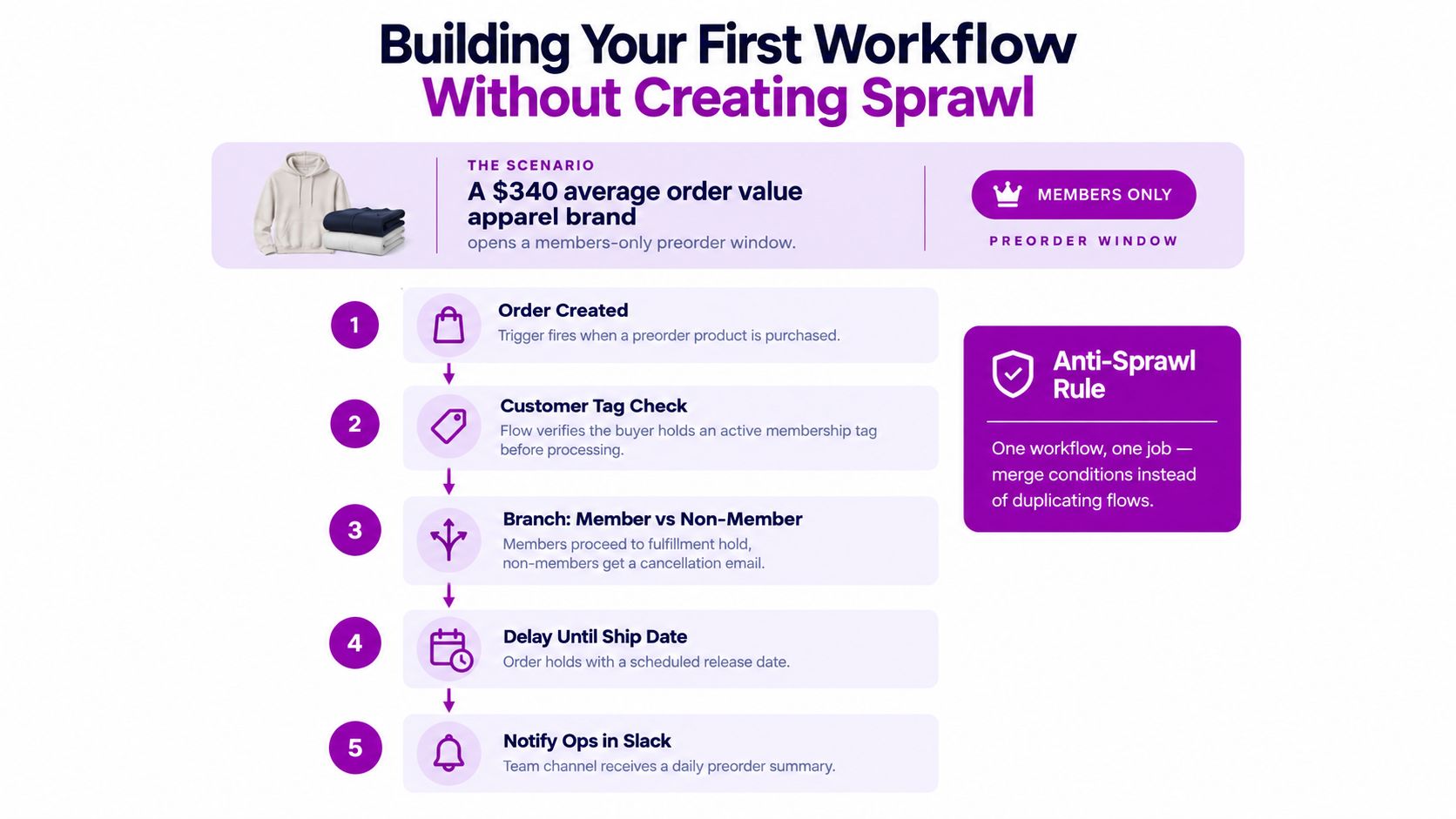
Start with a workflow that has a clear trigger, a predictable volume, and a result someone can verify. A members-only preorder for a high-value apparel brand is a useful example because it combines customer eligibility, fulfillment timing, and internal communication.
The first event is simple. When a preorder product is purchased, Flow tags the customer, sends a message to the relevant Slack channel, sends the line item to the 3PL through a webhook, and records the order in the reconciliation sheet used by operations.
Build the rules in layers
Don't begin by adding every possible exception. First, prove that the workflow can process the standard event correctly.
- Capture the trigger. Start with the order-created event and identify the preorder product or product tag.
- Check eligibility. Confirm that the customer has the active membership tag required for the sale.
- Branch deliberately. Members proceed to the fulfillment hold. Non-members receive the defined customer communication and route for review.
- Delay the release. Hold the eligible order until the planned shipping date rather than sending it to fulfillment immediately.
- Notify the team. Send a daily preorder summary to Slack instead of generating a separate alert for every routine order.
The workflow should then branch on meaningful data, such as shipping country, SKU category, or order value. A country-specific branch might route an order to a different 3PL. A category branch might identify products requiring special packaging. A value branch might send an order to manual review before a refund, discount, or fulfillment override is applied.
For a practical reference on structuring repeatable workflows, see this guide to marketing automation workflows. The same discipline applies to commerce operations, especially when a workflow spans Shopify and external tools.
Add approval gates before sensitive actions
Automation should execute routine decisions and pause for consequential ones. Add an approval gate for a large refund, a high-value manual discount, an inventory override, or a change that could release an order before its intended date.
Log the trigger payload, conditions evaluated, action taken, and the person who approved the exception. That audit trail matters more than the number of steps in the workflow. It lets the team replay what happened, diagnose a failure, and improve the rule without relying on memory.
One workflow, one job. Merge conditions inside a workflow before creating another near-duplicate flow.
Low-Code Workflows Versus Heavy App-Based Automation
Low-code automation isn't free, and custom code isn't automatically expensive. The right decision depends on where the data lives, how often the rule changes, and who will maintain it after launch.
Flow is a strong choice when the event already exists in Shopify, the rule is easy to state, and the action is supported by Shopify or a reliable connector. A stock threshold that alerts purchasing, or an order tag that routes fulfillment, usually belongs in a low-code workflow.
Heavy app-based automation becomes more appropriate when the workflow depends on a private data model, multiple systems of record, complex state, or an external decision engine. A pricing process that combines ERP cost data, contract terms, customer-level pricing, and regional rules may be difficult to maintain as a visual flow.
Compare the ownership burden
| Dimension | Low-Code, Flow and Scripts | Heavy App or Custom Code |
|---|---|---|
| Maintenance | Operations teams can often inspect and adjust the rule | Developers usually own deployment and troubleshooting |
| Data access | Best when the required data already exists in Shopify | Better for ERP, warehouse, pricing, or private customer data |
| Failure points | Connector behavior, missing fields, duplicate triggers | API changes, webhook retries, version drift, vendor outages |
| Change speed | Fast for clear, stable rules | Slower, but more controlled for complex logic |
| Cost profile | App subscriptions, connector limits, and operator time | Development, hosting, monitoring, support, and maintenance |
| Testing | Simple cases can be tested quickly, but edge cases need discipline | More formal testing is possible, with a larger delivery burden |
| Best fit | Standard events and straightforward actions | Complex state, orchestration, and cross-system decisions |
The hidden cost of low-code is fragmentation. A store can accumulate connectors, subscriptions, duplicated alerts, and workflows that nobody reviews. The hidden cost of custom code is concentration of knowledge in a developer or agency that may not be available during a campaign incident.
Teams extending beyond standard workflows should understand the practical constraints of Shopify API integration. The decision rule is simple: use low-code when the data and trigger already live in Shopify, and use custom development when Shopify can't express the business rule without awkward workarounds.
Don't automate a poorly defined process merely because a connector exists. First define the state changes, ownership, retry behavior, and fallback. Then choose the lightest tool that can handle the actual requirement.
Enterprise Use Cases That Move the Numbers
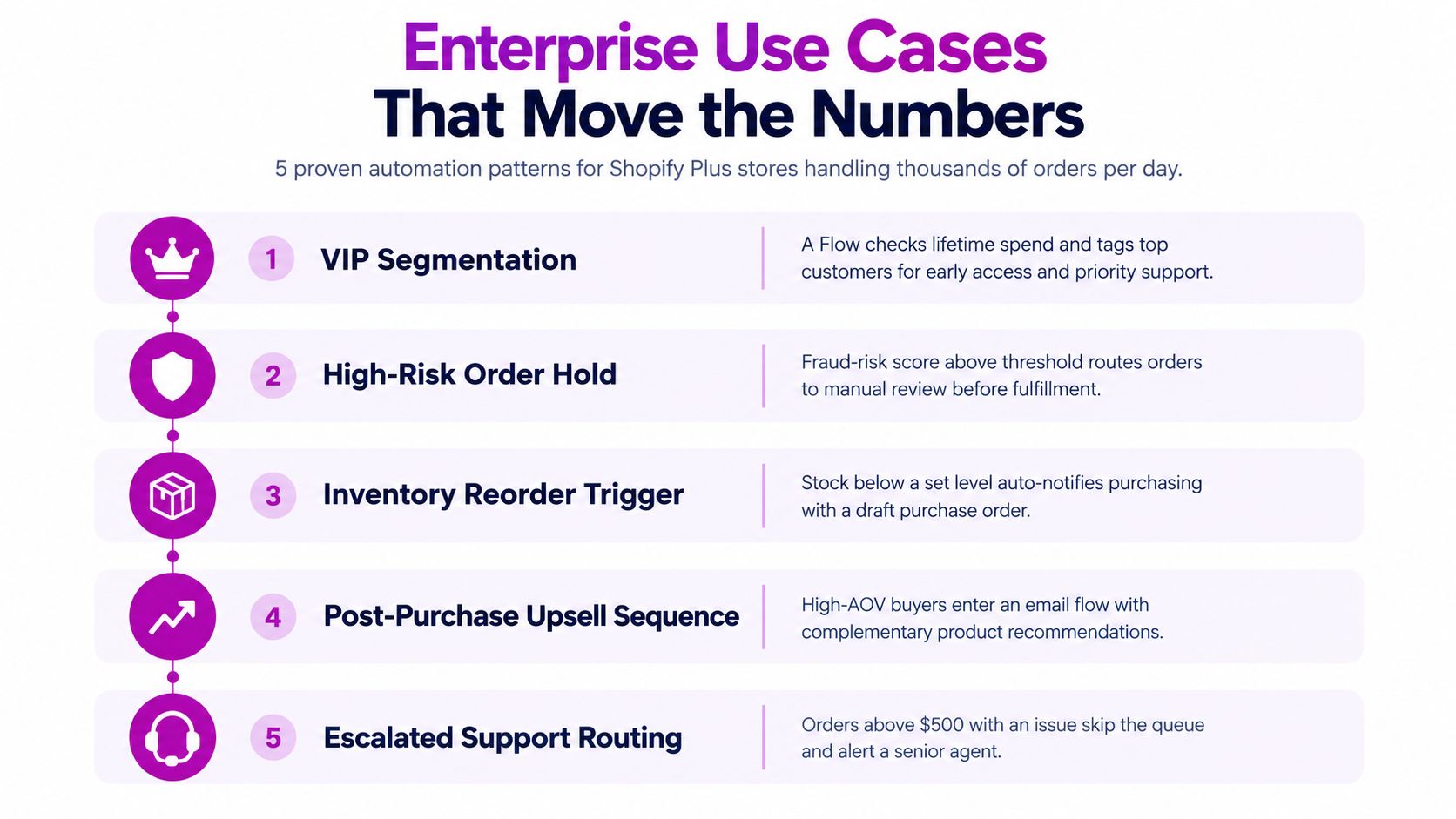
Enterprise automation earns its place when it changes a measurable operating outcome. The useful metric isn't always revenue. It may be fewer manual reviews, quicker exception handling, fewer stockout-related tickets, or a cleaner audit trail.
Segment valuable customers without manual exports
A Flow can identify customers based on a defined revenue or purchase rule, add the appropriate tag, and send the segment to Klaviyo. Checkout logic can then apply a benefit or protect a member-only offer through a Script or Function.
The trigger is a customer milestone. The action is segmentation. The control point is eligibility validation. The outcome is a repeatable VIP process that doesn't depend on a marketer exporting a list before every campaign.
Recover demand when inventory returns
Back-in-stock intent can be stored in a custom object or an external system. When inventory changes, Flow can notify the relevant team or trigger the next communication step. Launchpad can coordinate the scheduled campaign window when the product is ready to promote.
Measure the recovered revenue, unsubscribe behavior, and support demand generated by the alert. A restock workflow that creates a surge the warehouse can't fulfill isn't successful merely because it sent messages.
Route fraud risk instead of cancelling blindly
Risk signals should route orders into the correct review queue. Flow can tag a high-risk order and notify a Slack channel while keeping fulfillment on hold. A human reviewer then decides whether to release, cancel, or request more information.
This pattern preserves control over false positives. It also creates an audit trail for the decision, which an automatic cancellation doesn't provide.
Personalize checkout rules with Functions
A Function can customize delivery options based on checkout data, such as shipping destination or customer type. A B2B buyer and a consumer may need different delivery choices, while a PO box may make certain methods unsuitable.
The measurement should include successful checkout completion, delivery exceptions, and customer service contacts. Hiding an invalid option is useful. Hiding a legitimate option without clear fallback creates friction.
Connect the post-purchase moment to the next campaign
A high-value order can trigger a post-purchase segment in Flow. A scheduled Launchpad event can then coordinate a complementary product release or campaign window.
Keep the timing and eligibility rules separate. Flow identifies the customer state, while Launchpad controls the calendar event. This separation makes each part easier to test and prevents a campaign schedule from becoming entangled with order logic.
Independent CX benchmarking across Shopify and Shopify Plus merchants reports that leading brands automated up to 87% of eligible support tickets across a full quarter, with the strongest day reaching 94%. The same benchmark reports a best day of 71% for typical merchants while maintaining 4.5 out of 5 CSAT, and it recommends tracking automation alongside customer satisfaction, resolution time, and agent-hours saved. The Yuma CX automation benchmark supports a core principle: deflection volume alone isn't proof of a good automation.
When Automation Becomes the Problem Instead of the Solution
Every repeated task looks like an automation candidate until the team accounts for exceptions, ownership, and change frequency. A rule that saves a few minutes but creates a difficult reconciliation process may increase the total workload.
Operational sprawl usually appears gradually. A second Flow is added because the first one is hard to edit. An old Script remains active because nobody knows what it does. Launchpad changes are approved in chat, but no one records the final decision. Notifications multiply until staff stop reading them.
Look for the warning signals
The following signals indicate that automation needs an audit rather than another feature:
- Silent failures: A meaningful share of Flow runs fails, skips an action, or produces an error that nobody reviews.
- Duplicate workflows: Multiple flows edit the same customer tag, order status, or inventory field.
- Orphaned logic: Workflows still reference retired products, collections, connectors, or team channels.
- Unclear ownership: Nobody can identify who built the automation or who approves changes.
- Debugging overhead: Staff spend more time untangling conflicts than the workflow saves.
- Alert fatigue: Teams ignore notifications because routine and urgent events look identical.
The practical checklist for keeping a process manual is equally important. Leave the human step in place when a process has low volume, when the rule changes frequently with merchandising or finance decisions, or when the action requires judgment.
Refunds, tax adjustments, account restrictions, and irreversible inventory changes deserve a human checkpoint. So do emotionally sensitive support cases and exceptions involving valuable customers.
Govern what remains automated
Assign one owner to every workflow. Keep a versioned change log, review active Flows and Scripts on a regular quarterly cadence, and document what the team should do if the workflow fails.
Shopify enterprise guidance recommends designing workflows around order volume, inventory thresholds, customer tags, and exception handling. Shopify Plus testing guidance from Virtuoso QA also emphasizes reliability for automations intended to operate across thousands of orders per day, including clear triggers, repeat-safe actions, and explicit fallbacks.
Automation is paying off only when the team can still explain what is running in production on a Friday afternoon.
Your 90-Day Shopify Plus Automation Rollout Plan
A controlled rollout starts with operating discipline, not a large backlog of ideas. The first objective is to understand where manual work, errors, and delayed decisions are concentrated.
Days 1 to 30 for audit and governance
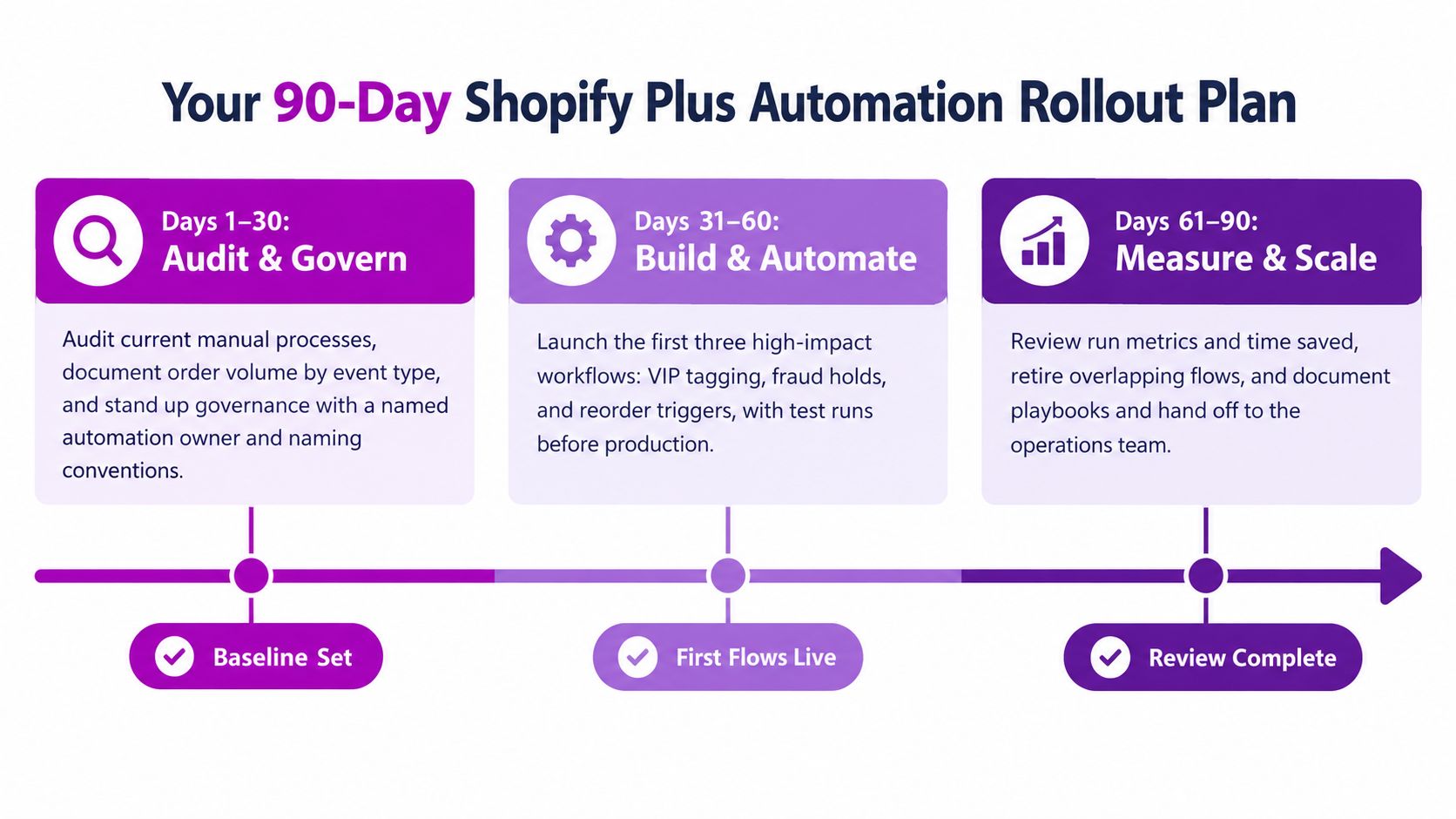
Document the main order, inventory, support, and campaign events. Record which team owns each event, what manual action follows it, and where mistakes or delays occur.
Choose a named automation owner. Create naming conventions, an approval process, a change log, and a rollback method. Establish a baseline for minutes spent, error frequency, exception volume, and campaign readiness before building anything.
Shopify's enterprise materials recommend a 90-day automation target and divide implementation into 1 to 15 days for design, 16 to 45 days for launch, and 46 to 90 days for optimization. Shopify's automation guidance provides a useful cadence, but the work still needs to be adapted to the store's risk profile and team capacity.
Days 31 to 60 for controlled delivery
Launch the first two Flow workflows around high-volume, rules-based events. Add one Launchpad event for a scheduled campaign change and one checkout customization through Scripts or Functions where the business rule is already clear.
Test normal events and exceptions separately. Confirm that a duplicate trigger won't create duplicate tags, messages, or fulfillment requests. Every workflow should have a visible run history and a person responsible for reviewing it.
Days 61 to 90 for measurement and scale
Review the first workflows against their baselines. Retire overlapping flows, fix noisy alerts, and move only the highest-volume edge cases into Functions or custom integrations.
Track four measures:
- Time saved: Compare manual handling time with automated handling time.
- Error rate: Compare incorrect or incomplete actions before and after launch.
- Exception quality: Measure how quickly people resolve orders routed for review.
- Commercial impact: Connect automation to recovered demand, refund control, campaign readiness, or repeat purchase behavior where the workflow affects those outcomes.
DHL reports that almost half of companies are integrating AI into operations, while its 2025 business edition states that 64% of e-commerce retailers already use AI in some form and 44% are likely to adopt additional emerging technology across their platforms. DHL's 2025 e-commerce trends report points to a shift toward AI-supported operations, but AI should be added after the underlying event data, approvals, and fallbacks are reliable.
Review Flow runs on an agreed cadence, inspect every active workflow quarterly, and require an owner plus a rollback path before production release. That governance is what separates a growth lever from a growing pile of rules.
ECORN helps Shopify Plus teams implement custom Flow automations, Shopify Functions, checkout logic, and API integrations with ERP and 3PL systems. If you're ready to audit workflow sprawl or build a governed automation roadmap, visit ECORN to discuss the right next step for your store.



10 Social Selling Platforms for Shopify Merchants

Shopify Website Design Examples: 7 Stores Worth Studying

7 Ecommerce Newsletter Examples for Shopify Brands

One Product Shopify Store: Build and Scale

Mobile Pop Up Strategy for Shopify Stores That Converts

Sitemap for Shopify: How to Find, Optimize, and Submit It

7 Single Product Websites Worth Emulating

Product Variants Shopify: The Complete 2026 Guide

Ecommerce Analytics Consulting for Growth

What Is AI Integration for eCommerce

How to Choose the Right eCommerce Website Development Firm

E Business Strategy Implementation

Conversion Tracking Setup for Shopify Stores

BigCommerce vs Shopify Plus Which Enterprise Wins in 2026

Shopify Theme Kit: Setup, Commands, and Migration Guide

Shopify Extension Development: A Practical 2026 Guide

Shopify Speed Score Explained and How to Improve It

Shopify Mobile Optimization: The 2026 Playbook

How to Add Subcategory in Shopify for Better UX

How to Implement Structured Data for Ecommerce in 2026

SEO App Mobile: Shopify Store Optimization Guide

Shopify Plus Support: What It Includes and How to Choose

Google Ads for Shopify: The Complete 2026 Playbook

Shopify New York: How to Find and Hire the Right Agency

Google Search Console for Shopify: The Complete Setup

First Party Data Collection for eCommerce Growth

FAQ Online Store Guide: Build and Measure It Right

Do FB Ads Work for eCommerce in 2026?

One Page Checkout for Shopify: Design and Implementation

Shopify GraphQL vs REST: The 2026 Developer Decision

Shopify Ecommerce Consulting: Strategy, Pricing &

Are Reddit Ads Worth It for eCommerce Brands

Shopify Title and Meta Description: A Practical 2026 Guide

Product Video Best Practices for Shopify Brands

Real-Time Inventory Management: A 2026 Guide

AI Chatbot Integration for Shopify Stores

Affiliate Program Management: A Shopify Guide

10 Best Performance Monitoring Tools for Shopify in 2026

Digital Asset Management for eCommerce Brands in 2026

Every Type of Facebook Ads Explained for eCommerce Growth

Product Information Management Explained for Shopify Brands

Support Ticket System: A Guide for Shopify Stores

10 Best Customer Service Tools for Shopify in 2026

Can I Start a Business with No Money? a 2026 Blueprint

What Sells Good on Etsy: Best Niches for 2026

Shopify Add to Cart Button: A Practical 2026 Guide

Customer Feedback Automation: A Practical eCommerce Guide

Critical Rendering Path: A Guide for Shopify Stores

How to Promote on TikTok for eCommerce in 2026

B2B eCommerce Consulting That Drives Real Revenue

10 Best Practices for Site Navigation in 2026

Return vs Refund for Shopify Stores: A Practical Guide

What Is Customer Lifetime Value and Why It Matters

What Is Voice of Customer Research for eCommerce

SMS Marketing for Ecommerce That Actually Converts

Master How to Improve Email Deliverability in 2026

Top 7 eCommerce Partners NYC for Shopify Brands in 2026

Machine Learning for Ecommerce: Boost Your Shopify Store

Beauty Market Research: Your 2026 Growth Guide

Shopify International Expansion: A 2026 Roadmap

What Does CRO Stand for in Business: Understanding CRO

Shopify Visual Merchandising: A Playbook for Higher Sales

Shopify Landing Page Design: Master Conversion in 2026

10 Best AI SEO Optimization Tools for Shopify in 2026

Agentic AI for Ecommerce: Boost Your Sales in 2026
Mastering Email Marketing Data for eCommerce Growth

Conversion Rate Optimisation Australia: Boost Your Sales

Conversion Rate Optimization AI: Your Shopify Store Guide

10 Product Bundling Strategies for Shopify in 2026

How to Increase Customer Lifetime Value: A Shopify Playbook

AI Customer Service Automation: Shopify Guide 2026

Clean Website Design: A Shopify Conversion Playbook

Omnichannel Retail Strategy: A Shopify Playbook

Product Data Enrichment: A Guide for Shopify Brands

Instagram Shopping Features a Guide for Shopify Stores

What Is Revenue Optimization: A Holistic RevOps Guide

Benefits of Conversion Rate Optimization: Boost Your

WordPress to Shopify Migration: Your 2026 Seamless Switch

Boost Sales: Ecommerce Payment Processing Guide 2026

Unified Commerce Platform: Benefits, KPIs & Shopify Guide

How to Reduce Bounce Rate eCommerce: Your 2026 Guide

Shopify API Integration: A Practical End-to-End Guide

How to Implement Data Governance: A 2026 Guide

Shopify Store Development Cost: A 2026 Breakdown

What Is Server Side Tracking: The Shopify Guide 2026

Marketing Automation Workflows: A Shopify Guide for 2026

Shopify: How to Reduce Technical Debt

Shopify UX Design Change: A Playbook for Growth

User Generated Content Strategy: Shopify Playbook

Shopify Pause and Build Plan Cost: A Complete 2026 Guide

Compare at Price on Shopify: A Complete Guide for 2026

Where Can I Sell My Prints? 10 Best Platforms for 2026
Shopify Order Management System: The Ultimate Guide 2026
What Is Marketing Attribution? an eCommerce Guide for 2026

10 Best Black Friday Sales Sheets for 2026

Discover the Top Social Media Marketing Agencies For

Consumer Confidence Definition for eCommerce in 2026
What Is Social Commerce? Your 2026 Guide to Boosting Sales

A Social Ad Campaign Playbook for eCommerce Growth

7 Best FAQ Page Examples for SaaS & eCommerce


newsletter in your inbox