

A wholesale buyer emails you after placing the same small order for the third time this month. They like the product, they know they'll need more, and they're asking a fair question: why should they pay the same unit price for 25 units that they pay for one? If you can't answer that cleanly, they'll spread orders out or shop elsewhere. Shopify volume pricing gives you that answer, but only if the margin math comes before the tool choice.
What Volume Pricing Means on Shopify
Say your buyer orders one case of 10 units at a time and asks why the price doesn't drop when they commit to 25. That's the exact job of volume pricing. Volume pricing means the unit price changes with the quantity bought in one order, for example $40 each for 1 unit and $36 each for 10 units in a hypothetical ladder.
It's not the same as a bulk discount or a discount code. A bulk discount is usually one percentage off once a minimum is reached, with no further steps. A sitewide code ignores quantity entirely, so a buyer ordering one unit gets the same deal as a buyer ordering 50.
Two buyer types, two setups
Wholesale and B2B buyers work through company accounts. They see company-specific catalogs with native quantity price breaks, so their pricing can differ from your public storefront. Retail shoppers don't have a company account, so they won't see native B2B breaks. If you want retail shoppers to see quantity tiers, you'll need a volume discount app or custom logic.
That split matters more than any feature list. Pick the wrong route and you'll build tiers your actual buyers never see.
Where tiers earn their keep
Merchants use volume pricing to lift average order value, make reorders simpler, and give repeat buyers a reason to consolidate purchases into fewer, larger orders. It fits case packs, B2B reorders, consumables, and gifting bundles, anywhere buyers already think in multiples.
It fits poorly for one-off, high-ticket items with little reorder behavior. A tier nobody reaches isn't an incentive, it's decoration.
Run this test on your own catalog: do buyers already order in multiples? If most orders are single units of a high-ticket item, tiers will rarely trigger and you're solving a problem you don't have.
Native Pricing, Functions or Apps Compared
Shopify volume pricing options compared
| Option | Who sets it up | What it handles best | Main limit |
|---|---|---|---|
| Native B2B quantity price breaks | Merchant in Shopify admin | Company-specific wholesale tiers, up to 10 breaks per product variant | Company-location catalog assignment needs Shopify Plus |
| Shopify Functions | Developer | Custom discount logic in cart and checkout, such as mixed-variant counting | Needs development and testing on a plan that supports Functions |
| Volume discount apps | Merchant from the App Store | Quick tier rules, product page widgets, retail tiers | Monthly app fee set by each app; check each app's variant support |
| Custom build by a development agency | Agency or in-house developer | Any tier logic, bespoke display across product, cart and checkout | Quoted per project; ongoing maintenance cost |
Verdicts by situation
If you run wholesale with company accounts, start with native quantity price breaks. There's no app fee and the pricing lives in the catalog your buyers already use. If you're a retail store that wants tiers across many products without a developer, start with an app.
If you need mixed-variant pooling, cart-wide tiers across collections, or other custom logic, you need Shopify Functions or a custom build. Don't force native tools or an app to pretend they can do that.
Four criteria to weigh
Ask who manages the prices after launch, whether tiers must count quantities across variants, which plan the feature needs, and how much maintenance the rules need over time. Plan matters commercially too. The Shopify Plus plan page lists Shopify Plus at $2,500 per month for a one-year term or $2,300 per month for a three-year term in USD, and notes that advanced catalog assignment to company locations is restricted to Shopify Plus. A wholesale store on a lower plan may need to plan around that limit rather than discover it mid-build.
Practical rule: pick the simplest route that handles your buyer type, then move up only when a real case breaks it.
Designing Tier Thresholds That Protect Margin
Example tier ladder with gross margin at $18 unit cost
| Quantity | Discount vs base | Unit price | Gross margin |
|---|---|---|---|
| 1-9 units | 0% | $40.00 | 55.0% |
| 10-24 units | 10% | $36.00 | 50.0% |
| 25-49 units | 20% | $32.00 | 43.8% |
| 50+ units | 30% | $28.00 | 35.7% |
Start from cost and margin, not from the discount you'd like to advertise. In this worked example, the base price is $40 and unit cost is $18, so every tier can be checked before a buyer ever sees it. The discount is the output of that math, not the starting point.
Set the floor first
I would set a margin floor first, for example 35%, then work back to the deepest discount you can offer. At $28, the deepest tier above still clears that floor at 35.7%. If your floor were higher, that tier would need a smaller discount or a larger minimum quantity to justify it through picking and shipping efficiency.
This is where wholesale pricing discipline matters beyond Shopify itself. If you're also selling through retail partners, a useful primer on pricing CPG products for retail growth from Reddog Consulting Group covers how wholesale price architecture supports retail expansion. Broader context on how tiering fits your overall approach is covered in this guide to ecommerce pricing strategies.
Space thresholds buyers can actually hit
Keep the ladder to three or four tiers. Make each jump worth chasing, usually 5 to 10 percentage points between steps, so buyers see a clear reason to reach the next break. Small jumps don't change behavior. Huge jumps give away margin you didn't need to spend.
Space the quantities like 10, 25, and 50 units rather than 10, 12, and 15. Round thresholds are easier to explain, easier to stock, and easier for a buyer to plan a reorder around. Odd spacing looks precise but usually reflects internal guesswork.
Decide stacking before launch
Decide whether volume prices can combine with a sitewide code, a loyalty discount, or a shipping offer, and write it down before launch. Stacking decided later becomes stacking discovered by a customer.
Close with a simple check: calculate gross margin at every break. If the deepest tier falls below your floor, reduce the depth or raise the threshold. Don't launch and hope volume makes up for it.
How to Set Up Native Quantity Price Breaks
The five core steps below give you the shape of the setup before you work through the detail.
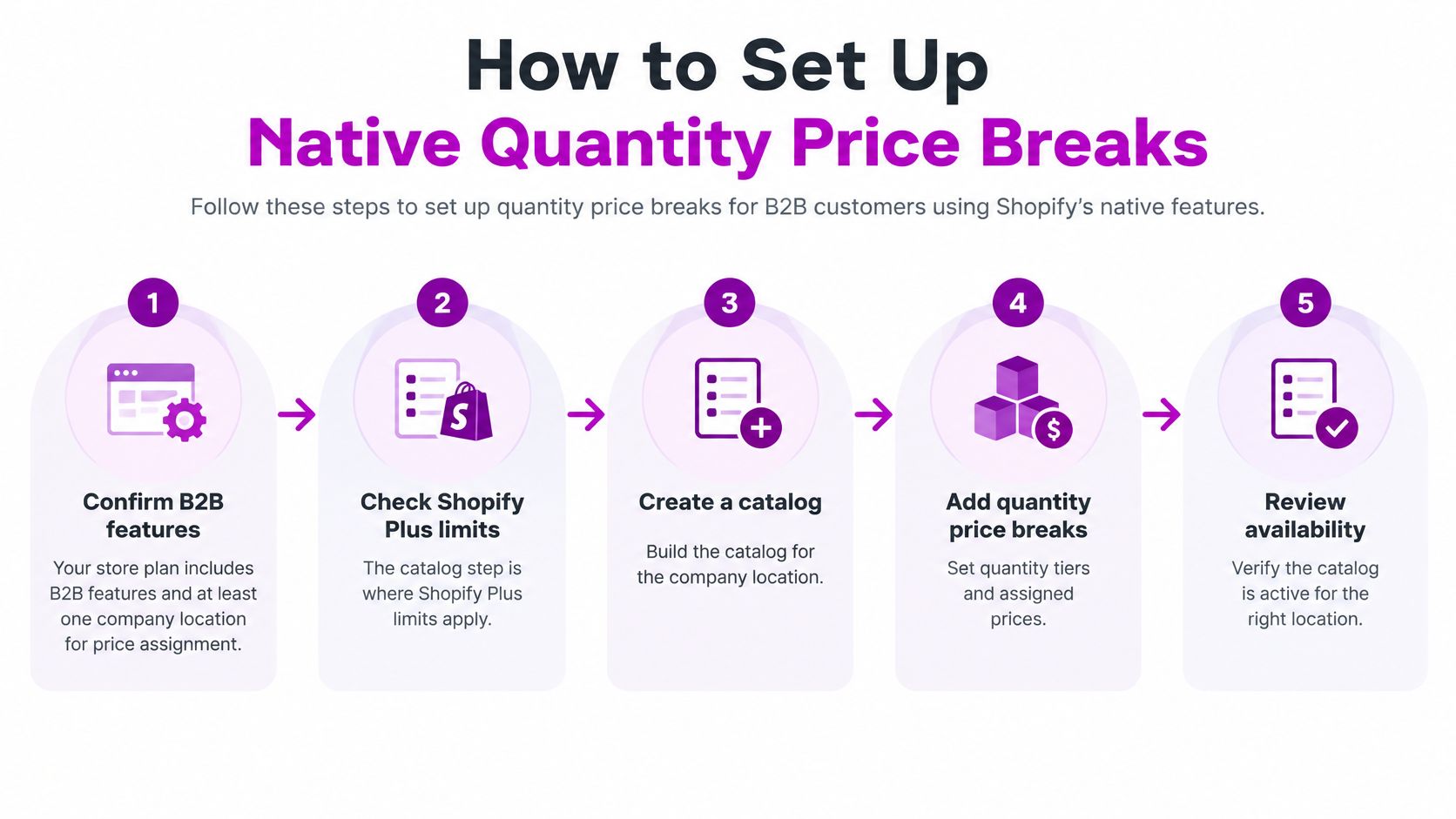
- Confirm B2B access. Check that your plan includes B2B features and that the store has at least one company location to assign prices to. The catalog step is where Shopify Plus limits apply, so confirm this before building anything.
- Create a catalog. Build a catalog for the wholesale group and attach the company location, so prices show only to that buyer. A catalog assigned to nobody is the most common reason correct prices never appear.
- Choose products and variants. Select the products and variants the tiers apply to, because each variant gets its own breaks. Don't assume setting one color covers the rest.
- Add the price breaks. The Shopify quantity pricing guide says merchants can configure up to 10 price breaks for each product, with each break linked to a required quantity and applied separately to each product variant. Enter the minimum quantity and unit price for each break, with prices falling as quantity rises.
- Review every variant. Save, then review the break table variant by variant. A missing break on one color is the most common gap, and buyers will find it before you do.
What the pricing behavior looks like
Shopify's own catalog example shows purchasing 25 shirts reduces the unit price to $5.00, while purchasing 40 reduces it to $3.50, which are effective discounts of 50% and 65% if the original unit price were $10.00. Volume pricing applies at the item level, script-based discounts can follow it, and an overall catalog adjustment doesn't apply once a volume price is set.
Variant separation is the behavior that catches merchants out. A buyer ordering 20 blue hats qualifies for the blue-variant break, while ordering 20 gray hats separately is required to qualify for the gray-variant break. Colors don't pool toward one threshold.
Test as the buyer sees it
Sign in on the company account and order exactly the threshold quantity, then one below it. Check the displayed price on the product page, in the cart, and at checkout. All three should match.
That three-page consistency is what separates a working setup from a correct-looking admin screen. For BAGWORKSNY, we built tiered volume pricing that recalculates prices based on purchased quantities and shows the pricing on product, cart and checkout pages. A correct setup means each variant shows the right break at the right quantity, and nothing else overrides it.
When Functions or Apps Are the Better Route
This view of volume pricing rules on a store screen is where most merchants realize their case doesn't fit the native model.
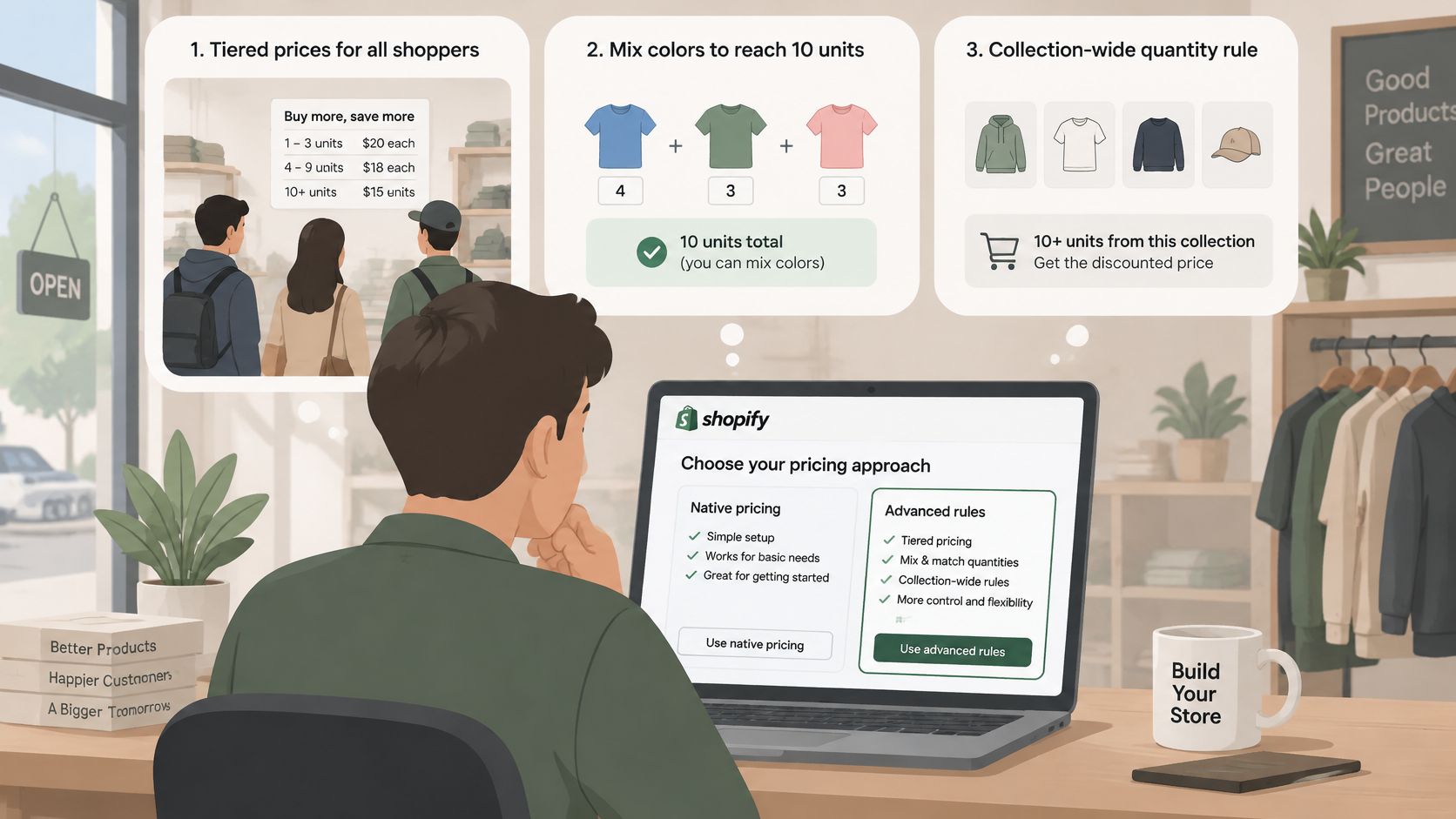
Native breaks fail in four predictable cases. You want tiers for anonymous retail shoppers, a buyer should mix colors to reach 10 units, tiers should count quantity across a whole collection, or bundles need to combine tiers with other offers. If any of those describe your store, stop configuring and change route.
Functions for rules you define
With Shopify Functions, a developer writes discount logic that runs during cart and checkout. You get full control over counting rules, pooling, and exclusions. You also take on build, test, and upkeep time every time the rules change.
The short walkthrough below shows how tier logic behaves from the buyer's side before you commit to a build.
Apps screened against a checklist
Before paying for any app, screen it against these points and compare candidates using this roundup of wholesale Shopify apps:
- Variant support: confirm it counts variants the way your buyers order
- Price display: confirm the tier price shows on product pages and in the cart, not only at checkout
- Discount behavior: confirm how it behaves alongside codes and other discounts
- Track record: check review volume and update history for signs the app is maintained
- Fee scaling: check how the monthly fee grows with store size
Apps differ sharply in how they treat mixed-variant orders, so test a mixed cart before paying. If no app passes the checklist and your rules are too specific for off-the-shelf tools, a custom Function or build is the next step. ECORN offers Shopify app development services for stores that reach that point. Base the decision on the failure cases above, not on features you don't need.
Fixing Tiered Prices That Misbehave
The most common complaint is simple: the tier doesn't show at checkout. The likely cause is assignment, not pricing. Check that the buyer is signed in on the company account the catalog is assigned to, and that the catalog covers that product. Test it by signing in as that buyer and adding the threshold quantity yourself.
Five symptoms and their tests
- Mixed-color order misses the break: native pricing counts per variant, so pooled colors won't qualify. Test with a single-variant order at the threshold. If that works and the mixed cart doesn't, you need a Function or app for pooled counts.
- Cart and invoice prices differ: compare the order's applied break with the break table and look for a stacked script discount. Test by placing the same order with scripts disabled or codes removed.
- A discount stacks when it shouldn't: review your stacking rule and the order discounts apply in. Test with the volume price alone, then add the second discount and watch the total.
- Price jumps when an item is removed: the tier recalculates on current cart quantity, so dropping below the threshold removes the break. Test by removing one unit from a qualifying cart. That's correct behavior, so tell buyers to keep quantity above the threshold.
Reproduce each symptom with its one-line test before changing any rules. Changing settings on a problem you can't reproduce just creates a second problem.
Test Your Tiers Before Customers Do
Use this checklist as your final pass before any buyer sees a tier.
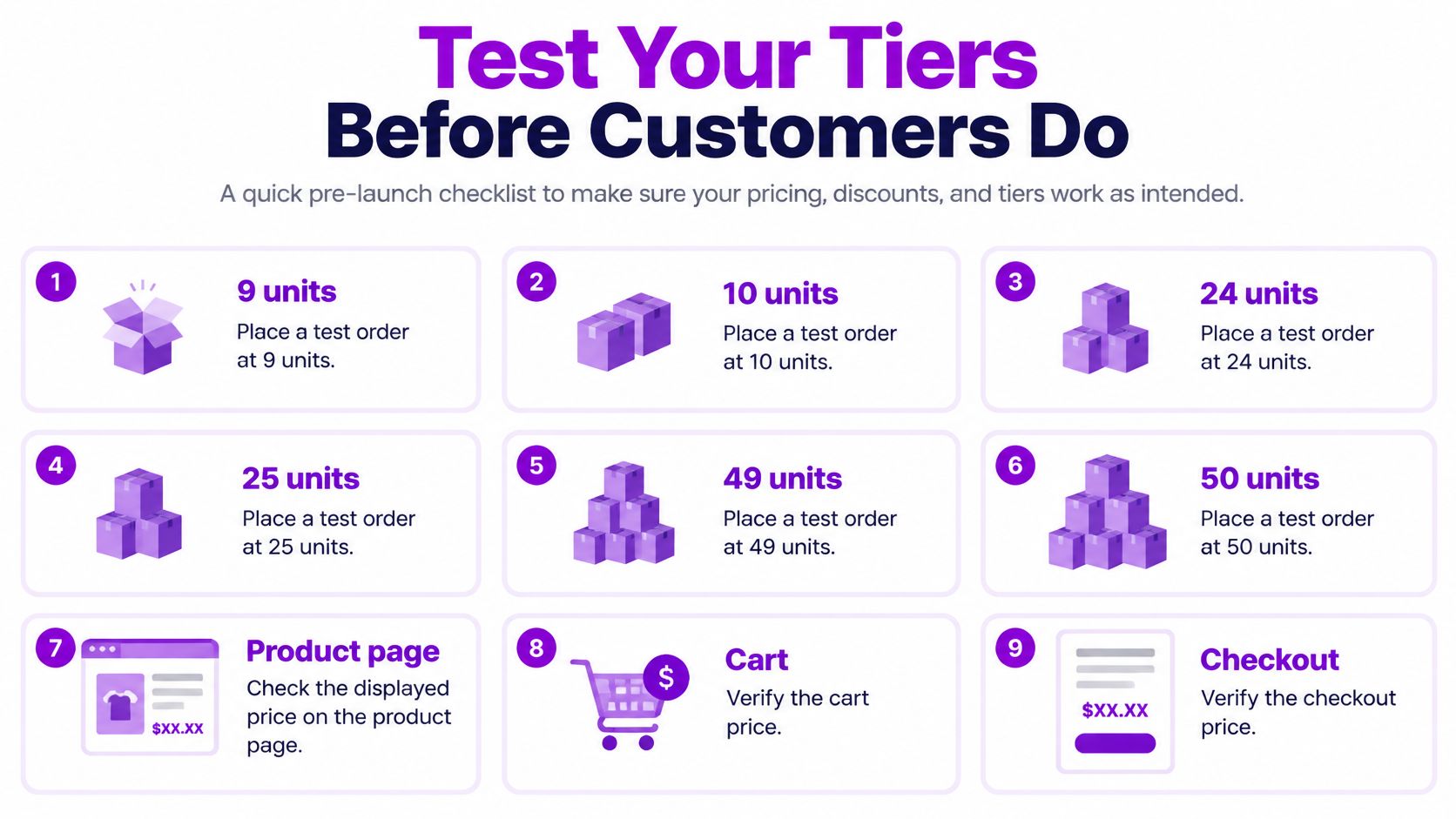
Place test orders at 9, 10, 24, 25, 49, and 50 units on each variant, so every boundary is covered on both sides. Check the displayed price on the product page, cart, and checkout for each test, then remove an item and confirm the price recalculates to the current cart quantity.
Test a mixed-variant order using the pooling rule you've chosen, and confirm the invoice total matches the expected unit price with no stacked script discount. If the setup is simple, launch to one company account first. If rules are complicated, scope the fix with a developer, our single-project work on Shopify and Shopify Plus costs $69 per hour with no minimum or maximum project size, and repeat this checklist on the custom logic. Review the ladder again after the first 60 days of real orders.
If your tier ladder is designed but the setup has outgrown native breaks, we can build the Functions, custom pricing display, or app logic to run it across product, cart, and checkout. Tell us your thresholds, margin floor, and pooling rules, and we'll scope the simplest build that handles them. Start that conversation at ECORN.


How Does Shopify Work for Sellers? a Practical Guide

Shopify Theme ZIP: How to Upload and Install It

Shopify Plus Organization Admin: Roles and Access Guide
How to Build a Drop Down Menu in Shopify: Steps and Fixes
Shopify Plus Integration Services Guide

Shopify Customer Experience: A 2026 Guide

Shopify Plus Expansion Stores: Limits and Setup
Shopify Theme Update: Safe Steps, Backups and Rollback

Shopify Website Design Packages: What You Actually Get

How to Choose a Shopify Plus Web Design Agency in 2026
Shopify Plus Ecommerce Agency: How to Pick the Right One

Shopify Themes Retina: How to Serve 2x Images

How to Cross Sell on Shopify Without Friction

Best Shopify Theme for Custom Products Compared
Multi Store Inventory Management: A Practical Guide

SEO Consulting for Ecommerce: A Practical Guide

Shopify Theme Updater App: A Safe Update Playbook

Shopify Git Integration: A Developer's Guide to 2026
Headless Ecommerce Development Services Explained

How to Build a Shopify Clothing Website That Converts

How to Launch a Box Subscription Business in 2026

Luxury Skincare Branding Playbook That Converters

10 Best Podcast Ecommerce Shows for Store Growth in 2026
Shopify Developer Hourly Rate: What to Pay in 2026
Critical Shopify Setup Errors That Are Secretly Sabotaging Your Store
Ecommerce Conversion Tracking: The Complete How-To Guide

Shopify Design Agency: How to Pick the Right Partner
Mastering Multi Store Management on Shopify

Scale Shopify Store

10 Shopify App Ideas Worth Building in 2026
Conversion Rate Optimization for Landing Pages: The Playbook
Shopify Plus Automation: A Guide for 2026
10 Social Selling Platforms for Shopify Merchants

Shopify Website Design Examples: 7 Stores Worth Studying

7 Ecommerce Newsletter Examples for Shopify Brands
One Product Shopify Store: Build and Scale

Mobile Pop Up Strategy for Shopify Stores That Converts

Sitemap for Shopify: How to Find, Optimize, and Submit It

7 Single Product Websites Worth Emulating
Product Variants Shopify: The Complete 2026 Guide

Ecommerce Analytics Consulting for Growth

What Is AI Integration for eCommerce

How to Choose the Right eCommerce Website Development Firm

E Business Strategy Implementation
Conversion Tracking Setup for Shopify Stores
BigCommerce vs Shopify Plus Which Enterprise Wins in 2026
Shopify Theme Kit: Setup, Commands, and Migration Guide

Shopify Extension Development: A Practical 2026 Guide

Shopify Speed Score Explained and How to Improve It

Shopify Mobile Optimization: The 2026 Playbook
How to Add Subcategory in Shopify for Better UX
How to Implement Structured Data for Ecommerce in 2026

SEO App Mobile: Shopify Store Optimization Guide

Shopify Plus Support: What It Includes and How to Choose

Google Ads for Shopify: The Complete 2026 Playbook

Shopify New York: How to Find and Hire the Right Agency
Google Search Console for Shopify: The Complete Setup

First Party Data Collection for eCommerce Growth
FAQ Online Store Guide: Build and Measure It Right

Do FB Ads Work for eCommerce in 2026?

One Page Checkout for Shopify: Design and Implementation
Shopify GraphQL vs REST: The 2026 Developer Decision
Shopify Ecommerce Consulting: Strategy, Pricing &

Are Reddit Ads Worth It for eCommerce Brands

Shopify Title and Meta Description: A Practical 2026 Guide

Product Video Best Practices for Shopify Brands
Real-Time Inventory Management: A 2026 Guide

AI Chatbot Integration for Shopify Stores

Affiliate Program Management: A Shopify Guide
10 Best Performance Monitoring Tools for Shopify in 2026

Digital Asset Management for eCommerce Brands in 2026

Every Type of Facebook Ads Explained for eCommerce Growth
Product Information Management Explained for Shopify Brands
Support Ticket System: A Guide for Shopify Stores

10 Best Customer Service Tools for Shopify in 2026

Can I Start a Business with No Money? a 2026 Blueprint

What Sells Good on Etsy: Best Niches for 2026

Shopify Add to Cart Button: A Practical 2026 Guide

Customer Feedback Automation: A Practical eCommerce Guide
Critical Rendering Path: A Guide for Shopify Stores

How to Promote on TikTok for eCommerce in 2026

B2B eCommerce Consulting That Drives Real Revenue

10 Best Practices for Site Navigation in 2026
Return vs Refund for Shopify Stores: A Practical Guide

What Is Customer Lifetime Value and Why It Matters

What Is Voice of Customer Research for eCommerce

SMS Marketing for Ecommerce That Actually Converts

Master How to Improve Email Deliverability in 2026

Top 8 eCommerce Partners NYC for Shopify Brands in 2026

Machine Learning for Ecommerce: Boost Your Shopify Store

Beauty Market Research: Your 2026 Growth Guide

Shopify International Expansion: A 2026 Roadmap

What Does CRO Stand for in Business: Understanding CRO

Shopify Visual Merchandising: A Playbook for Higher Sales

Shopify Landing Page Design: Master Conversion in 2026

10 Best AI SEO Optimization Tools for Shopify in 2026

Agentic AI for Ecommerce: Boost Your Sales in 2026
Mastering Email Marketing Data for eCommerce Growth

Conversion Rate Optimisation Australia: Boost Your Sales
Conversion Rate Optimization AI: Your Shopify Store Guide


newsletter in your inbox