


Your Shopify cart already has a recommendation row. It looks tidy, the products load, and shoppers occasionally click. But when you inspect the offers, a customer buying a throw blanket gets another throw blanket instead of something that completes the purchase. Before installing another app, ask a harder question: does the offer help the shopper finish, or make them reconsider?
Why Most Shopify Cross-Sells Miss the Sale
Consider a shopper who has finally chosen a blanket after comparing materials and colors. They add it to the cart and see a row of similar blankets. There's nothing technically broken, but the store has reopened a decision the shopper already made.
Now consider a pillow cover that works with the chosen blanket. That could be useful, provided the shopper can see the fabric, price, and compatibility without leaving the cart. The difference isn't the recommendation widget. It's the merchandising decision behind it.
Diagnose the offer before the design
A generic recommendation heading asks shoppers to do the merchandiser's work. They must figure out whether each item replaces their selection, belongs alongside it, or is popular.
That uncertainty gets worse when titles are truncated or the store hides essential buying information. A recommendation isn't useful just because a customer recognizes the product category. They need to understand why this particular item belongs in this particular purchase.
Use these questions when reviewing an existing module:
- Purpose: Does the offer complete the purchase or reopen product comparison?
- Context: Can the shopper understand the relationship without opening another page?
- Effort: Can they assess the item and continue without an unwanted detour?
- Evidence: Are you measuring completed purchases, or celebrating interaction with the block?
Separate completion from comparison
Complementary products help someone use or enjoy what they've selected. Related products help them evaluate another option. Both have a place, but they shouldn't share an indistinguishable row at the moment of commitment.
A recommendation should resolve a customer need, not create another merchandising puzzle.
My starting recommendation is to write the customer need before choosing the product. A compatible cleaning product answers a maintenance question. Another version of the anchor product answers a comparison question. Those require different messaging and different placement.
Learning how to cross sell on Shopify starts with that distinction. Catalog rules, implementation, placement, and tool choice should follow the intended shopper job. The result worth pursuing is a relevant offer customers can ignore, then a controlled test of whether it changes attach rate and order value.
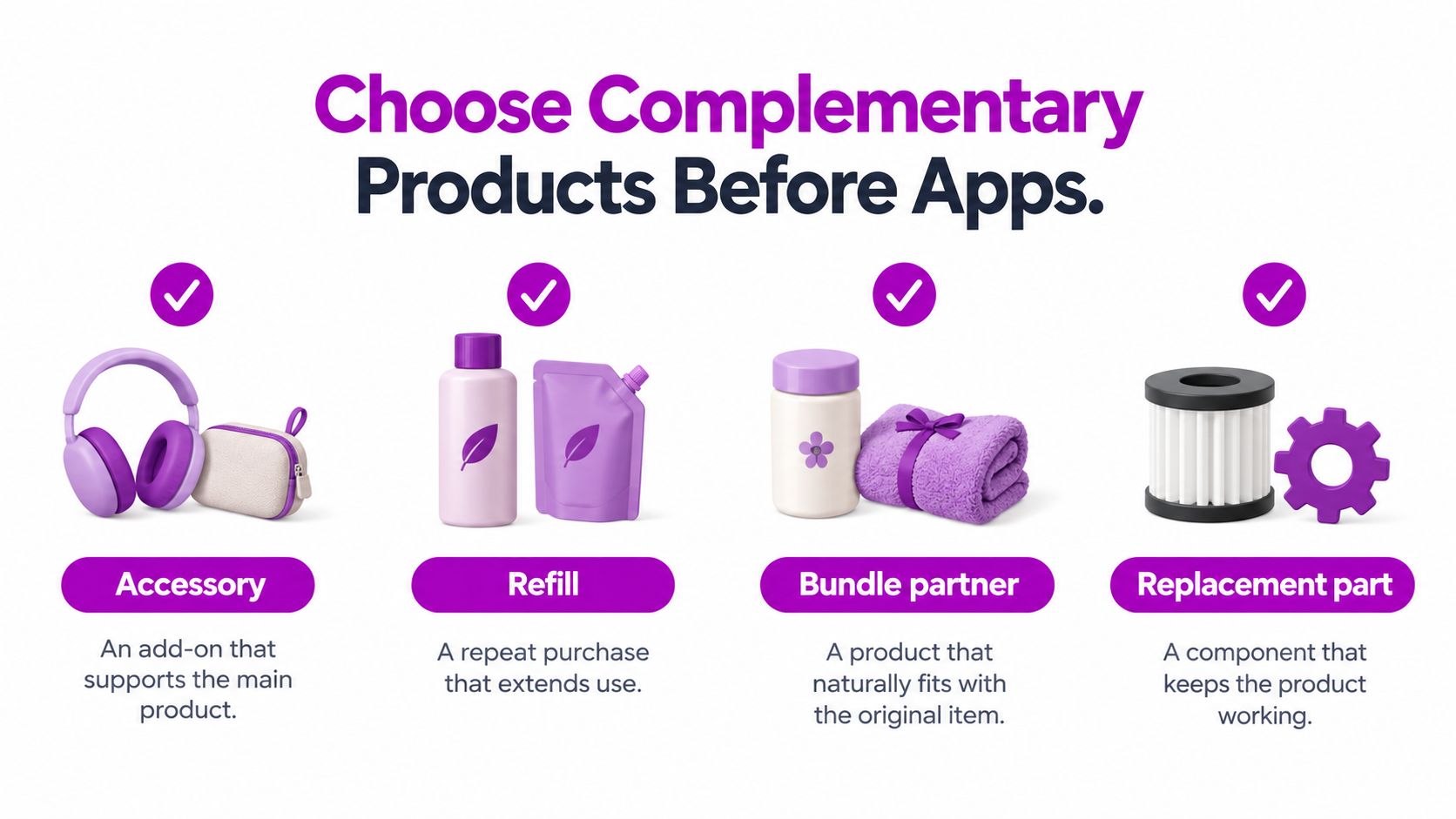
Choose Complementary Products Before Apps
Start with an anchor product that customers already want. Then identify what someone might reasonably need to set it up, maintain it, replenish it, or enjoy it more fully. Don't begin with inventory you'd like to clear.
For a hypothetical homeware store, a coordinated pillow cover could complement a throw. Another throw in a different weave is more likely to be an alternative. For help thinking through the visual relationship, That Blanket Co.’s guide to styling coordinated throws and pillows is a useful merchandising reference, not evidence that any pairing will convert.
Use these companion categories to organize the shortlist.
Build relationships customers can understand
Write a reason for each pairing before configuring it. A refill extends use; a replacement component addresses wear; an accessory supports a specific task. A bundle partner should make sense even without a bundle discount.
Reject pairings that depend on vague similarity. Matching colors don't establish compatibility, and a shared collection doesn't automatically mean products belong in the same order. Confirm dimensions, materials, intended use, and any product-specific restrictions.
Run the catalog preflight
Shopify's recommendation eligibility guidance explains that related recommendations can use purchase history, product descriptions, and related collections; eligible products generally must be active, published to the Online Store, priced above $0, and available for sale, while complementary products require inventory above zero.
Turn those requirements into a catalog review:
- Publishing and availability: Check the recommended product itself, not just the anchor.
- Inventory: Confirm the companion can be fulfilled.
- Descriptions: Keep compatibility and intended use accurate.
- Collections: Organize products clearly enough to support meaningful relationships.
The same Shopify guidance notes that purchase-history recommendations need previous sales data, while description-based recommendations are limited to English storefronts. Don't troubleshoot a presentation problem when the underlying recommendation strategy lacks the required inputs.
Finish with a manageable anchor-to-companion map. Include the reason for the relationship and whoever owns its maintenance. That document is more valuable than a large, unreviewed list of suggestions because the team can explain, update, and challenge every offer.
Set Up Cross-Sells in Search and Discovery
Configure the relationship separately from its presentation. In Shopify Search & Discovery, define the complementary products for your selected anchors. Treat automatically generated related recommendations as a different merchandising stream.
Use this workflow as the implementation overview.

Connect the configured intent to the storefront
After assigning companions, check that the storefront implementation requests complementary recommendations rather than displaying its existing related-product block. A populated Search & Discovery configuration isn't enough if the visible module requests the wrong intent.
For custom storefront work, Shopify's productRecommendations query supports recommendation intent and requests using the product ID or handle; its response also includes URL parameters intended to support conversion-funnel reporting. The developer's job is to connect that behavior to the intended placement, not expose API complexity to the merchandising team.
Apply a final relevance filter before displaying the response:
- Exclude the anchor: Don't recommend the item the customer is already viewing.
- Remove unavailable products: Don't offer an add-on customers can't purchase.
- Collapse duplicate variants: Avoid filling the module with near-identical choices.
- Check the cart: Suppress products the shopper has already added.
For a cart module, explicitly choose the anchor rule. The most recently added line reflects the shopper's latest action; the highest-value line may better represent the purchase's main purpose. Neither is universally correct, so document the choice rather than letting an incidental cart order decide it.
Validate the rendered experience
Preview the module with an empty cart, a mixed cart, and a cart containing a recommended companion. Test what happens after adding an item without refreshing the page. If filtering leaves no suitable products, hide the module instead of filling the space with unrelated stock.
For broader implementation context, use the ecommerce product recommendations guide when briefing theme or storefront work. Keep the brief focused on intent, filtering, and fallback behavior before discussing visual polish.
Use the video as a supplementary walkthrough while checking your own configuration.
Before release, verify the event trail. Record module impressions, product clicks, recommendation add-to-cart events, and completed orders with distinct intent and placement labels. An impression should represent a displayed recommendation, not merely a successful request.
Preserve the reporting parameters through the rendered product links. You want a working offer with traceable behavior, not an attractive block whose results disappear into general storefront activity.
Place Offers Without Blocking Checkout
A prominent offer isn't necessarily a useful offer. A modal guarantees that shoppers encounter the recommendation, but it may also require them to stop doing exactly what you want: completing their purchase.
Baymard's checkout cross-sell research reports that injected offers requiring acceptance or rejection felt aggressive; 66% of users who initiated checkout on Amazon showed extreme frustration when forced through a separate cross-sell step. That finding isn't a forecast for your store, but it's a strong reason not to make interruption the default.
Cross-Sell Placement Risk
Choose placement according to the shopper's job and the cost of distracting them.
| Placement | Shopper job | Interaction | Main risk |
|---|---|---|---|
| Product page | Understand how products work together | Inline, optional explanation | Distracting from the anchor's buying decision |
| Cart drawer | Complete the selected purchase | Compact, dismissible add-on | Crowding the checkout action |
| Post-purchase page | Consider a useful extra after ordering | Clearly optional offer | Confusion about charges or fulfillment |
| Checkout | Finish payment and delivery details | Minimal, only where supported and justified | Interrupting an already committed shopper |
My default would be an inline product-page module when the pairing needs explanation. Use the cart drawer when the relationship is immediately understandable. Consider post-purchase placement when the offer can be presented with clear terms and without making the original order feel unfinished.
Checkout placement should require a stronger justification than available screen space. Confirm platform support, explain the customer benefit, and define a rollback condition before building it.
Preserve the original purchase path
Review the interaction on a phone and with a keyboard, not only in a desktop design file.
- Touch controls: Make product selection and dismissal comfortable without accidental taps.
- Keyboard access: Keep focus order logical and the checkout action reachable.
- Screen-reader labels: Identify the product and the action, rather than repeating an ambiguous add button.
- Commercial clarity: Show price and relevant delivery information before commitment.
- Dismissal: Let shoppers close or ignore the offer without explaining why.
Placement rule: The shopper should be able to finish the original purchase without negotiating with your cross-sell.
Avoid preselected extras and interface choices that make declining feel like an error. If the recommendation adds a separate interaction, test whether that interaction helps customers make a decision or merely exposes more people to the offer.
Review checkout completion, accessibility defects, refunds, and complaints alongside commercial metrics. An increase in add-on acceptance doesn't justify a purchasing path customers struggle to finish.
Compare Native Tools Apps and Shopify Plus
Choose the smallest implementation that meets the merchandising requirement. An emerging store with straightforward companion relationships needs a different build from an established business coordinating a custom cart and multiple storefronts.
The decision shouldn't start with which tool has the longest feature list. Start with the behavior you can't deliver today and the person who will maintain it after launch.
Match the route to the constraint
| Route | Appropriate use | Trade-off to assess |
|---|---|---|
| Native recommendations and Search & Discovery | Managing straightforward complementary relationships | Whether the storefront presentation meets the requirement |
| Theme work or an app block | Improving layout, controls, or offer presentation | Maintenance, compatibility, and overlapping modules |
| Custom storefront implementation | Applying cart-aware filtering and placement rules | Development ownership and regression testing |
| Shopify Plus implementation work | Coordinating requirements across a complex checkout or multi-store setup | Scope, supported capabilities, and operational complexity |
Native first is a useful recommendation for stores still establishing their merchandising logic. If the offer itself hasn't been validated, adding configuration options mostly creates more decisions.
A theme change is the more direct route when the recommendations are sensible but the presentation is weak. An app deserves consideration when it provides a clearly defined capability the current implementation lacks. Ask for a demonstration using your cart behavior, not just the vendor's example store.
Know when implementation help is justified
ECORN offers Shopify design and development, conversion-rate optimization, ecommerce consulting, and Shopify Plus work through monthly packages or a single project. It's an option when a store needs merchandising requirements translated into theme changes, custom integration work, and a measurable experiment rather than another independently configured widget.
For a growing brand, brief the actual defect: missing product information, inconsistent cart updates, unclear placement ownership, or unreliable reporting. That creates a bounded engagement. Asking someone to improve cross-selling without specifying the failure invites unnecessary scope.
For a Plus store, define the rules across storefronts and checkout before choosing a technical route. If an older brief calls for a Scripts-style solution, treat it as a requirement to reassess against current supported capabilities, not an implementation instruction.
Buy or build the missing capability. Don't replace an entire recommendation system to fix a product card.
Before approval, name who maintains pairings, who tests theme changes, and who can disable the module. A simpler implementation with clear ownership is preferable to elaborate logic nobody feels responsible for reviewing.
Measure Attach Rate Instead of Vanity Revenue
The quality problem is concrete. In Baymard's recommendation benchmarks, 52% of desktop sites showed cart or post-add-to-cart cross-sells that were irrelevant or based only on other customers' purchases, 68% omitted an essential listing attribute, and only 42% of 50 leading sites offered both alternative and supplementary suggestions.
Those findings establish a useful audit standard, not a promised performance lift. Explain the pairing, provide a clear image and price, keep the full title readable, and show genuine ratings where available. Keep comparison offers distinct from purchase-completion offers.
Use the following scorecard to organize measurement.

Compare exposure with a randomized control
Run a no-recommendation control against curated complementary products and algorithmic related products. Hold price, shipping, and promotional messaging constant so the recommendation strategy is the meaningful difference.
Keep assignment consistent for the shopper. Analyze everyone assigned to each experience, not just people who clicked. Otherwise, you're comparing self-selected interested buyers with a broader audience.
| Metric | Working definition | What it helps diagnose |
|---|---|---|
| Recommendation CTR | Clicks divided by displayed impressions | Whether the offer attracts attention |
| Recommendation-to-cart rate | Recommendation additions relative to exposures | Whether shoppers act on it |
| Attach rate | Eligible completed orders containing a defined companion divided by eligible completed orders | Whether companions appear in more purchases |
| Average order value | Order revenue divided by completed orders | Whether completed baskets are worth more |
| Checkout completion | Completed checkouts relative to checkout starts | Whether the offer disrupts purchase completion |
| Revenue per exposed session | Revenue divided by exposed sessions, compared across assignments | Whether the overall commercial result improves |
Separate attribution from incrementality
Use the same companion definition in the control and treatment groups. A customer who finds the accessory independently still counts toward the control's attach rate. That's precisely why the control matters.
Recommendation reporting parameters help trace a funnel, as described earlier, but they don't establish causation. Attributed revenue is not automatically incremental revenue.
Clicks can rise while the offer merely redirects customers who would have bought anyway. Review device and order-value segments, then weigh commercial results against the checkout and customer-experience checks. Keep the module only when the combined evidence supports it.
Start a Cross-Sell Test This Week
Choose an anchor with existing demand and an obvious customer need you can address. Write a short test brief containing the proposed companions, the reason for each pairing, the placement, and the decision you'll make from the result.
Keep this first experiment narrow enough that the operator, merchandiser, and developer can describe the same experience. Expanding across the catalog immediately makes weak pairings harder to identify and implementation problems harder to isolate.
Prepare the release
Use the catalog preflight and event checks already defined. Then inspect the actual module on the devices customers use, including the cart state after someone accepts an offer.
- Merchandising approval: Confirm that every pairing is useful without a discount.
- Copy approval: Give the shopper a specific reason to consider the companion.
- Interface approval: Keep the buying information readable and checkout accessible.
- Measurement approval: Verify control assignment and completed-order reporting before collecting results.
The Shopify A/B testing guide can help structure the experiment. Launching this week doesn't mean declaring a winner this week. Let the evidence determine when you can make a defensible decision.
Decide what to change next
If the result is flat, inspect the journey in order. Confirm the right customers saw the module, check whether the pairing made sense, and review whether the product card answered the buying question. Don't immediately add a discount or move the offer into a louder placement.
If reporting is incomplete, repair measurement before interpreting performance. If customers add companions but abandon checkout, investigate the added friction rather than celebrating the attachment events.
A founder or operator can run a bounded test in the current theme when the setup is manageable. When catalog relationships, cart behavior, or a Plus implementation make ownership unclear, prepare a focused implementation brief instead. The next action is concrete: assign an owner, select the anchor, and approve the control before changing the storefront.
ECORN offers Shopify design, development, and CRO support for stores that need relevant cross-sells, safer placement, and dependable measurement. Visit ECORN with your anchor products and current cart experience to discuss a focused implementation project or ongoing optimization support.



Best Shopify Theme for Custom Products Compared
Multi Store Inventory Management: A Practical Guide

SEO Consulting for Ecommerce: A Practical Guide
Shopify Theme Updater App: A Safe Update Playbook

Shopify Git Integration: A Developer's Guide to 2026
Headless Ecommerce Development Services Explained

How to Build a Shopify Clothing Website That Converts

How to Launch a Box Subscription Business in 2026

Luxury Skincare Branding Playbook That Converters
10 Best Podcast Ecommerce Shows for Store Growth in 2026

Shopify Developer Hourly Rate: What to Pay in 2026
Critical Shopify Setup Errors That Are Secretly Sabotaging Your Store

Ecommerce Conversion Tracking: The Complete How-To Guide

Shopify Design Agency: How to Pick the Right Partner

Mastering Multi Store Management on Shopify

Scale Shopify Store

10 Shopify App Ideas Worth Building in 2026

Conversion Rate Optimization for Landing Pages: The Playbook

Shopify Plus Automation: A Guide for 2026

10 Social Selling Platforms for Shopify Merchants

Shopify Website Design Examples: 7 Stores Worth Studying

7 Ecommerce Newsletter Examples for Shopify Brands

One Product Shopify Store: Build and Scale

Mobile Pop Up Strategy for Shopify Stores That Converts

Sitemap for Shopify: How to Find, Optimize, and Submit It

7 Single Product Websites Worth Emulating

Product Variants Shopify: The Complete 2026 Guide

Ecommerce Analytics Consulting for Growth

What Is AI Integration for eCommerce

How to Choose the Right eCommerce Website Development Firm

E Business Strategy Implementation

Conversion Tracking Setup for Shopify Stores

BigCommerce vs Shopify Plus Which Enterprise Wins in 2026

Shopify Theme Kit: Setup, Commands, and Migration Guide

Shopify Extension Development: A Practical 2026 Guide

Shopify Speed Score Explained and How to Improve It

Shopify Mobile Optimization: The 2026 Playbook

How to Add Subcategory in Shopify for Better UX

How to Implement Structured Data for Ecommerce in 2026

SEO App Mobile: Shopify Store Optimization Guide

Shopify Plus Support: What It Includes and How to Choose

Google Ads for Shopify: The Complete 2026 Playbook

Shopify New York: How to Find and Hire the Right Agency

Google Search Console for Shopify: The Complete Setup

First Party Data Collection for eCommerce Growth

FAQ Online Store Guide: Build and Measure It Right

Do FB Ads Work for eCommerce in 2026?

One Page Checkout for Shopify: Design and Implementation

Shopify GraphQL vs REST: The 2026 Developer Decision

Shopify Ecommerce Consulting: Strategy, Pricing &

Are Reddit Ads Worth It for eCommerce Brands

Shopify Title and Meta Description: A Practical 2026 Guide

Product Video Best Practices for Shopify Brands

Real-Time Inventory Management: A 2026 Guide

AI Chatbot Integration for Shopify Stores

Affiliate Program Management: A Shopify Guide

10 Best Performance Monitoring Tools for Shopify in 2026

Digital Asset Management for eCommerce Brands in 2026

Every Type of Facebook Ads Explained for eCommerce Growth

Product Information Management Explained for Shopify Brands

Support Ticket System: A Guide for Shopify Stores

10 Best Customer Service Tools for Shopify in 2026

Can I Start a Business with No Money? a 2026 Blueprint

What Sells Good on Etsy: Best Niches for 2026

Shopify Add to Cart Button: A Practical 2026 Guide

Customer Feedback Automation: A Practical eCommerce Guide

Critical Rendering Path: A Guide for Shopify Stores

How to Promote on TikTok for eCommerce in 2026

B2B eCommerce Consulting That Drives Real Revenue

10 Best Practices for Site Navigation in 2026

Return vs Refund for Shopify Stores: A Practical Guide

What Is Customer Lifetime Value and Why It Matters

What Is Voice of Customer Research for eCommerce

SMS Marketing for Ecommerce That Actually Converts

Master How to Improve Email Deliverability in 2026

Top 8 eCommerce Partners NYC for Shopify Brands in 2026

Machine Learning for Ecommerce: Boost Your Shopify Store

Beauty Market Research: Your 2026 Growth Guide

Shopify International Expansion: A 2026 Roadmap

What Does CRO Stand for in Business: Understanding CRO

Shopify Visual Merchandising: A Playbook for Higher Sales

Shopify Landing Page Design: Master Conversion in 2026

10 Best AI SEO Optimization Tools for Shopify in 2026

Agentic AI for Ecommerce: Boost Your Sales in 2026
Mastering Email Marketing Data for eCommerce Growth

Conversion Rate Optimisation Australia: Boost Your Sales

Conversion Rate Optimization AI: Your Shopify Store Guide

10 Product Bundling Strategies for Shopify in 2026

How to Increase Customer Lifetime Value: A Shopify Playbook

AI Customer Service Automation: Shopify Guide 2026

Clean Website Design: A Shopify Conversion Playbook

Omnichannel Retail Strategy: A Shopify Playbook

Product Data Enrichment: A Guide for Shopify Brands

Instagram Shopping Features a Guide for Shopify Stores

What Is Revenue Optimization: A Holistic RevOps Guide

Benefits of Conversion Rate Optimization: Boost Your

WordPress to Shopify Migration: Your 2026 Seamless Switch

Boost Sales: Ecommerce Payment Processing Guide 2026

Unified Commerce Platform: Benefits, KPIs & Shopify Guide

How to Reduce Bounce Rate eCommerce: Your 2026 Guide


newsletter in your inbox