


A lot of teams are in the same spot right now. They built a Shopify extension when the requirement was narrow, the merchant needed it live fast, and the first release worked. Then Shopify changed an API version, a checkout capability moved, token handling changed for public apps, or a merchant switched templates and the extension started failing in a way that looked like JavaScript but wasn't.
That's the shape of Shopify extension development in 2026. The hard part usually isn't scaffolding the first block or rendering a banner. The hard part is deciding which surface should own the behavior, pinning the right versions, surviving quarterly platform change, and knowing when an extension is the wrong tool entirely.
Teams that treat extensions like disposable storefront snippets end up with brittle releases. Teams that treat them like products usually ship less code, move sensitive logic closer to Shopify's runtime, and spend less time debugging the wrong layer.
Why Shopify Extension Development Needs a Strategy in 2026
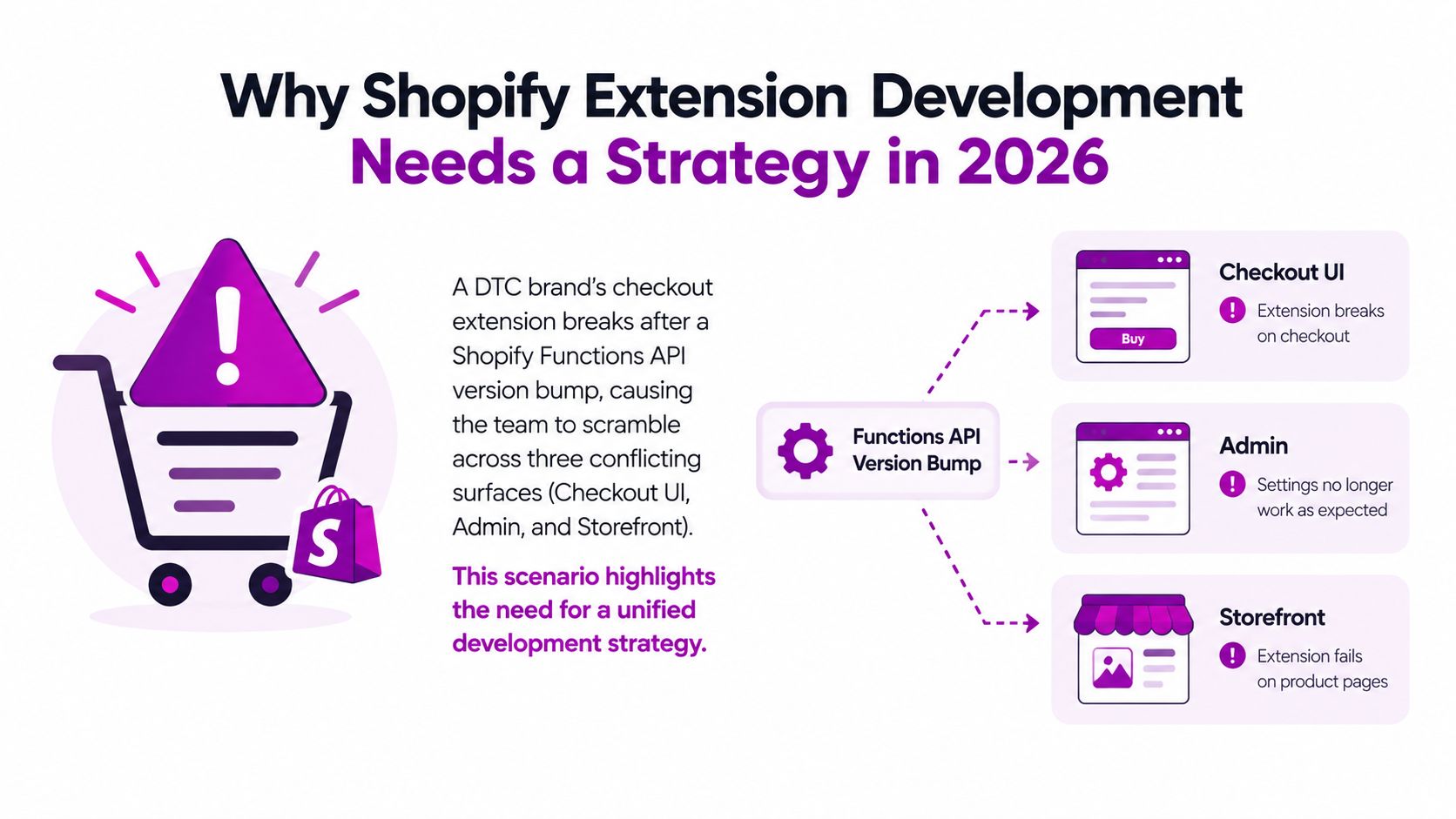
A common 2026 incident starts after a routine platform update. Checkout UI still renders, a Function still executes, Admin still shows the merchant control, but the three no longer agree on the same rule. Support calls it a bug. Engineering finds a surface mismatch that should have been decided months earlier.
That is why Shopify extension development needs a strategy before anyone scaffolds code. Shopify now gives teams several app extension surfaces with different runtimes, review paths, and maintenance costs, outlined in Shopify's app extension overview. The first decision is rarely “how do we build this?” It is “which surface should own this behavior for the next year, and what happens when Shopify changes the boundary?”
What changed for maintenance teams
The build itself is often the easy part.
The harder part is release hygiene. Shopify versioning creates a recurring maintenance schedule whether a team plans for it or not. If an app pins API versions loosely, leaves extension configs half-migrated, or keeps sensitive behavior split across UI and backend fallbacks, the clean-up work does not disappear. It shows up later as failed reviews, broken merchant setups, and rushed migration sprints.
Configuration drift is one of the quietest causes of extension instability. Older repos may still carry legacy extension config patterns, while newer generated projects use the unified shopify.extension.toml approach. In mixed-age codebases, that difference affects tooling assumptions, deployment scripts, and onboarding. A repo that contains both naming schemes should be treated as a migration candidate, not as “good enough for now.”
The 2026 lens
The bigger shift is operational, not cosmetic. Public apps now need a plan for expiring offline access tokens, older checkout metafield patterns are becoming migration work, and new testing support changes what a stable extension pipeline should look like. Shopify teams that ignore those changes usually end up debugging production behavior from the wrong layer.
There is also a product decision hiding inside the engineering work. Some logic belongs in an extension because the merchant needs placement and UI control. Some belongs in a Function because execution timing and platform proximity matter more than flexibility. Some workflows now fit better in AI-assisted surfaces such as Sidekick, where the goal is merchant assistance rather than deterministic runtime logic. Treating all three as interchangeable creates avoidable migration risk.
The practical standard in 2026 is simple. Pick the surface based on who owns the behavior, where it must run, how it will be tested, and what breaks when Shopify changes the contract. Teams that do that spend less time patching token issues, less time rewriting extension configs under deadline, and less time carrying duplicated logic across surfaces. As noted in this write-up on Shopify breaking changes, the platform changes are not isolated release notes. They are maintenance work queued in advance.
The Five Extension Surfaces and When to Use Each
A common 2026 failure case looks like this. A team ships a checkout message as a UI extension, then six weeks later the merchant asks for discount eligibility to match that message, analytics wants event parity, and support needs a way to diagnose edge cases in Admin. The first build worked. The second and third requirements expose that the wrong surface was chosen, and now the team is splitting one feature across extension code, Function logic, and app-managed state under release pressure.
Surface choice decides more than where code renders. It decides who owns behavior, how version upgrades get tested, what breaks during Shopify platform changes, and whether a future migration is small or expensive.
Comparing the five Shopify extension surfaces
| Surface | Where it runs | Best for | Maintenance risk to watch |
|---|---|---|---|
| Checkout UI extension | Checkout surface | Messaging, custom fields, guided UI, lightweight buyer interaction | Checkout capability changes, API version drift, duplicated logic with Functions |
| Admin UI extension | Shopify Admin | Merchant workflows, settings, operational tools, diagnostics | Auth and token handling, embedded app dependencies, merchant role assumptions |
| Theme app extension | Online store theme | Storefront blocks, app embeds, merchant-controlled placement | Theme compatibility, app block migrations, older storefront patterns that need retirement |
| Shopify Functions | Shopify runtime | Discounts, validation, shipping, payment, delivery logic | Strict runtime constraints, config migration, hard-to-see regressions without good test fixtures |
| Post-purchase or pixel extension | Post-purchase flow or tracking surface | Upsells after purchase, approved tracking and event handling | Consent changes, event contract changes, attribution gaps across surfaces |
The practical rule is simple. Put logic on the surface that owns the outcome. If code changes money, eligibility, or checkout rules, start with Functions. If it changes what a merchant sees or configures in Admin, use an Admin UI extension. If placement inside the storefront matters, use a theme app extension.
What usually belongs where
Checkout UI extensions fit requirements that are visible, contextual, and interactive. Delivery notes, gift messaging, eligibility explanations, and trust copy belong here. They do not replace pricing logic. Teams get into trouble when the UI implies a rule that is enforced somewhere else, then both layers drift.
Shopify Functions belong under any requirement that must execute inside Shopify's runtime. Discount logic, shipping choices, payment customization, and validation rules usually end up here for good reason. The trade-off is tighter constraints and a heavier testing burden. You gain determinism close to checkout execution, but you lose some flexibility that a UI layer gives you.
Theme app extensions are still the right answer when merchants need placement control on the storefront. They also carry migration responsibility. If a storefront feature still depends on older injection patterns, that is not just technical debt. It is scheduled rewrite work, and teams should treat it that way in the roadmap.
Admin UI extensions work best for merchant-facing operations. Settings panels, approval flows, exception handling, and lightweight reporting fit well here. On real builds, I also use Admin surfaces to expose diagnostics for what a Function or checkout extension decided, because support teams need a place to inspect state without reading logs.
Post-purchase and pixel extensions solve narrower problems, but they matter. Post-purchase is for a specific commercial moment after order completion. Pixels are for approved event collection within Shopify's boundaries. Both can look small during planning and still create long-tail maintenance work when consent rules, attribution expectations, or event contracts change.
Pick the surface your future maintenance team can still defend during a version upgrade.
A quick decision check
Before generating anything, answer these questions:
- Does it change price, eligibility, validation, or fulfillment logic? Start with Functions.
- Does the buyer need to see or input something during checkout? Start with a Checkout UI extension.
- Does the merchant need to configure, review, or troubleshoot it in Shopify Admin? Start with an Admin UI extension.
- Does placement on the storefront matter? Start with a theme app extension.
- Does it happen after purchase or depend on event tracking rules? Use the post-purchase or pixel surface.
One more question saves rework.
- Should this be an extension at all? Some workflows are better handled in the core app. Others are now better suited to AI-assisted merchant help, where the job is guidance or summarization rather than deterministic runtime behavior. If the feature does not need platform-native execution or merchant-controlled placement, another extension can become one more item to migrate, retest, and reapprove later.
Scaffolding Your First Extension with the Shopify CLI
A lot of first extension builds go wrong before any app code runs. The repo scaffolds cleanly, the extension even compiles, then six months later someone tries to upgrade the API version, rotate app credentials, or add a second surface and finds out the project structure was treated like a throwaway prototype. In 2026, scaffolding is part of the maintenance plan.
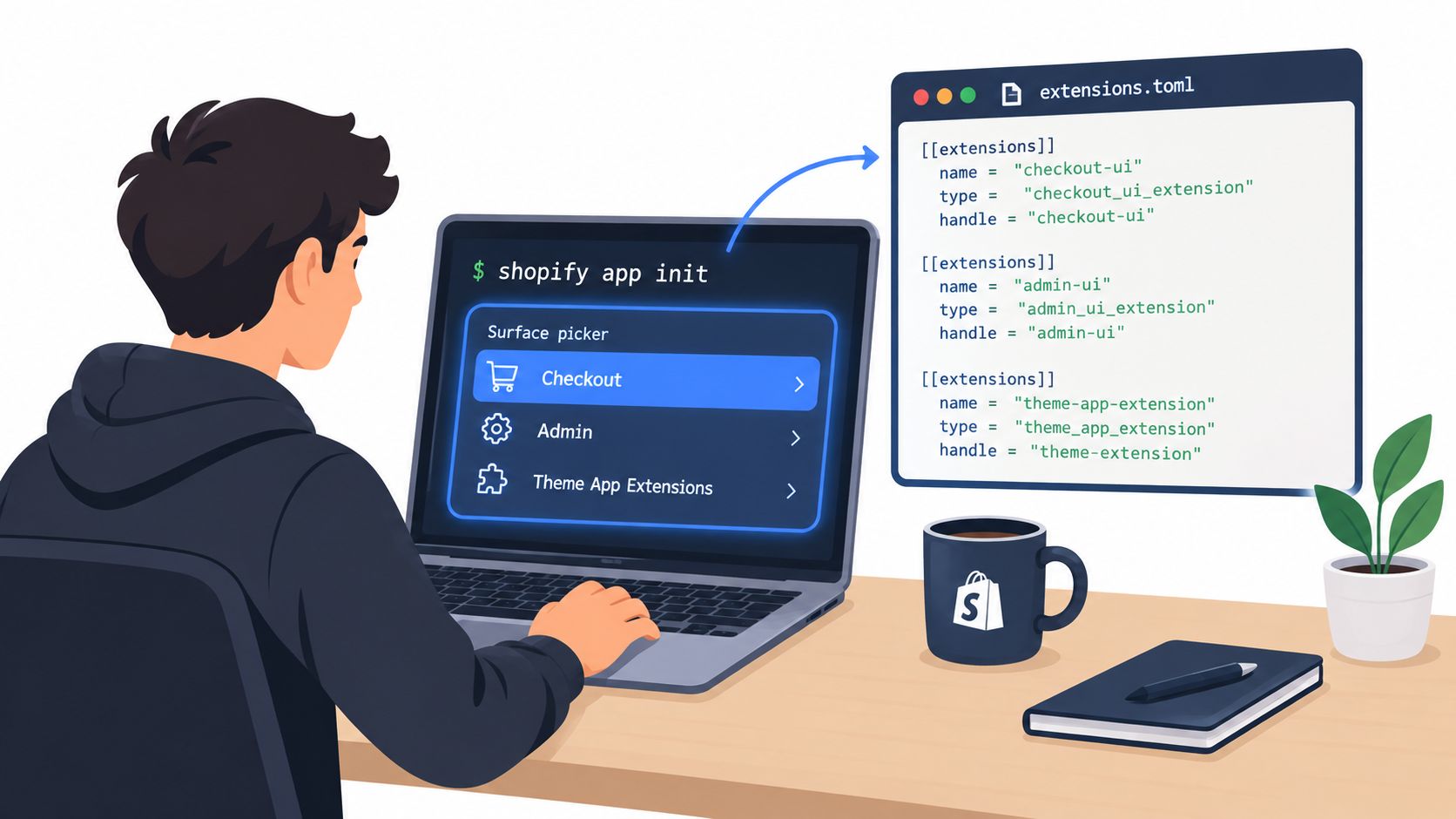
Use the Shopify CLI to generate from the app root and let it create a dedicated directory per extension under extensions/. That keeps extension config, targets, and release history separate enough to migrate without touching unrelated surfaces. Shopify documents the current commands and project workflow in its Shopify CLI app command reference.
The commands that still matter
Start from the app project, not an ad hoc folder structure:
shopify app init- Authenticate and select the app type
- Choose the extension surface from the interactive prompt
- Run
shopify app generate extension - Run
shopify app dev
That flow is ordinary on purpose. The practical value is consistency across contributors, CI jobs, and later migrations when an old extension has to be regenerated or split out.
Here's the repo shape I want to see:
- Root app config for app-level settings and auth
extensions/checkout-banner/with its ownshopify.extension.toml- One extension per directory, so changes can be reviewed and deployed with clear scope
- Shared utilities only when the bundle cost is justified, not a catch-all package imported everywhere
The TOML change that still trips up upgrades
Older apps often carry assumptions from previous config conventions. Newer generated extensions use shopify.extension.toml inside each extension directory, and that difference matters during migration work.
I see the same failure pattern repeatedly. A team copies scripts from an older repo, points them at the wrong filename, then spends hours debugging capabilities, targets, or API version drift that came from bad config discovery rather than bad runtime code. If you inherit an app, verify the generated structure before you trust any deployment script.
Review these fields early:
api_versionso version changes happen on purpose- Capability settings for surfaces that require explicit declarations
- Target configuration so the extension is attached where you expect
- Auth and scope alignment between the app and extension, especially when access tokens expire or scopes change during app review updates
Pinning versions during scaffold work saves rework later. Leaving version choice to whoever runs the next generator is how migration risk sneaks into a stable app.
A minimal first render
For a first checkout UI extension, ship the smallest visible thing that proves the target, permissions, and release path are correct. A simple banner is enough.
A minimal React pattern usually does three things:
- imports from
@shopify/ui-extensions-react - reads basic context from the extension API
- renders visible text in the intended target
Keep that first release small and inspect it in the runtime surface, not only in local output. Shopify's extension development guidance for checkout and customer account surfaces emphasizes validating behavior in the actual host environment, which is where placement mistakes and capability mismatches show up first, not in your editor or test harness.
The first bug is often placement, not JavaScript.
One last point from real builds. If the feature is likely to become pricing logic, validation logic, or another path that must survive platform changes with minimal UI churn, reconsider the extension before you scaffold it. Extensions are easy to generate. Maintaining the right boundary between an extension, a Function, and an AI-assisted merchant workflow is the harder engineering decision.
Performance, Functions and the Async Checkout Model
A merchant changes shipping rules on a Thursday afternoon, traffic spikes that night, and checkout starts lagging because the app still depends on an external round-trip for a decision that should have been local. That is the performance discussion in Shopify. It is not only about bundle weight. It is about choosing a surface that can keep working when checkout is asynchronous, tokens expire, and platform versions move underneath you.
Shopify's App Store bar is clear. Apps must avoid dragging storefront Lighthouse scores down beyond Shopify's published threshold in Shopify's app performance guidance. On real builds, that requirement usually settles one argument early. If a feature can live outside the storefront request path, keep it there.
Placement decides the performance budget
Checkout UI extensions and customer account extensions run inside Shopify's host environment, which is better than injecting custom scripts into pages, but the budget is still tight. Extra requests, oversized bundles, and expensive GraphQL queries still show up as shopper delay, especially once the extension has to render around asynchronous data that may not arrive in the order your UI expects.
The practical rule is simple. Use UI extensions for presentation and lightweight interaction. Use Functions for deterministic logic that affects checkout outcomes. Use background jobs, webhooks, or worker flows for third-party calls that do not belong in the critical path.
Shopify's checkout stack keeps pushing teams toward that split. Shopify Functions performance and scale documentation explains why. Functions execute close to the platform decision point. Webhooks do not. If pricing, payment options, delivery options, or validation depend on your code, every external dependency you keep in that path becomes migration debt.
Function vs extension vs async worker
| Use case | Best primary tool | Why | Migration risk |
|---|---|---|---|
| Discount logic | Function | Price changes need platform-time execution and predictable inputs | High if still handled through delayed app logic |
| Shipping or payment customization | Function | Checkout needs the answer during option resolution | High if external calls are still involved |
| Checkout messaging from ERP, WMS, or loyalty data | UI extension plus async fetch or precomputed data | Shopper messaging can tolerate delayed hydration if the decision itself does not block checkout | Moderate |
| Fraud enrichment or post-purchase review | Worker or webhook flow | Third-party scoring rarely belongs in checkout's hot path | Moderate to high |
That split also makes maintenance easier in 2026. Functions tend to survive UI churn better because they sit closer to platform primitives. Extensions carry more surface-specific migration work. AI-assisted surfaces add another layer of review because they can change how merchants trigger workflows without changing the underlying business rule.
If a team is modernizing checkout now, Shopify checkout extensibility migration patterns help frame what still belongs in checkout and what should be moved into an async or back-office flow.
Async checkout changes how you model state
The old mistake was treating checkout like a page you fully controlled. The newer mistake is treating async rendering as permission to fetch anything, anytime. Neither holds up.
A safer model is to separate data into three buckets:
- Runtime-critical data that must be available inside a Function
- Display data that the extension can render when available, with a safe fallback state
- Deferred data that can arrive after checkout through webhook, Flow, or app-side processing
That boundary matters during upgrades. When Shopify changes target capabilities, API versions, or auth behavior, teams with clear separation usually patch one layer. Teams that mixed pricing logic, remote fetches, and UI state inside the extension end up rewriting the feature.
What to retire first
Retire synchronous webhook chains that still try to influence checkout outcomes after the shopper has already moved on. They fail in subtle ways. They also create the worst kind of maintenance burden because the bug looks like a checkout issue while the root cause lives in an app server, an expired token, or a slow vendor API.
A safer migration sequence looks like this:
- Map the exact decision point and mark whether it changes price, eligibility, or available options
- Move that decision into a Function if Shopify provides the right input surface
- Reduce the extension to UI state and merchant-facing feedback
- Push third-party API work into async processing, cached reads, or precomputed data
- Pin and review API versions intentionally so a routine CLI update does not change runtime behavior on the next release
Performance work in Shopify usually ends up being release hygiene. The teams that stay out of trouble are not the ones with the fanciest extension. They are the ones that keep checkout-critical logic local, keep extension payloads small, and treat every platform version bump as a migration event instead of a routine deploy.
Local Dev, Testing and CI/CD for Extension Stability
A lot of extension outages start the same way. The code passed locally, staging looked fine, then production exposed a different template, a different account state, or an expired credential. In 2026, extension stability is less about getting the first build out and more about keeping releases predictable as Shopify changes APIs, targets, and auth rules.
The local loop that catches migration bugs early
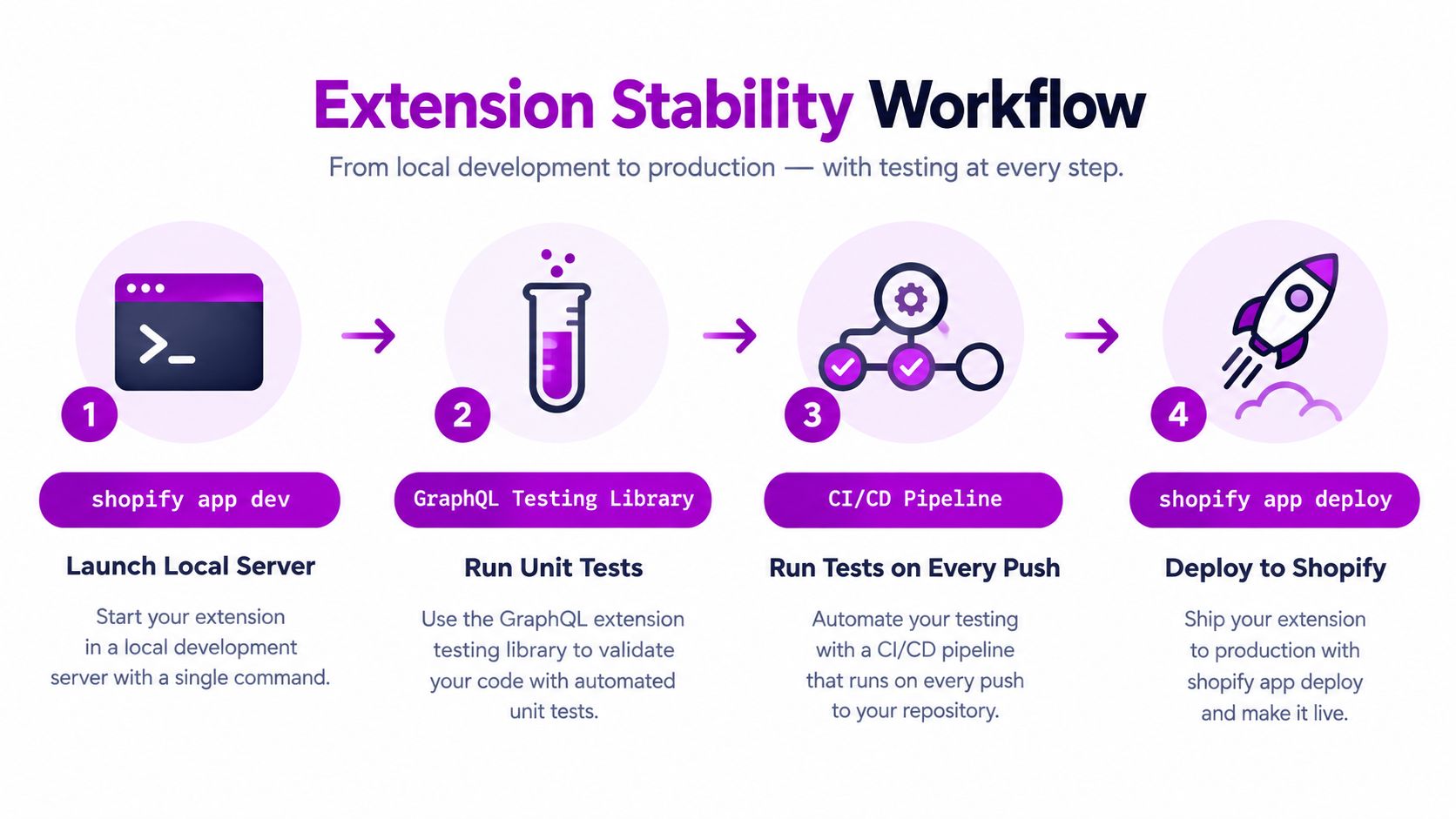
Start with shopify app dev, but do not stop at "it renders on my machine." Test the extension in the exact surface where merchants will use it, with the account features, templates, and app configuration that exist in that store. A checkout UI extension, customer account block, and Admin action can all pass basic local checks while failing in the target context.
The fastest teams keep small, surface-specific fixtures. One fixture for a Plus checkout case. One for a non-Plus fallback. One for the customer account state the support team sees. That is usually more useful than a large generic mock that hides target-specific breakage.
A practical setup usually includes:
- Render tests with
mount()for the extension component - Mocked extension APIs for each target context you support
- Fixtures tied to real merchant scenarios instead of one shared happy-path payload
- A smoke test against a staging store before every tagged release
The trade-off is maintenance overhead. More fixtures mean more updates when Shopify changes input shape or deprecates a capability. That cost is still lower than finding out after deploy that one target lost a field your extension assumed would always exist.
CI should test release hygiene, not just code
Generic app CI misses the failures that break installs. Extension pipelines need to catch config drift, version drift, and deploy-time auth problems.
Useful gates include:
- Run extension tests on every push
- Build and deploy to staging with
shopify app deploy - Diff extension config and app TOML changes in pull requests
- Fail the pipeline if the CLI or API version changed without review
- Check storefront-facing work for performance regressions before release
That last point matters during App Store review and during merchant rollouts. If an extension changes storefront behavior, treat performance budgets as a release gate, not a cleanup task for later.
For store setup and reproducible staging environments, this guide to creating a Shopify development store is useful for QA, merchants, and anyone who needs a clean test shop without production residue.
Here's a useful visual summary before deployment:
Token expiry and version pinning
Teams usually lose a day.
Offline tokens expire. CLI behavior changes. An API version bump that looked harmless in a dependency update can alter extension behavior on the next deploy. Treat all three as operational risks with named owners.
Keep a short runbook for token rotation, reauthorization, and recovery steps. Store the CLI version in the repo. Pin API versions intentionally. Review those pins on a schedule instead of letting them drift until a forced migration lands in the middle of a feature sprint.
Stable extension delivery comes from repeatable habits: pinned CLI versions, pinned API versions, staging deploys that match production, and tests built around the real target surface.
One more hard-earned rule. Every version change deserves a quick compatibility pass across extensions, Functions, and any AI-assisted surface that reads the same app data. The code may live in separate folders, but merchants experience the release as one system.
Agency vs In-House Builds and the ECORN Playbook
The ownership question gets more serious once a brand has more than one extension surface in production. One checkout customization is manageable. A stack that spans theme, Admin, Functions, and merchant operations needs someone to own review cycles, migration timing, and release hygiene.
Some teams solve that in-house. Some outsource it. Most growing brands end up in a hybrid model whether they planned to or not.
Where each model works
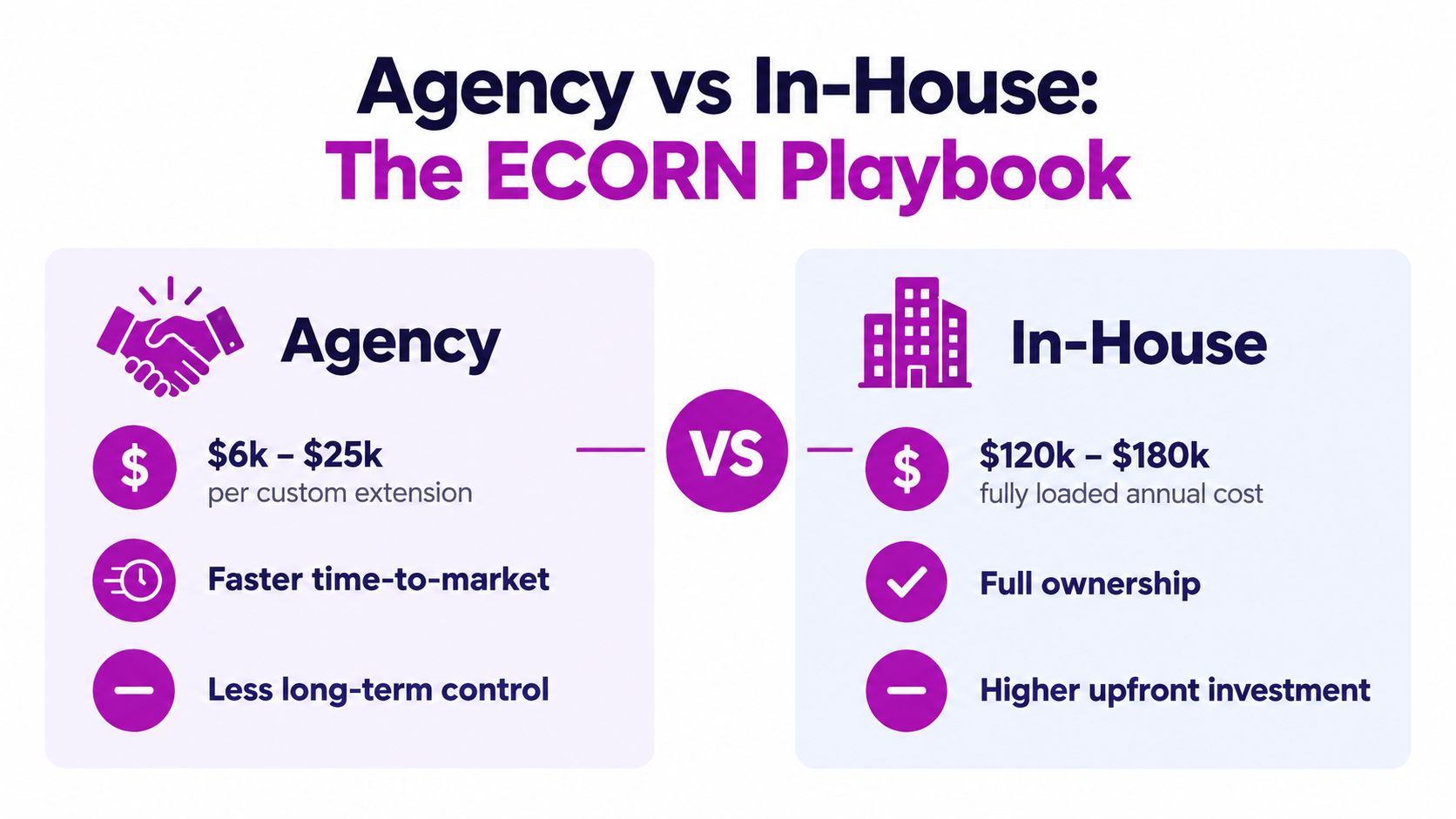
An agency often makes sense when speed matters, the app architecture is still taking shape, or the brand needs cross-surface experience right away. Agencies usually see the edge cases earlier because they've handled checkout review issues, Function design decisions, and theme migration patterns across more than one merchant context.
An in-house team makes sense when the extension roadmap is tightly tied to internal product operations. If merch, retention, support, and engineering iterate on the same workflows every week, internal ownership is easier to coordinate.
The problem is that each model tends to break in a predictable way:
- Agency-only ownership can lose roadmap context after launch
- In-house-only ownership can get bogged down by niche platform changes and review edge cases
- No clear owner leads to extension drift, auth confusion, and delayed migrations
The hybrid pattern tends to age better
A practical model is a small external squad that ships the first release, hands over the repo, CI, and runbooks, then stays available for quarterly migration support. That keeps platform knowledge close without making every extension a permanent outsourced dependency.
That's the pattern I'd usually recommend for brands that are still building internal capability. If the business already outsources adjacent operating work, the same logic often applies here. For example, teams that use specialized support such as Outsourced Appointment Setters already understand that not every operational function needs to be staffed full-time internally. Extension maintenance can follow a similar staffing logic when the workload is periodic rather than constant.
A five-question ownership check
Ask these before deciding who builds and maintains the extension:
- Will this surface change quarterly, or only occasionally?
- Does the logic touch checkout, pricing, or approvals that need specialist review experience?
- Can your internal team own token rotation, version pins, and test coverage consistently?
- Is the extension tied to business operations that change weekly?
- Do you need a handoff package, or long-term product ownership?
One factual option in this space is ECORN, which offers Shopify design, development, CRO, and custom app support for merchants that need either project-based work or ongoing help.
A 90-Day Operating Plan for Extension Maintenance
Shopify extension development doesn't require a grand platform transformation. It needs a rhythm. Shopify ships on a calendar, so your extension maintenance should too.
Days 1 to 15
Start with the inventory work that nobody enjoys and everybody needs.
- Audit extension inventory across checkout, theme, Admin, post-purchase, and Functions
- Review API version pins and flag anything nearing your internal migration window
- Sweep token handling for apps and deployment workflows
- Capture a Lighthouse baseline for every storefront-facing extension experience
- Check old config patterns so legacy TOML structures don't linger unnoticed
This is also the right window to verify that every extension still targets a supported surface and still lives on the templates merchants are using.
Days 16 to 45
Do one meaningful migration, not five partial ones.
A strong cycle usually includes:
- One Function rewrite for logic that still relies on slower or more fragile external patterns
- One UI extension refactor to reduce client complexity or request volume
- One AI-surface experiment behind a feature flag, only if there's a clear operational case
The strategic question matters. Not every new requirement should become another extension. Some belong in the app, some in Admin workflow, and some in emerging AI-assisted surfaces where the merchant benefit is operational rather than visual.
Don't ask only whether Shopify lets you build it. Ask whether your team wants to maintain it for the next release cycle.
Days 46 to 75
Use this period for merchant-facing validation and ownership decisions.
- Run a CRO pass on checkout-facing UI
- Instrument impressions and interactions for discount or shipping-related extension messaging
- Review rollback paths in CI before touching live merchant experiences
- Revisit ownership per surface if one team is becoming a bottleneck
By this point, weak architecture choices usually become obvious. If a feature still depends on webhook timing for something that shoppers experience synchronously, move it onto the rewrite list.
Days 76 to 90
Close the quarter with a short technical brief that product and operations people can use.
Include:
- Current latency-sensitive logic placement
- Auth and token risk status
- API version drift summary
- Pending review-sensitive changes
- Next quarter migration candidates
That document does more than organize engineering. It gives the merchant team a realistic view of what can change safely and what shouldn't be promised in a campaign calendar until the underlying surface is stable.
Shopify extension development works best when release discipline is treated as a product capability. The teams that stay calm in 2026 aren't the ones with the most custom code. They're the ones with the clearest surface choices, the fewest unnecessary dependencies, and a quarterly habit of cleaning up before drift turns into breakage.
If your team is dealing with extension sprawl, checkout migration pressure, or a repo that mixes old and new Shopify patterns, ECORN can help structure the work into something maintainable. They handle Shopify development, CRO, and custom app delivery with the kind of release hygiene this stack now requires. If you want a second set of eyes on your extension architecture or migration plan, visit ECORN.



Shopify Theme ZIP: How to Upload and Install It
Shopify Plus Organization Admin: Roles and Access Guide
How to Build a Drop Down Menu in Shopify: Steps and Fixes
Shopify Plus Integration Services Guide

Shopify Customer Experience: A 2026 Guide

Shopify Plus Expansion Stores: Limits and Setup
Shopify Theme Update: Safe Steps, Backups and Rollback

Shopify Website Design Packages: What You Actually Get

How to Choose a Shopify Plus Web Design Agency in 2026

Shopify Plus Ecommerce Agency: How to Pick the Right One

Shopify Themes Retina: How to Serve 2x Images

How to Cross Sell on Shopify Without Friction

Best Shopify Theme for Custom Products Compared
Multi Store Inventory Management: A Practical Guide

SEO Consulting for Ecommerce: A Practical Guide

Shopify Theme Updater App: A Safe Update Playbook
Shopify Git Integration: A Developer's Guide to 2026
Headless Ecommerce Development Services Explained

How to Build a Shopify Clothing Website That Converts

How to Launch a Box Subscription Business in 2026

Luxury Skincare Branding Playbook That Converters

10 Best Podcast Ecommerce Shows for Store Growth in 2026
Shopify Developer Hourly Rate: What to Pay in 2026
Critical Shopify Setup Errors That Are Secretly Sabotaging Your Store

Ecommerce Conversion Tracking: The Complete How-To Guide

Shopify Design Agency: How to Pick the Right Partner

Mastering Multi Store Management on Shopify

Scale Shopify Store

10 Shopify App Ideas Worth Building in 2026

Conversion Rate Optimization for Landing Pages: The Playbook

Shopify Plus Automation: A Guide for 2026

10 Social Selling Platforms for Shopify Merchants

Shopify Website Design Examples: 7 Stores Worth Studying

7 Ecommerce Newsletter Examples for Shopify Brands

One Product Shopify Store: Build and Scale

Mobile Pop Up Strategy for Shopify Stores That Converts

Sitemap for Shopify: How to Find, Optimize, and Submit It

7 Single Product Websites Worth Emulating

Product Variants Shopify: The Complete 2026 Guide

Ecommerce Analytics Consulting for Growth

What Is AI Integration for eCommerce

How to Choose the Right eCommerce Website Development Firm

E Business Strategy Implementation

Conversion Tracking Setup for Shopify Stores

BigCommerce vs Shopify Plus Which Enterprise Wins in 2026

Shopify Theme Kit: Setup, Commands, and Migration Guide

Shopify Speed Score Explained and How to Improve It

Shopify Mobile Optimization: The 2026 Playbook

How to Add Subcategory in Shopify for Better UX

How to Implement Structured Data for Ecommerce in 2026

SEO App Mobile: Shopify Store Optimization Guide

Shopify Plus Support: What It Includes and How to Choose

Google Ads for Shopify: The Complete 2026 Playbook

Shopify New York: How to Find and Hire the Right Agency

Google Search Console for Shopify: The Complete Setup

First Party Data Collection for eCommerce Growth

FAQ Online Store Guide: Build and Measure It Right

Do FB Ads Work for eCommerce in 2026?

One Page Checkout for Shopify: Design and Implementation

Shopify GraphQL vs REST: The 2026 Developer Decision

Shopify Ecommerce Consulting: Strategy, Pricing &

Are Reddit Ads Worth It for eCommerce Brands

Shopify Title and Meta Description: A Practical 2026 Guide

Product Video Best Practices for Shopify Brands

Real-Time Inventory Management: A 2026 Guide

AI Chatbot Integration for Shopify Stores

Affiliate Program Management: A Shopify Guide

10 Best Performance Monitoring Tools for Shopify in 2026

Digital Asset Management for eCommerce Brands in 2026

Every Type of Facebook Ads Explained for eCommerce Growth

Product Information Management Explained for Shopify Brands

Support Ticket System: A Guide for Shopify Stores

10 Best Customer Service Tools for Shopify in 2026

Can I Start a Business with No Money? a 2026 Blueprint

What Sells Good on Etsy: Best Niches for 2026

Shopify Add to Cart Button: A Practical 2026 Guide

Customer Feedback Automation: A Practical eCommerce Guide

Critical Rendering Path: A Guide for Shopify Stores

How to Promote on TikTok for eCommerce in 2026

B2B eCommerce Consulting That Drives Real Revenue

10 Best Practices for Site Navigation in 2026

Return vs Refund for Shopify Stores: A Practical Guide

What Is Customer Lifetime Value and Why It Matters

What Is Voice of Customer Research for eCommerce

SMS Marketing for Ecommerce That Actually Converts

Master How to Improve Email Deliverability in 2026

Top 8 eCommerce Partners NYC for Shopify Brands in 2026

Machine Learning for Ecommerce: Boost Your Shopify Store

Beauty Market Research: Your 2026 Growth Guide

Shopify International Expansion: A 2026 Roadmap

What Does CRO Stand for in Business: Understanding CRO

Shopify Visual Merchandising: A Playbook for Higher Sales

Shopify Landing Page Design: Master Conversion in 2026

10 Best AI SEO Optimization Tools for Shopify in 2026

Agentic AI for Ecommerce: Boost Your Sales in 2026
Mastering Email Marketing Data for eCommerce Growth

Conversion Rate Optimisation Australia: Boost Your Sales

Conversion Rate Optimization AI: Your Shopify Store Guide

10 Product Bundling Strategies for Shopify in 2026

How to Increase Customer Lifetime Value: A Shopify Playbook


newsletter in your inbox