


70.22% of shopping carts are abandoned, according to Baymard Institute's analysis of more than a decade of checkout research, cited in Shopify's ecommerce checkout guide. That reframes Shopify customer experience: before you redesign the storefront or add a chatbot, find out whether someone who wants your product can buy it without unnecessary effort.
The Numbers Behind Shopify Customer Experience
Customer experience becomes commercially useful when you can connect a customer's difficulty to a specific store change. A confusing delivery promise needs better information. A failed payment needs investigation. Neither automatically needs another app.
The benchmarks below come from the Baymard findings and Dynamic Yield benchmark network summarized in Shopify's checkout guide linked above. They're diagnostic baselines, not forecasts for your store. Baymard's estimated conversion upside applies to the average large ecommerce site, while the device figures describe Dynamic Yield's network, not Shopify merchants alone.
Checkout leaks that shape Shopify customer experience
| Signal | Figure | What to check on Shopify |
|---|---|---|
| Global cart abandonment | 70.22% | Share of intent carts that never become orders |
| Conversion upside from checkout design | 35.26% | Lift Baymard estimates for an average large site |
| Extra costs such as shipping, tax or fees | 39% of US abandoners in the 2025 findings | Total price visible before the pay button |
| Slow delivery | 21% of US abandoners in the 2025 findings | Delivery promise on the product page and cart |
| Forced account creation | 19% of US abandoners in the 2025 findings | Guest checkout offered by default |
| Checkout too long or complicated | 18% of US abandoners in the 2025 findings | Shorter forms and fewer surprises |
| Mobile share of visitors | Approximately 76% in Dynamic Yield's benchmark network | Phone treated as the primary path |
| Mobile vs desktop cart abandonment | 78.5% vs 71.14% in that network | Completion compared by device, not blended |
Read the rows as different operational problems. For additional costs, place shipping rules near the buying decision and make estimated totals understandable before payment. Where tax or delivery charges require an address, explain that calculation rather than implying the displayed product price is the final total.
For delivery, distinguish dispatch time from arrival time. A product page that says an item ships quickly still leaves the customer wondering whether it will arrive before a birthday or trip. Give a realistic delivery window and explain exceptions for preorder, personalized, or international orders.
Account creation and complicated checkout require a different check. Buy as a new visitor in a private browser session, without saved details or staff access. Notice every point where the store asks you to stop shopping and learn how its systems work.
Choose the problem before the software
Start with a funnel broken down by device and customer type. ECORN's guide to customer experience analytics offers a useful framework for connecting journey measurements to operational decisions.
Apply the same discipline when evaluating emerging acquisition services. OGTool's guide to buying GEO services in 2026 is a useful resource for framing what you're buying and what you'll measure before committing budget.
Practical rule: Name the largest observable leak on your own store before buying another app.
How a Shopify Journey Actually Feels
Think of a high-street shop. The theme is the window: it helps someone decide whether to enter. The customer's experience includes finding the entrance, checking the product, paying, receiving the purchase, and getting help if something isn't right.
User experience is how a particular interaction works. Customer experience includes the handoffs between those interactions. A beautiful product selector doesn't compensate for a returns desk that can't find the order.
This journey illustration captures the shopping visit from discovery through delivery.
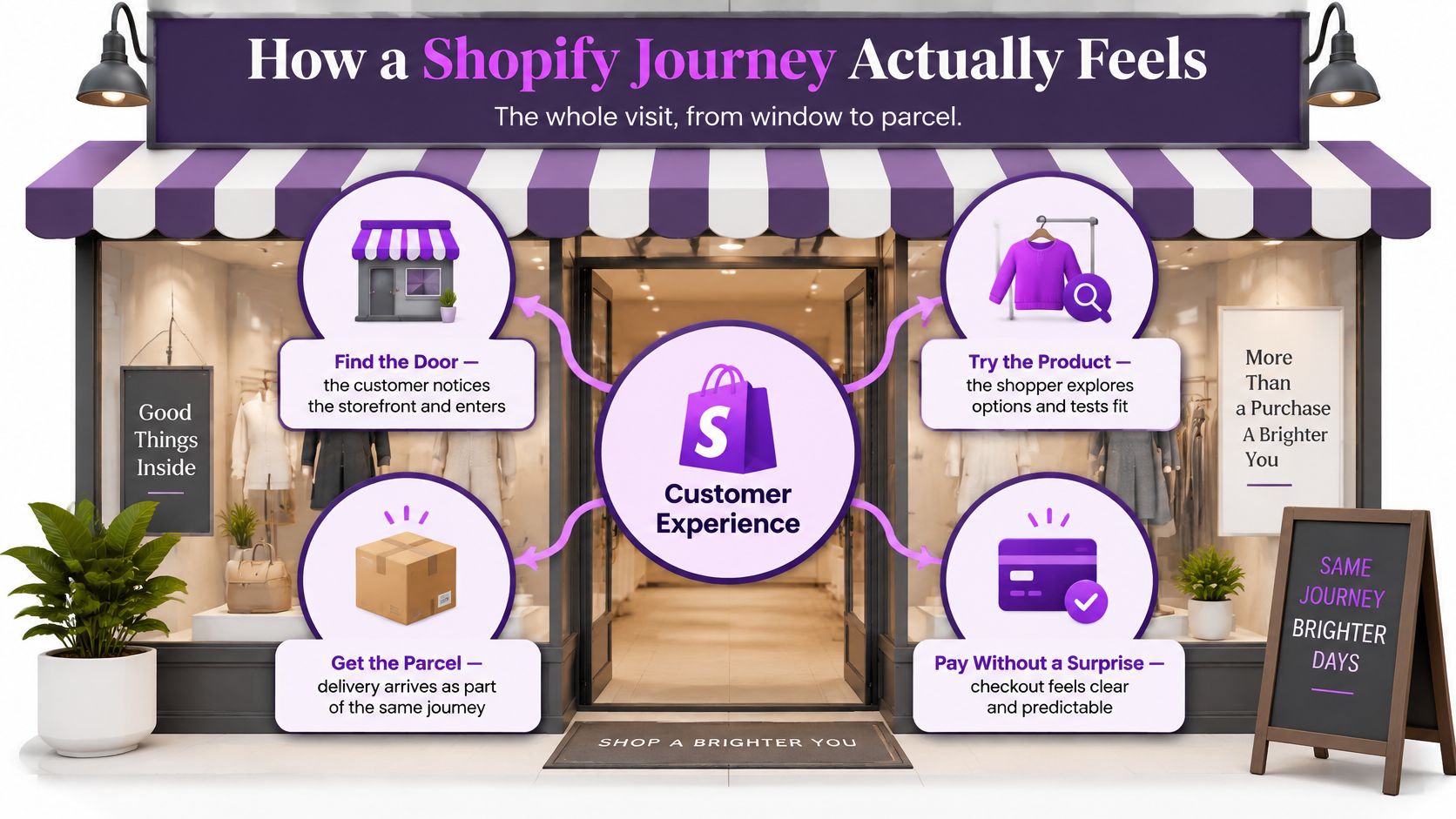
Follow a customer rather than a page template
Say someone discovers a jacket through a product comparison. They land on the relevant variant, check whether the fabric suits wet weather, choose a size, and place an order. Later, they need to exchange it.
Your marketing team might count the visit as successful once the order is placed. The customer won't consider the experience successful until the replacement fits and the exchange is resolved. Assigning ownership only to acquisition or design leaves that final handoff unaccountable.
Customer experience is how little effort it takes to buy, receive, and resolve a problem.
Customer experience metrics by journey stage
| Stage | Metric | Where it breaks |
|---|---|---|
| Discovery | Qualified sessions and product-match rate | The product doesn't match the promise that brought visitors |
| Product page | Add-to-cart rate | Size, material, or delivery information is unclear |
| Cart | Progress to checkout | Totals or delivery information appear too late |
| Checkout | Completion and payment success | Fees, forced accounts, or form burden interrupt payment |
| After the sale | Time to first useful update, repeat purchase, and refund cycle time | Order status is unclear or support can't see returns |
Treat product-match rate as an operational measure you define, not a standard Shopify dashboard field. You might assess it through landing-page relevance checks, onsite feedback, and support messages about misleading product expectations. Document the method so your team doesn't confuse a subjective review with an automatically tracked event.
The same principle applies after purchase. An automated email saying the order exists isn't necessarily a useful update. The customer may need a dispatch estimate, a tracking event, or a clear explanation of a delay.
YipSMS Inc.’s customer experience guidance for Shopify merchants provides a complementary reference when reviewing communication across the buying journey. Keep the working question concrete: does each message help the customer complete their next task?
A store review should follow an order through the service systems, not stop at the thank-you page. Checkout still deserves close attention because it's where an intended purchase must become a successful payment.
Cut Checkout Fields That Block the Order
In Shopify's 2025 global holiday retail research, which surveyed 18,000 shoppers across nine countries, 48% said they'd abandoned a purchase during the previous year because checkout was complicated. That's a reason to inspect the form itself, not just its colors or progress indicator.
Baymard's 2024 checkout benchmark found an average of 11.3 fields across 5.1 steps, while its usability research indicates that most checkouts can be reduced to approximately 8 fields. Baymard also identifies total field burden as more closely related to checkout usability than step count.
Audit every question at the till
For each input, write down who needs the answer and why. Keep information required for fulfillment, tax, fraud prevention, or legal obligations. Challenge everything else.
Moving unnecessary questions onto another screen doesn't remove the work. Neither does marking every field optional while leaving the customer to decide whether skipping it will cause a problem.
Checkout fields to keep, hide or collapse
| Field | Default treatment | Why |
|---|---|---|
| Address line 2 | Hide behind a clear expansion control or mark optional | Keeps apartment and unit details available without requiring everyone to respond |
| Billing address | Same as shipping unless the buyer opens it | Removes repeated address entry |
| Coupon code | Collapsed link off the main path, where supported | Keeps discounts discoverable without encouraging a discount hunt |
| Company name | Show only for B2B or tax cases | Removes an irrelevant box for consumer orders |
| Extra phone number | Ask only when the carrier needs it | Avoids unnecessary mobile typing |
| Order notes | After the main form or optional | Keeps nonessential instructions away from payment |
Begin in Shopify admin's checkout settings, then inspect the checkout editor and any installed checkout extensions. Available controls differ by plan and implementation. Don't assume a theme edit can change a platform-controlled checkout field.
Treat the table as a default decision framework, not permission to remove delivery-critical information. Apartment numbers must remain easy to enter. If a carrier requires a contact number, explain its purpose instead of collecting it without explanation.
Offer a shortcut without assuming the outcome
Accelerated checkout can spare returning customers from entering details again. Shopify reports that Shop Pay can increase conversion by up to 50% compared with guest checkout, based on the evidence it cites. That's a Shopify-reported result, not a guaranteed lift for your audience.
Configure relevant payment options through Shopify's payment settings, then test the complete experience as both a recognized and an unfamiliar customer. Make sure customers who don't use accelerated checkout still have a straightforward route.
Instrument field errors, backtracks, completion time, and checkout exits, where your implementation permits it. Compare outcomes by device, country, and payment method, while avoiding sensitive payment data in analytics. A shorter form is useful only if customers can still provide accurate information and complete an order.
Make Mobile Checkout Survive Real Phones
Mobile checkout is an interaction-engineering problem, not merely a smaller-screen layout. Baymard's review of 50 major mobile ecommerce sites found generally seriously flawed checkout and data-input experiences, including problems with layout, descriptions, touch keyboards, input functionality, and errors.
Use those failure categories as a practical QA checklist.
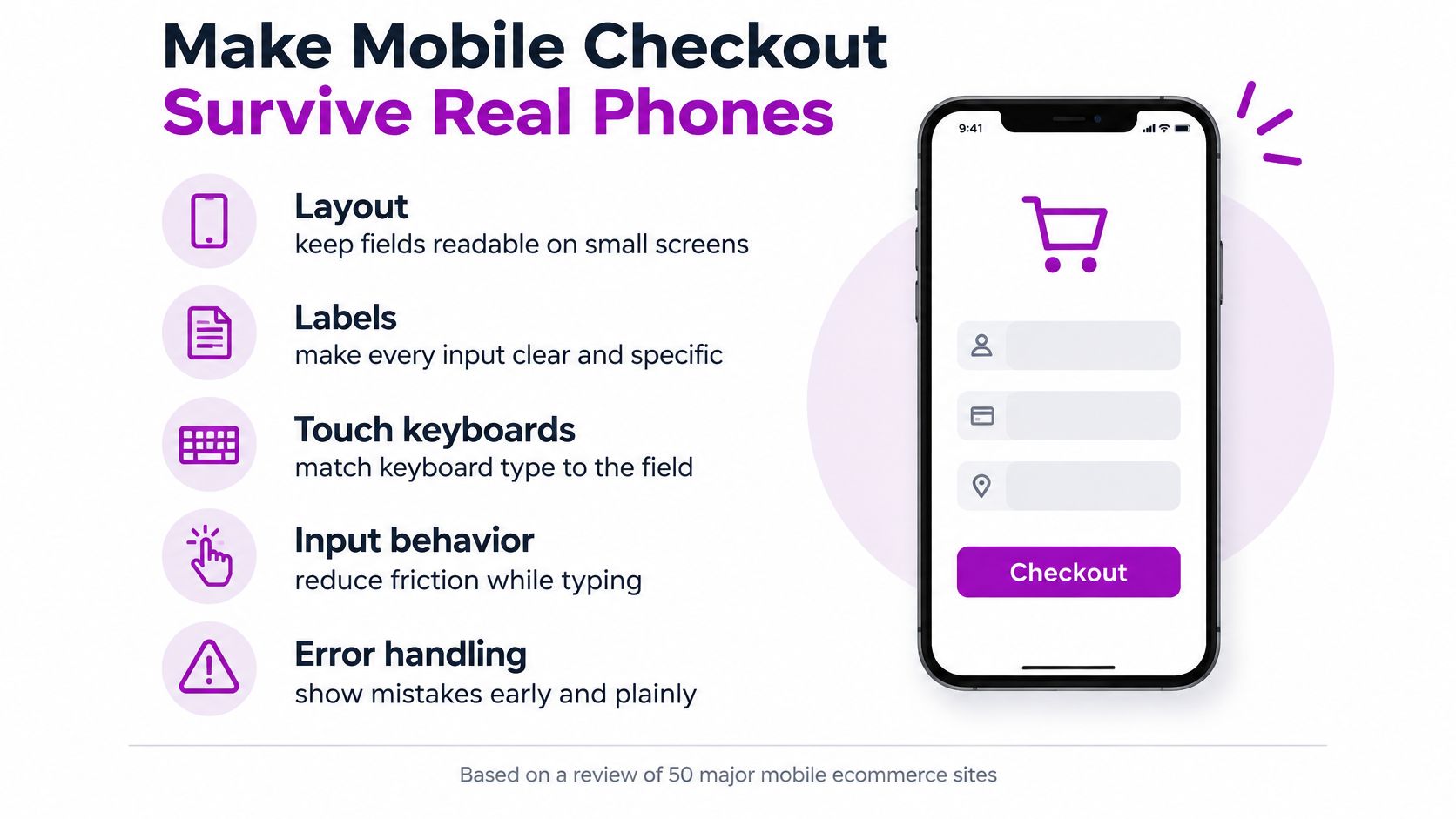
Test input behavior, not just appearance
- Use meaningful input semantics. Apply appropriate HTML input types, autocomplete tokens, and controls. Email and telephone have dedicated input types; postal codes and countries need suitable autocomplete attributes and country-aware handling, not invented HTML types.
- Match the keyboard to the answer. Check what opens on the device. A numeric-only keyboard isn't suitable for every postal code because some countries use letters.
- Support autofill. Test names and addresses using saved browser details. Where Shopify or the payment provider controls card entry, verify that flow rather than adding your own payment inputs.
- Preserve valid entries after an error. Trigger a validation failure deliberately. Correcting a postcode shouldn't require the customer to re-enter the rest of their address.
- Put useful errors beside the failed field. Explain what to change. A generic warning at the top of a long screen leaves the shopper searching for the problem.
- Check non-touch navigation. Complete the flow with keyboard navigation and a screen reader. Inspect labels, focus order, error announcements, and whether controls remain usable under magnification.
Include difficult conditions in acceptance testing
International addresses expose assumptions that local test orders miss. Try an address with an apartment identifier, a long locality name, and a postal format different from your home market. Then test interruption and recovery on a weaker connection.
Use real iOS and Android devices, not only browser emulation. Watch a participant complete guest checkout and recover from an intentional mistake. Record completion, error-recovery time, and payment success alongside their explanation of what confused them.
Automated accessibility checks and Lighthouse can support this process, but neither proves that a person can finish buying. A moderated test can reveal an onscreen keyboard covering the payment control or a validation message that disappears before the shopper understands it.
Release gate: A new theme isn't ready if a guest on a phone must retype a valid address to recover from an unrelated error.
Measure AI Shoppers Before You Add a Bot
Adding a chat widget isn't the starting point for AI customer experience. A shopper may already have used an AI assistant to compare products before reaching your store. Your first responsibility is to make the product page match the expectation they arrive with.
Shopify reports that AI-search referrals to its storefronts increased eightfold year over year in Q1 2026, while AI-referred shoppers converted nearly 50% better and spent 14% more than organic-search shoppers. Those platform-reported results justify separate measurement, not a promise that your store will see the same performance.
The distinction is between traffic volume and commercial quality.
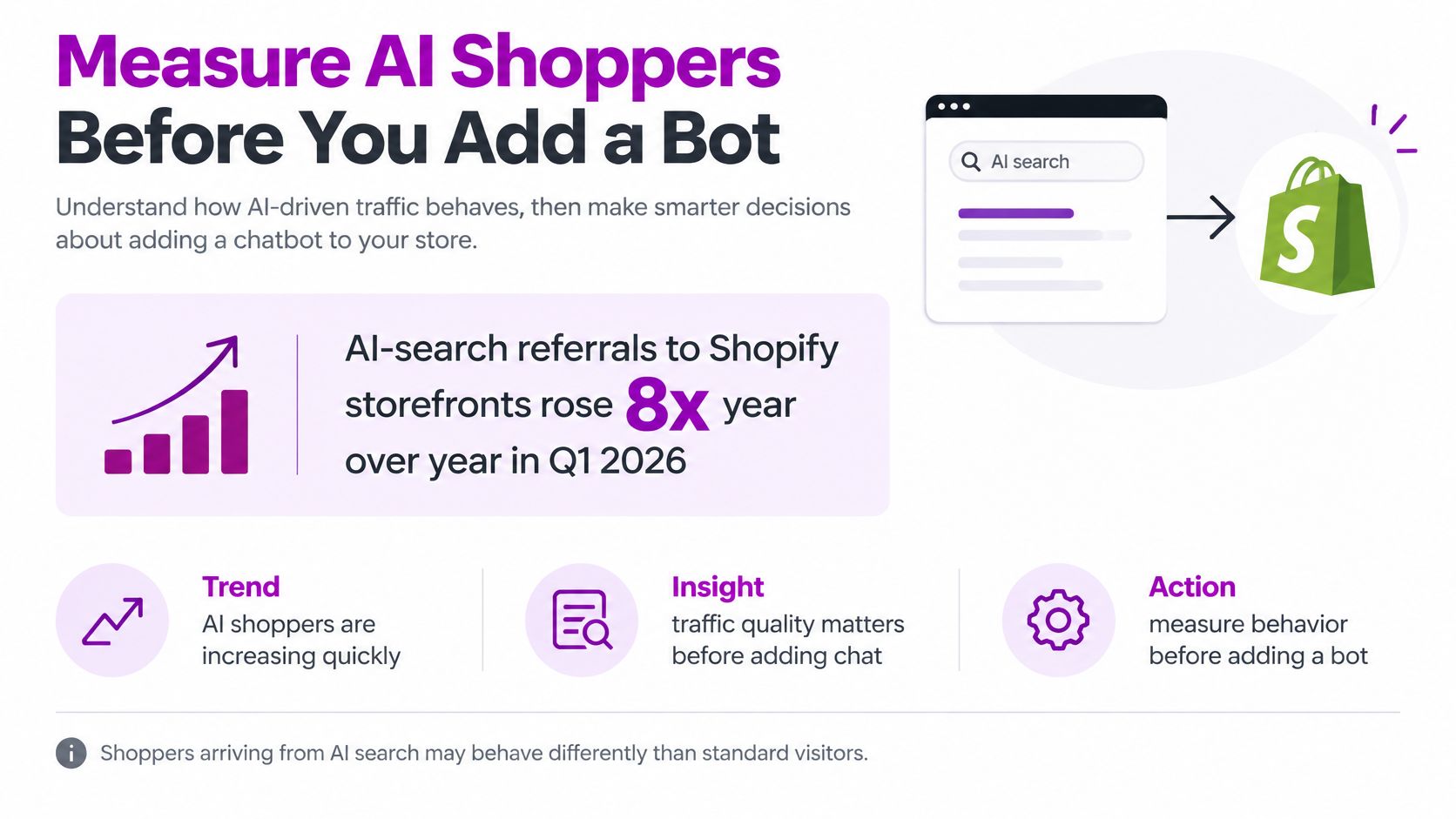
Make product facts retrievable and consistent
Say a shopper asks an assistant to compare jackets for commuting in heavy rain. They arrive convinced your jacket is waterproof, but the product is only water-resistant. The purchase may look successful in acquisition reporting even though the expectation was wrong before checkout.
Thin product information leaves more room for an assistant to supply an unsupported answer. It doesn't cause an invented claim, but it gives you less accurate material against which to check recommendations.
Structure the details customers use:
- Identity and variants. Keep product titles, sizes, colors, and variant availability consistent.
- Physical facts. Publish material composition, dimensions, fit information, and care instructions.
- Delivery conditions. State shipping windows and distinguish available stock from preorder items.
- Limitations. Explain what the product doesn't do when customers could reasonably misunderstand it.
Use Shopify product fields and metafields to maintain these facts, then check that the visible page and relevant structured output agree. Don't hide essential limitations in a document customers are unlikely to open.
Measure the result after the order
Create a reporting segment for identifiable AI referrals. Preserve an unknown category rather than claiming every assisted visit can be attributed perfectly. Compare conversion, contribution margin, returns, and support contacts with other acquisition sources.
Sample assistant-generated product descriptions against the live catalog. Log unsupported claims, the affected product, and the corrective action. Changing the product page won't guarantee an immediate change in an external assistant's answer, so repeat the check.
Personalization belongs within the same controls. Recommendations should reflect real inventory, relevant purchase history, and the permissions available to you. A persuasive answer that recommends an unavailable or unsuitable item isn't a good customer experience.
Fund an accuracy and attribution audit before another conversational app. You need to know whether AI-assisted shoppers buy the right product and keep it, not merely whether they click a recommendation.
Keep Omnichannel Continuous Without Oversharing
A customer doesn't experience your warehouse, store, and help desk as separate departments. They expect the person handling the next interaction to know enough to help.
The journey below is straightforward only when the underlying order and inventory information remains usable.
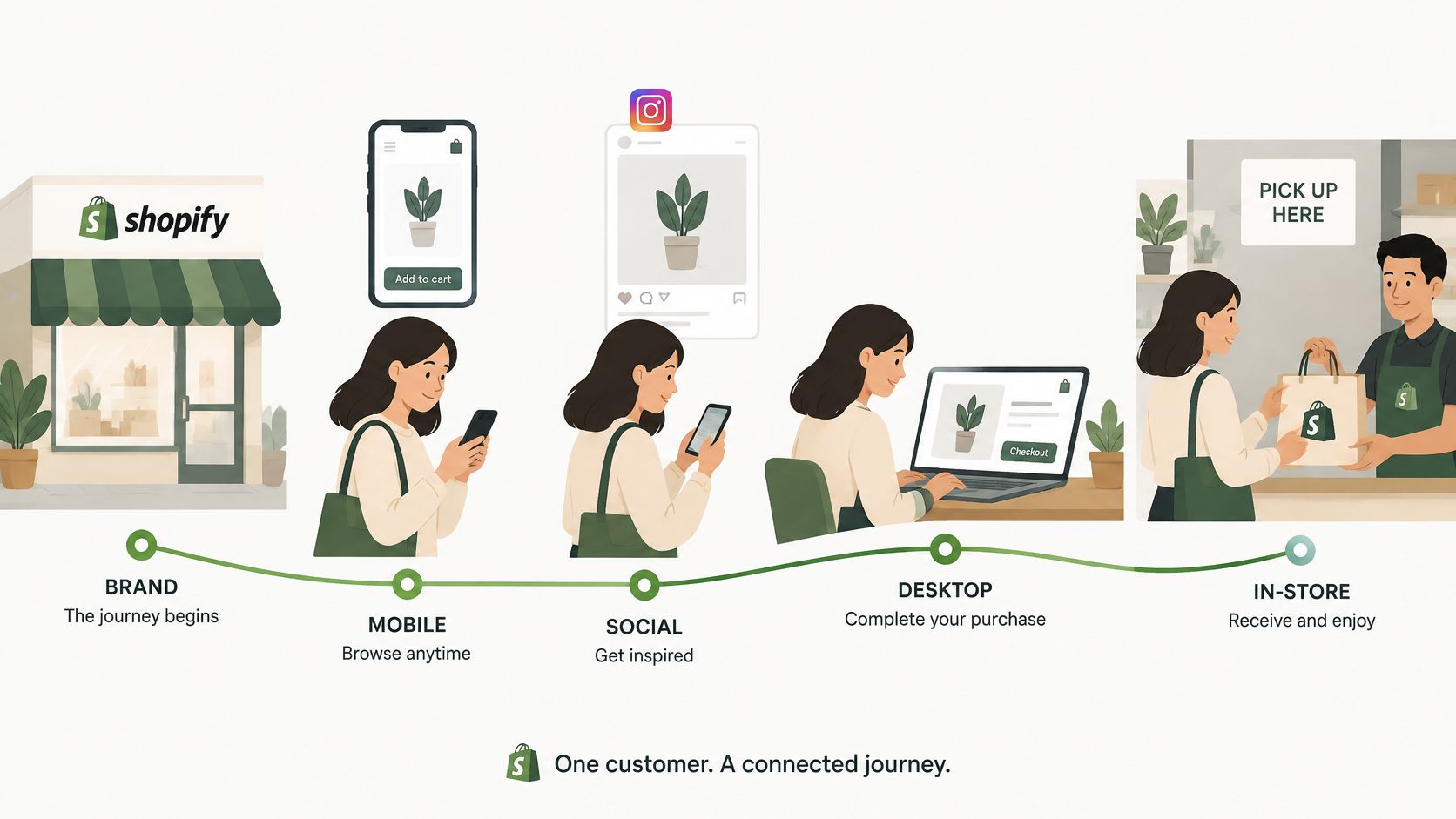
Shopify's customer experience trends coverage cites 2026 research in which 71% of shoppers take privacy-protective actions, while 69% of privacy-conscious shoppers still want personalized experiences. The useful distinction is continuity with appropriate access, not unrestricted sharing of every customer detail.
Design the fallback, not just the ideal journey
Consider an online order returned in store. Staff need an authenticated way to check the order, items, return eligibility, and relevant fulfillment status. They don't need the customer's browsing history to process that return.
An inventory mismatch needs a different fallback. If a pickup item isn't available, staff need authority to offer a transfer, shipment, substitute, or refund, with a clear explanation of timing. Showing the same branding across channels won't solve the missing item.
A support handoff creates another test. When someone moves from social messaging to email, the agent should receive an authorized case summary and the information needed to continue, rather than demanding the whole story again.
- Limit access by task. Define what store staff, support agents, and marketing users need.
- Verify identity appropriately. Make order lookup convenient without exposing another customer's information.
- Record the resolution. Keep return status and customer commitments available to the next authorized person.
Watch service friction as well as sales
Track repeat contacts, failed returns, avoidable channel switching, refund time, and margin lost to inaccurate promises. Conversion alone won't show a customer repeatedly contacting support after a purchase.
Use ECORN's omnichannel retail strategy guide to frame channel responsibilities alongside the systems that connect them. Assign an owner to each failure state, not just to each software platform.
Use this video alongside a discussion of your own cross-channel handoffs.
Before opening another channel, introduce a deliberate failure in a safe test environment, such as a mismatched inventory count. Ask staff to follow the written fallback without coaching. If they can't resolve it, improve the procedure before exposing customers to it.
Fix Checkout Before You Add Channels
Use the next quarter as an implementation sequence, not a deadline for installing more tools. Give each phase an owner, a testable outcome, and a record of what changed. Don't treat deployment as evidence of improvement.
Sequence the work around customer risk
- Weeks one and two. Review price and delivery disclosures, then verify the new-customer purchase path. Capture a baseline before making changes so the team can distinguish an improvement from ordinary fluctuations.
- Weeks three through six. Remove unjustified form inputs within Shopify's available controls and run device-based acceptance tests. Prioritize defects that prevent payment or make error recovery difficult.
- Weeks seven through ten. Establish AI-referral reporting and review product-answer accuracy. Assign catalog corrections to merchandising and attribution gaps to the analytics owner.
- Weeks eleven and twelve. Rehearse an operational failure across channels. Publish the fallback, access rules, and escalation owner where staff will find them.
Make expansion conditional
Growing brands and Shopify Plus operators should make channel expansion conditional on reliable checkout completion by device. Define stability using your own traffic patterns and test results, not a generic conversion target. Keep a change log so payment-provider issues, campaigns, and storefront releases don't get mistaken for the effect of a form edit.
Personalization and another support inbox should solve a demonstrated need. They shouldn't become a substitute for repairing a purchase path that the team already knows is unreliable.
If internal capacity is the constraint, scope outside help around specific deliverables. ECORN is an official Shopify Partner Agency; our CRO approach includes an audit with recommendations and bug fixing, A/B testing, and scaling hypotheses. A bounded audit can establish priorities, while ongoing implementation work can support a backlog that your team can't staff internally.
The decision is practical: finish the changes that help customers complete and resolve an order before creating more places where those orders can go wrong.
ECORN offers Shopify CRO audits, development, and custom themes with conversion rate optimization. Visit ECORN to discuss a focused review of your checkout, mobile purchase flow, and service handoffs, with implementation priorities tied to measurable customer effort.



Shopify Plus Expansion Stores: Limits and Setup
Shopify Theme Update: Safe Steps, Backups and Rollback

Shopify Website Design Packages: What You Actually Get

How to Choose a Shopify Plus Web Design Agency in 2026
Shopify Plus Ecommerce Agency: How to Pick the Right One

Shopify Themes Retina: How to Serve 2x Images

How to Cross Sell on Shopify Without Friction

Best Shopify Theme for Custom Products Compared
Multi Store Inventory Management: A Practical Guide

SEO Consulting for Ecommerce: A Practical Guide

Shopify Theme Updater App: A Safe Update Playbook

Shopify Git Integration: A Developer's Guide to 2026
Headless Ecommerce Development Services Explained

How to Build a Shopify Clothing Website That Converts

How to Launch a Box Subscription Business in 2026

Luxury Skincare Branding Playbook That Converters

10 Best Podcast Ecommerce Shows for Store Growth in 2026

Shopify Developer Hourly Rate: What to Pay in 2026

Critical Shopify Setup Errors That Are Secretly Sabotaging Your Store

Ecommerce Conversion Tracking: The Complete How-To Guide

Shopify Design Agency: How to Pick the Right Partner

Mastering Multi Store Management on Shopify

Scale Shopify Store

10 Shopify App Ideas Worth Building in 2026

Conversion Rate Optimization for Landing Pages: The Playbook

Shopify Plus Automation: A Guide for 2026

10 Social Selling Platforms for Shopify Merchants

Shopify Website Design Examples: 7 Stores Worth Studying

7 Ecommerce Newsletter Examples for Shopify Brands

One Product Shopify Store: Build and Scale

Mobile Pop Up Strategy for Shopify Stores That Converts

Sitemap for Shopify: How to Find, Optimize, and Submit It

7 Single Product Websites Worth Emulating

Product Variants Shopify: The Complete 2026 Guide

Ecommerce Analytics Consulting for Growth

What Is AI Integration for eCommerce

How to Choose the Right eCommerce Website Development Firm

E Business Strategy Implementation

Conversion Tracking Setup for Shopify Stores

BigCommerce vs Shopify Plus Which Enterprise Wins in 2026

Shopify Theme Kit: Setup, Commands, and Migration Guide

Shopify Extension Development: A Practical 2026 Guide

Shopify Speed Score Explained and How to Improve It

Shopify Mobile Optimization: The 2026 Playbook

How to Add Subcategory in Shopify for Better UX

How to Implement Structured Data for Ecommerce in 2026

SEO App Mobile: Shopify Store Optimization Guide

Shopify Plus Support: What It Includes and How to Choose

Google Ads for Shopify: The Complete 2026 Playbook

Shopify New York: How to Find and Hire the Right Agency

Google Search Console for Shopify: The Complete Setup

First Party Data Collection for eCommerce Growth

FAQ Online Store Guide: Build and Measure It Right

Do FB Ads Work for eCommerce in 2026?

One Page Checkout for Shopify: Design and Implementation

Shopify GraphQL vs REST: The 2026 Developer Decision

Shopify Ecommerce Consulting: Strategy, Pricing &

Are Reddit Ads Worth It for eCommerce Brands

Shopify Title and Meta Description: A Practical 2026 Guide

Product Video Best Practices for Shopify Brands

Real-Time Inventory Management: A 2026 Guide

AI Chatbot Integration for Shopify Stores

Affiliate Program Management: A Shopify Guide

10 Best Performance Monitoring Tools for Shopify in 2026

Digital Asset Management for eCommerce Brands in 2026

Every Type of Facebook Ads Explained for eCommerce Growth

Product Information Management Explained for Shopify Brands

Support Ticket System: A Guide for Shopify Stores

10 Best Customer Service Tools for Shopify in 2026

Can I Start a Business with No Money? a 2026 Blueprint

What Sells Good on Etsy: Best Niches for 2026

Shopify Add to Cart Button: A Practical 2026 Guide

Customer Feedback Automation: A Practical eCommerce Guide

Critical Rendering Path: A Guide for Shopify Stores

How to Promote on TikTok for eCommerce in 2026

B2B eCommerce Consulting That Drives Real Revenue

10 Best Practices for Site Navigation in 2026

Return vs Refund for Shopify Stores: A Practical Guide

What Is Customer Lifetime Value and Why It Matters

What Is Voice of Customer Research for eCommerce

SMS Marketing for Ecommerce That Actually Converts

Master How to Improve Email Deliverability in 2026

Top 8 eCommerce Partners NYC for Shopify Brands in 2026

Machine Learning for Ecommerce: Boost Your Shopify Store

Beauty Market Research: Your 2026 Growth Guide

Shopify International Expansion: A 2026 Roadmap

What Does CRO Stand for in Business: Understanding CRO

Shopify Visual Merchandising: A Playbook for Higher Sales

Shopify Landing Page Design: Master Conversion in 2026

10 Best AI SEO Optimization Tools for Shopify in 2026

Agentic AI for Ecommerce: Boost Your Sales in 2026
Mastering Email Marketing Data for eCommerce Growth

Conversion Rate Optimisation Australia: Boost Your Sales

Conversion Rate Optimization AI: Your Shopify Store Guide

10 Product Bundling Strategies for Shopify in 2026

How to Increase Customer Lifetime Value: A Shopify Playbook

AI Customer Service Automation: Shopify Guide 2026

Clean Website Design: A Shopify Conversion Playbook

Omnichannel Retail Strategy: A Shopify Playbook

Product Data Enrichment: A Guide for Shopify Brands


newsletter in your inbox