

You're two hours into a theme change, the preview finally loads, and a teammate's work is staring back at you instead. Or your preview looks perfect, then checkout fails the first time a real payment provider touches it. That's the usual shape of Shopify local development problems. Your files are local, but your store data, preview state, webhooks, and checkout aren't. Once you treat that shared, remote half as engineering to design and clean up, most of the surprise failures stop.
Set Up Shopify CLI and Connect a Development Store
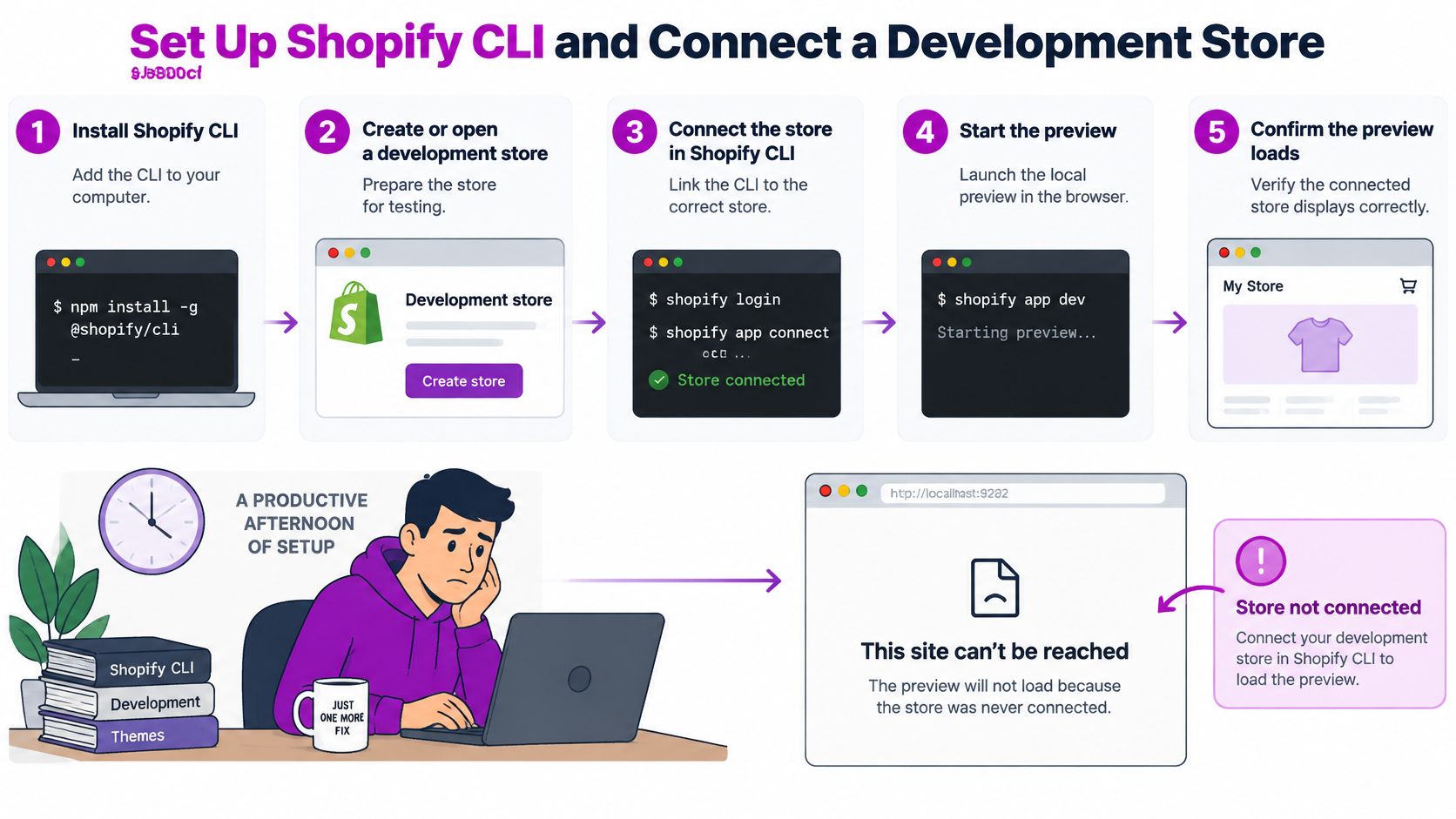
Shopify CLI only previews the store it is connected to. Point it at nothing, or at a development store another session already owns, and the preview fails before your theme or app code is even in question. I connect the store first.
The six setup steps
- Install Node.js and a package manager. Use a current Node.js LTS release with npm, pnpm, or Yarn. The CLI depends on that toolchain to install and run.
- Install Shopify CLI and confirm the version. Install the latest CLI globally, then check the reported version so the team is on one known release.
- Create or open a development store. Do this in the Partners or Dev Dashboard. The store holds the preview, so choose the project store before you connect, not a store already in use.
- Scaffold the project. Run
shopify theme initfor theme work orshopify app initfor an app, so the file structure and config match what the CLI expects. - Connect and start the preview. Run
shopify theme devagainst that development store, orshopify app devfor an app. The Shopify CLI documentation describesshopify theme devas creating a live-reloading development theme andshopify app devas watching local app changes. - Open the preview URL on desktop and mobile. Products, collections, and cart should load from the store's own data. Placeholder content means the session is not on the catalog you intended.
Why a development store fits the job
A development theme is temporary and hidden. You can exercise product, collection, cart, and customer states without editing the published theme. That split is the point of the environment: local files, store-backed shopper context, published theme left alone.
The capacity is enough for serious QA, with one hard limit. The Shopify development stores documentation states that a development store can process an unlimited number of test orders, support an unlimited number of unique products, and create up to 10 custom apps. You can model a large catalog and repeat checkout scenarios. Plan custom app installs around that cap of 10.
How you structure the store is a separate choice from the CLI login. Our guide to a Shopify development store covers the store side of the setup. A healthy first run ends with three checks: a working preview URL, live store data in the storefront, and a published theme that nobody changed.
Practical rule: If the preview won't load, verify the connected store first, before you debug code that may not be broken.
Which Command Fits Each Project Type
Shopify local development is cloud-connected, not a local replica. Your editor, file watcher, and build tooling run on your machine. Store data, APIs, checkout behavior, and platform services come from Shopify. The Shopify CLI reference describes development stores as testing environments for building and testing apps and themes in a realistic Shopify environment without affecting a live store. Every command choice flows from that split.
Shopify CLI commands by task
| Task | Command | What it does | Watch out for |
|---|---|---|---|
| Theme changes | shopify theme dev |
Creates a temporary development theme that uses the store's live data | Shopify deletes development themes after seven days of inactivity |
| App changes | shopify app dev |
Installs a developer preview on the connected store | Can replace another developer's preview until app dev clean runs |
| Headless storefront | shopify hydrogen dev |
Runs a local Hydrogen storefront against store data | Needs store credentials set in your local environment |
| Clear an app preview | shopify app dev clean |
Removes the developer preview from the store | Run it before switching branches or handing the store over |
| Dev store lifecycle | Store commands in Shopify CLI 4.8 and later | Creates, lists, inspects and deletes development stores | Limit of 250 development stores per Dev Dashboard organization |
Read the table by risk, not just by function. Theme work is safe to iterate on because the development theme stays unpublished, and it doesn't count toward a store's theme limit. App work is different: shopify app dev previews your changes without deploying a new production version, but that preview lands on a shared store, where it can displace a teammate's.
Headless work shifts the risk again. Hydrogen runs locally, yet it still depends on store credentials and remote data, so a wrong environment file gives you a convincing storefront built on the wrong catalog.
Pick the command by what you're changing, then check where its output lands before you run it.
That one habit, confirming the target store and preview before pressing enter, prevents most cross-contamination between developers. Deployment stays a separate, deliberate step either way.
Release Gate Before Anything Goes Live
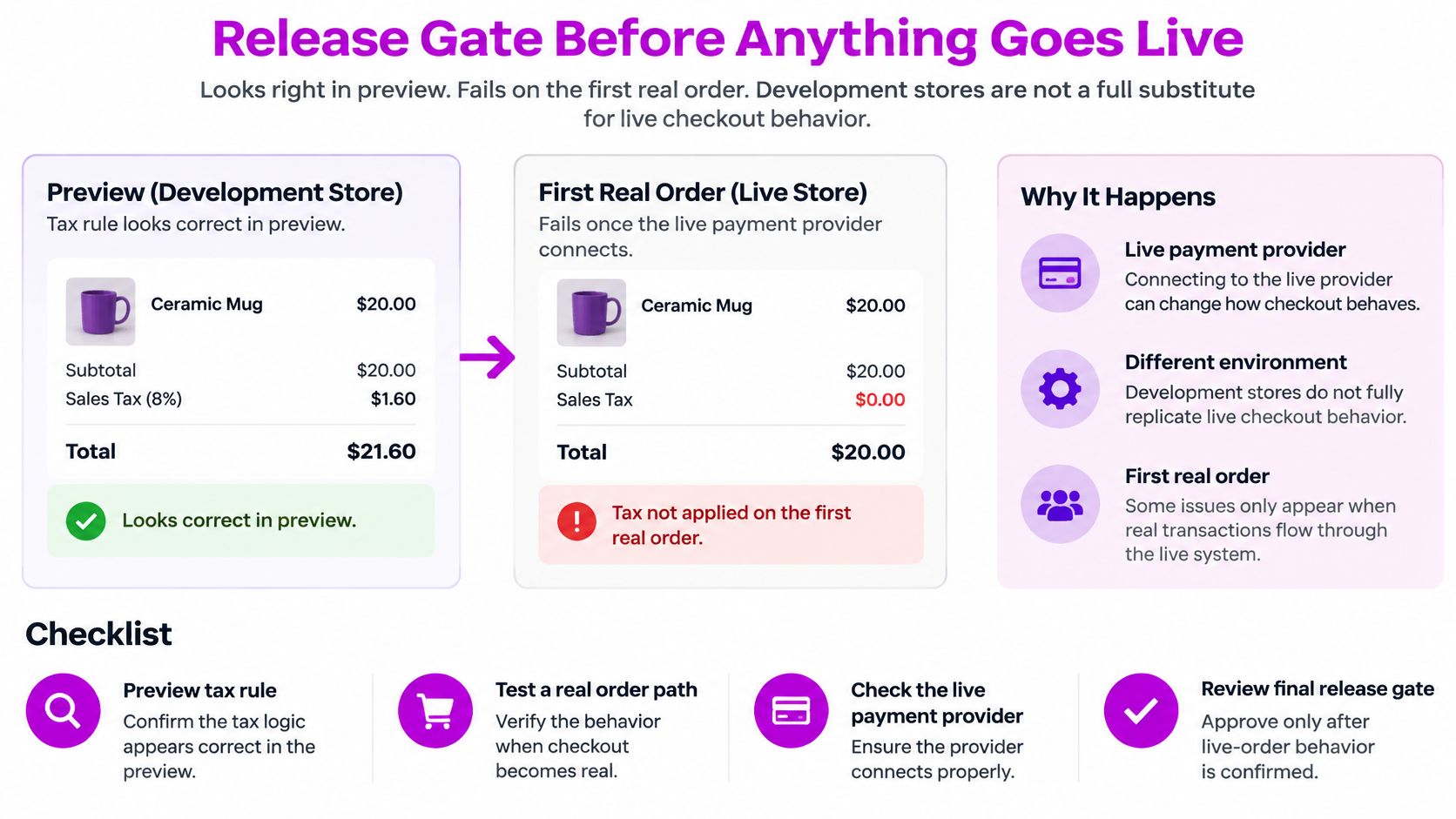
A tax rule can look correct in preview. Totals add up, a stakeholder approves, and the change ships. The first real order then fails once the live payment provider connects, because the preview never ran that path. Development stores are password-protected and cannot process real transactions through active payment providers. A clean preview does not prove a clean launch.
A release gate is only useful if it is explicit and measured. A verbal all-clear is not one. Teams that track DevOps metrics that matter to employers already refuse an unmeasured handoff. On Shopify, that standard is concrete: every item below is checked, and the approver is named on the release.
This checklist marks where preview confidence stops and live verification has to start.
The release gate checklist
- Keep the development theme unpublished: Shoppers stay on the live theme until you deliberately publish or deploy the change.
- Review desktop and mobile previews: Layout and tap targets fail differently on a phone, so check both viewports before sign-off.
- Test theme settings and app blocks: Settings a merchant can change are the ones that break your assumptions about layout and content.
- Confirm a clean Git diff: Only the intended files should ship. Drop anything that arrived from another branch.
- Get stakeholder sign-off: Record who approved, so a rollback has a named owner.
What the preview cannot prove
Six flows need a separate staging run with the provider in test mode: tax calculation, shipping rates, payment authorization, email notifications, subscriptions, and checkout extensibility. Each one changes once live credentials and a real payment provider are in the path. Skip them and the store's first paying customer becomes the test.
The short walkthrough below shows how a preview session behaves day to day. Use it to see which of those six flows your current gate still never touches.
Deploy only when every gate item is checked and the approver is recorded with the release. A gate you can skip under time pressure is not a gate.
Team Previews and the Symptoms They Cause
Your machine is the only isolated part of this workflow. Shared dev stores, credentials, and preview state are where team failures happen. One developer's session can overwrite another's theme files or produce a preview that misleads both of them. I would design the environment before adding a second developer, not after the first collision.
Environment rules that hold up
Use one store or one development theme per branch or feature. Name each one so owner and branch are obvious at a glance, something a teammate can read without asking. Seed the store deterministically so a bug reproduces on any machine, and write a teardown rule for stale stores before they pile up.
Scripted lifecycle management is now practical. The Shopify CLI changelog entry on dev store commands notes that Shopify CLI 4.8 introduced terminal commands to create, list, inspect, and delete development stores, alongside a limit of 250 development stores per organization. That ceiling turns cleanup from tidiness into governance. Script provisioning and resets, then delete on a schedule.
The sharpest trap is app preview state. app dev installs a developer preview on the connected store and can replace another developer's preview until app dev clean runs. On a shared store, that's not a quirk, it's a daily coordination problem.
Team preview symptoms, causes and fixes
| Symptom | Likely cause | Fix |
|---|---|---|
| Preview changed without a push | Another developer ran app dev on the same store |
Use one store per branch and run app dev clean before switching |
| Theme files overwritten | Two theme dev sessions share one development theme |
Give each branch its own development theme |
| Development theme missing | Inactive for seven days, so Shopify deleted it | Push work to Git first, then recreate it with theme dev |
| Checkout works in preview but fails live | Payment provider not in test mode or not in the staging run | Run the staging checklist with the provider's test mode |
| Cannot create a new dev store | Organization reached the 250-store limit | Delete stale stores on a fixed schedule through the CLI |
Notice that none of these fixes is a code change. They're naming conventions, isolation rules, cleanup schedules, and one cleanup command run at the right moment. Write the rules down once, put them in the repo, and enforce them in review. A team that depends on everyone remembering the etiquette will keep rediscovering the same symptoms.
Test Webhooks Through a Local Tunnel Safely
A webhook handler fails expensively. Your localhost endpoint has to be reachable over HTTPS through a secure tunnel, and if the handler behind it is slow, retries can trigger duplicate fulfillment, refund, or inventory actions. The tunnel gets the event to you. The handler design decides whether you process it once.
Build the handler in four steps
- Verify the HMAC signature using the raw request body. Parse the body first and the signature won't match what Shopify signed, so verify before anything transforms the payload.
- Record
X-Shopify-Webhook-Idin durable storage. That stored ID is how you recognize a duplicate delivery and skip it. - Return a 2xx response right after safe receipt. Acknowledge first, work second. Shopify's delivery system uses HTTP keep-alive, so enable connection reuse on your endpoint too.
- Process the event asynchronously with an idempotent worker. The worker should produce the same result if it runs twice, because retries mean it might.
The Shopify order webhooks documentation states that failed webhook deliveries are retried up to eight times over four hours, and persistent failures can remove the subscription. It also recommends using the webhook ID to detect duplicate deliveries. The common pitfall is doing slow API calls, database writes, or third-party requests before acknowledging. Every second spent there raises timeout and retry risk.
Local webhook test cases
| Test | How to run it | Expected result |
|---|---|---|
| Duplicate delivery | Replay the same payload with the same webhook ID | Handler stores the ID once and skips the second run |
| Bad signature | Send a payload with a wrong HMAC | Request is rejected before any processing |
| Tunnel interruption | Stop the tunnel during a delivery | Shopify retries later, and the event is still processed once |
| Slow handler | Add a delay before the work runs | Handler still returns 2xx quickly and the work runs in the worker |
| Out-of-order events | Send an update before the create event | Worker reconciles the order using its own state, not arrival order |
| Lost delivery | Skip a delivery entirely | Reconciliation job or API check finds and fixes the gap |
Run these deliberately against your local tunnel. Don't wait for production traffic to replay a payload for you.
One caveat shapes the whole design: webhook delivery is not always guaranteed. A successful first delivery proves the happy path, not permanence. For high-value order and inventory flows, add a reconciliation job or periodic API checks that compare Shopify's state with yours and repair gaps. That's the safety net when an event never arrives at all.
Debug Local Failures Step by Step
Start from what you see: a preview that won't load, a webhook that never arrives, a checkout that behaves differently from the preview. Then work in order, because each step rules out a cheaper explanation than broken code.
- Read the CLI output first. If your team uses JSON output, read the session status and JSONL log for the failing run before guessing.
- Confirm the target. Check which store and which development theme or app preview the session points at. A wrong target explains most confusing results.
- Check the tunnel. Confirm the URL is live and served over HTTPS, and restart it if it has dropped.
- Inspect webhooks directly. Check subscription status and retry history, then compare the delivered payload with what your handler expected.
- Reproduce small. Use the smallest payload or the single affected page before changing code, so the fix maps to one cause.
- Verify payments separately. If checkout fails, confirm the provider is in test mode and the staging checklist ran against it.
- Clean the environment. Run
app dev cleanor delete the stale development theme so the next session starts clean.
Write down each failure and its fix in a short team note. The second time a symptom appears, you should be reading an answer, not re-running the whole sequence.
Automate Checks with JSON Output and CI
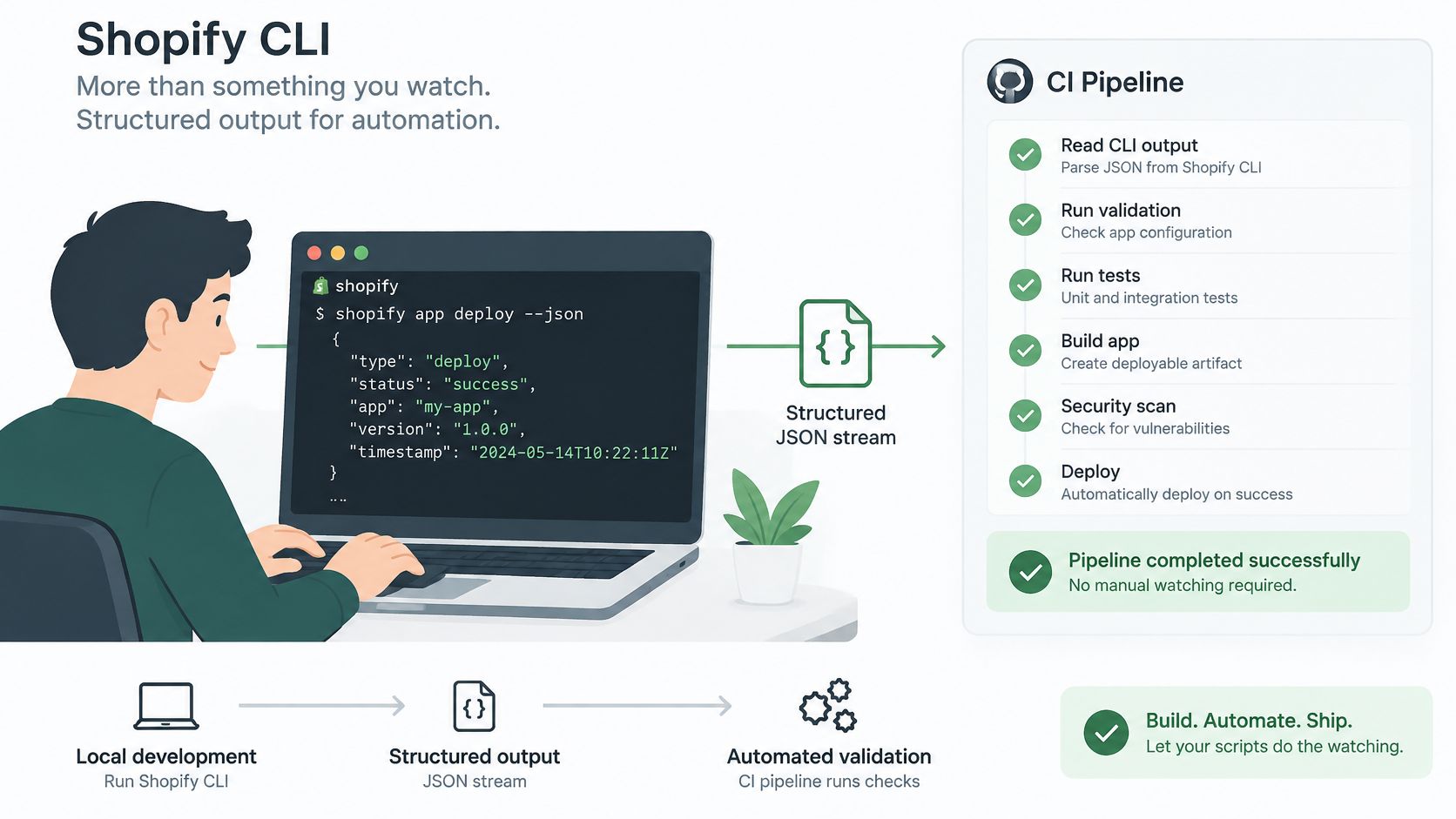
The assumption worth challenging is that the CLI is something a developer sits and watches. The Shopify CLI releases describe Shopify CLI 5.0 standardizing JSON output across major command areas and adding streaming JSON for app dev, with advice to update scripts and CI workflows that consume older output contracts. Scripts can now read preview state directly instead of scraping terminal text.
The CLI also records development sessions, preview status, and JSONL logs, so a coding agent can reuse an active session and your team can retain logs for debugging. That's useful. It's also where the risk moves.
Structured output makes these automated checks practical in a pipeline.
Where each check runs
| Check | Run locally | Run in CI pipeline |
|---|---|---|
| Schema check of CLI JSON output | Quick check before pushing | Full check on every branch push |
| Linting and quick tests | On each save or commit | Repeated on merge |
| Preview and staging checks | Manual preview on the branch store | Scripted run against the staging store |
| Store provisioning and deletion | Only with branch approval | Scripted, with an audit trail of who ran it |
Keep fast feedback local and authoritative checks remote. That division matches the engineering pipeline insights from TekRecruiter, and it pairs with a disciplined Shopify Git integration so every automated run ties back to a branch.
Agent-friendly commands make provisioning, deployment, and deletion faster. Faster destructive actions demand branch isolation, approval gates, and an audit trail of who or what ran them.
Automation speeds up the workflow, but permissions decide whether it stays safe.
Confirm Your Dev Setup Before the Next Release
Don't ship the next change until the environment itself passes review. Four checks cover the failure points that matter most.
- Each branch has its own development store or theme, so previews can't overwrite each other.
- The CLI version is pinned, and the pipeline validates its JSON output against the expected schema.
- The webhook test cases pass, including duplicate delivery and bad signature handling.
- The release gate has a named approver, recorded with the release.
If your team doesn't have the time to keep these checks running, we can help as an official Shopify Partner Agency. Our Shopify Expertise service provides an augmented team of Shopify specialists to maintain and enhance a project, and the packages require no commitment.
Run the four checks on your current project today and note the first one that fails. That's your next fix, before any new feature work.
If your local workflow needs the environment discipline covered here, branch isolation, webhook testing, and a release gate your team can sustain, ECORN can set it up and maintain it with you. Tell us where your previews or releases keep breaking, and we'll help you turn that fragile setup into a repeatable one.



Shopify Theme Minimal: How to Design and Build One

Consistent Website Design: A Practical Guide for Stores

Shopify Development Company in USA Hiring Guide
Shopify Inventory Tracking App: How to Set It Up Right

Shopify Volume Pricing: How to Set Up Tiered Discounts

How Does Shopify Work for Sellers? a Practical Guide

Shopify Theme ZIP: How to Upload and Install It
Shopify Plus Organization Admin: Roles and Access Guide
How to Build a Drop Down Menu in Shopify: Steps and Fixes
Shopify Plus Integration Services Guide

Shopify Customer Experience: A 2026 Guide

AI Lead Generation for E-commerce Growth

Shopify Plus Expansion Stores: Limits and Setup
Shopify Theme Update: Safe Steps, Backups and Rollback

Shopify Website Design Packages: What You Actually Get

How to Choose a Shopify Plus Web Design Agency in 2026

Shopify Plus Ecommerce Agency: How to Pick the Right One

Shopify Themes Retina: How to Serve 2x Images

How to Cross Sell on Shopify Without Friction

Best Shopify Theme for Custom Products Compared
Multi Store Inventory Management: A Practical Guide

SEO Consulting for Ecommerce: A Practical Guide

Shopify Theme Updater App: A Safe Update Playbook
Shopify Git Integration: A Developer's Guide to 2026
Headless Ecommerce Development Services Explained

How to Build a Shopify Clothing Website That Converts

How to Launch a Box Subscription Business in 2026

Luxury Skincare Branding Playbook That Converters

11 Best Podcast Ecommerce Shows for Store Growth in 2026
Shopify Developer Hourly Rate: What to Pay in 2026
Critical Shopify Setup Errors That Are Secretly Sabotaging Your Store
Ecommerce Conversion Tracking: The Complete How-To Guide

Shopify Design Agency: How to Pick the Right Partner
Mastering Multi Store Management on Shopify

Scale Shopify Store

10 Shopify App Ideas Worth Building in 2026

Conversion Rate Optimization for Landing Pages: The Playbook

Shopify Plus Automation: A Guide for 2026

10 Social Selling Platforms for Shopify Merchants

Shopify Website Design Examples: 7 Stores Worth Studying

7 Ecommerce Newsletter Examples for Shopify Brands

One Product Shopify Store: Build and Scale

Mobile Pop Up Strategy for Shopify Stores That Converts

Sitemap for Shopify: How to Find, Optimize, and Submit It

7 Single Product Websites Worth Emulating

Product Variants Shopify: The Complete 2026 Guide

Ecommerce Analytics Consulting for Growth

What Is AI Integration for eCommerce

How to Choose the Right eCommerce Website Development Firm

E Business Strategy Implementation
Conversion Tracking Setup for Shopify Stores

BigCommerce vs Shopify Plus Which Enterprise Wins in 2026
Shopify Theme Kit: Setup, Commands, and Migration Guide

Shopify Extension Development: A Practical 2026 Guide

Shopify Speed Score Explained and How to Improve It

Shopify Mobile Optimization: The 2026 Playbook

How to Add Subcategory in Shopify for Better UX
How to Implement Structured Data for Ecommerce in 2026

SEO App Mobile: Shopify Store Optimization Guide

Shopify Plus Support: What It Includes and How to Choose

Google Ads for Shopify: The Complete 2026 Playbook

Shopify New York: How to Find and Hire the Right Agency

Google Search Console for Shopify: The Complete Setup

First Party Data Collection for eCommerce Growth

FAQ Online Store Guide: Build and Measure It Right

Do FB Ads Work for eCommerce in 2026?

One Page Checkout for Shopify: Design and Implementation
Shopify GraphQL vs REST: The 2026 Developer Decision

Shopify Ecommerce Consulting: Strategy, Pricing &

Are Reddit Ads Worth It for eCommerce Brands

Shopify Title and Meta Description: A Practical 2026 Guide

Product Video Best Practices for Shopify Brands
Real-Time Inventory Management: A 2026 Guide

AI Chatbot Integration for Shopify Stores

Affiliate Program Management: A Shopify Guide
10 Best Performance Monitoring Tools for Shopify in 2026

Digital Asset Management for eCommerce Brands in 2026

Every Type of Facebook Ads Explained for eCommerce Growth
Product Information Management Explained for Shopify Brands

Support Ticket System: A Guide for Shopify Stores

10 Best Customer Service Tools for Shopify in 2026

Can I Start a Business with No Money? a 2026 Blueprint

What Sells Good on Etsy: Best Niches for 2026

Shopify Add to Cart Button: A Practical 2026 Guide

Customer Feedback Automation: A Practical eCommerce Guide
Critical Rendering Path: A Guide for Shopify Stores

How to Promote on TikTok for eCommerce in 2026

B2B eCommerce Consulting That Drives Real Revenue

10 Best Practices for Site Navigation in 2026
Return vs Refund for Shopify Stores: A Practical Guide

What Is Customer Lifetime Value and Why It Matters

What Is Voice of Customer Research for eCommerce

SMS Marketing for Ecommerce That Actually Converts

Master How to Improve Email Deliverability in 2026

Top 8 eCommerce Partners NYC for Shopify Brands in 2026

Machine Learning for Ecommerce: Boost Your Shopify Store

Beauty Market Research: Your 2026 Growth Guide

Shopify International Expansion: A 2026 Roadmap

What Does CRO Stand for in Business: Understanding CRO

Shopify Visual Merchandising: A Playbook for Higher Sales


newsletter in your inbox