

Your post-purchase upsell is probably earning more than your dashboard says it is. Shopify's pixel integrations record the initial order and its value, not the add-on a shopper accepts a few seconds later, so a live offer can look flat in the same report your ad team opens every morning.
That gap explains why so many stores switch off a working offer. The mechanics of a Shopify post purchase upsell are simple; the accounting around them is not. This guide covers where to place the offer, how to build the flow without breaking checkout, which offer fits which purchase, and how to reconcile the revenue before you decide whether it worked.
It's written for merchants on Shopify and Shopify Plus with steady order volume and at least one product that obviously belongs next to another. If you sell a single item with no natural companion, most of this will read like theory.
Why Post-Purchase Offers Add Revenue Without Risking Checkout
A post-purchase offer appears after payment has cleared, and that ordering is the entire argument. The customer has committed, the card is charged, and the confirmation screen is the calmest moment in the funnel. An add-on there is a second, small decision rather than one more reason to abandon a cart. Because it sits outside checkout, it also sits outside what your checkout pixel was built to record, which is why the revenue it earns needs separate accounting later.
The commercial case for the category shows up in Upsell.com's post-purchase upsell statistics roundup, which reports upselling raising website conversion rates by 45%, cutting abandoned-cart rates by 10% and lifting average order value by more than $60. Keep the scope honest: those are broader upselling results, not an isolated benchmark for a one-click post-purchase offer.
What the numbers don't prove: that your store will see a 45% lift from a single offer on the order status page. They measure the weight of upselling as a category, not a forecast for one placement.
Four terms do most of the work in this article, so it's worth fixing them now:
- Post-purchase offer: a discounted add-on shown on a page after payment and before the confirmation screen.
- Accepted offer: the buyer tapped yes and the saved card was charged a second time. That second charge is the event most ad platforms never see.
- Acceptance rate: accepted offers divided by offers shown. You can only calculate it if your app logs impressions.
- Incremental AOV: the change in revenue per checkout measured against a holdout group that never saw the offer.
This approach suits stores with enough daily orders to read a split test inside a few weeks and at least one product line that complements what's already selling. Below that volume, the same effort usually earns more on the product page. Above it, the risk profile is unusually favorable: the worst an offer can do is get declined, while a good one adds revenue your standard reports will understate.
Upsell Placements and the Share of Sales Each Earns
Placement decides more of the outcome than the copy does. A 2026 analysis of platform data from more than 11,000 stores, published in Upsell.com's placement analysis, recorded 2,543,635 accepted upsell conversions between October 2025 and October 2026. The three itemized post-payment placements account for about 84% of that total; the balance is not split out cleanly enough to credit to checkout.
| Placement | When the offer appears | Accepted conversions | Best used for |
|---|---|---|---|
| First one-click offer | Right after payment, one tap to accept | 1,379,261 (about 54% of accepted conversions) | Complementary add-on or accessory |
| Second one-click offer | After the first offer is accepted or declined | 293,899 (about 12%; roughly 21% of first-offer volume) | Higher-value follow-up for buyers who said yes once |
| Thank-you page offer | On the confirmation page after payment | 455,935 (about 18% of accepted conversions) | Low-pressure bundles and restock offers |
| Pre-payment checkout upsell | Inside checkout, before payment | Not broken out in this dataset | Core bundle, tested against a holdout before rollout |
Two rows carry most of the weight. The first one-click offer is the clear primary surface at about 54% of accepted conversions, while the thank-you page contributes a meaningful second stream at about 18%. The second one-click offer is smaller, roughly one fifth of first-offer volume, which frames its job: extract extra value from buyers already saying yes.
Read the limits before ranking them. These are accepted conversions; impressions, click-through and order value are absent. For measurement, treat the app and order records as the source of truth, because browser pixels and ad-platform reports can miss a second charge when acceptance happens after the initial purchase event or inside an extension surface. Reconcile accepted offer IDs to orders before judging any placement. This is also one commercial platform's view, so use it as placement hierarchy evidence rather than a universal Shopify benchmark.
Working rule for a first rollout: launch the first one-click offer alone, let it run cleanly for a few weeks, then add the thank-you page. Add the second offer only once the first shows steady acceptance.
Each added placement dilutes attention and complicates attribution. One offer you can reconcile beats three you cannot.
How to Build the Upsell Flow Step by Step
The order of these steps matters, because the expensive mistakes happen during setup. Copywriting is the cheap part. Here is the full sequence, including the slip to avoid at each stage.
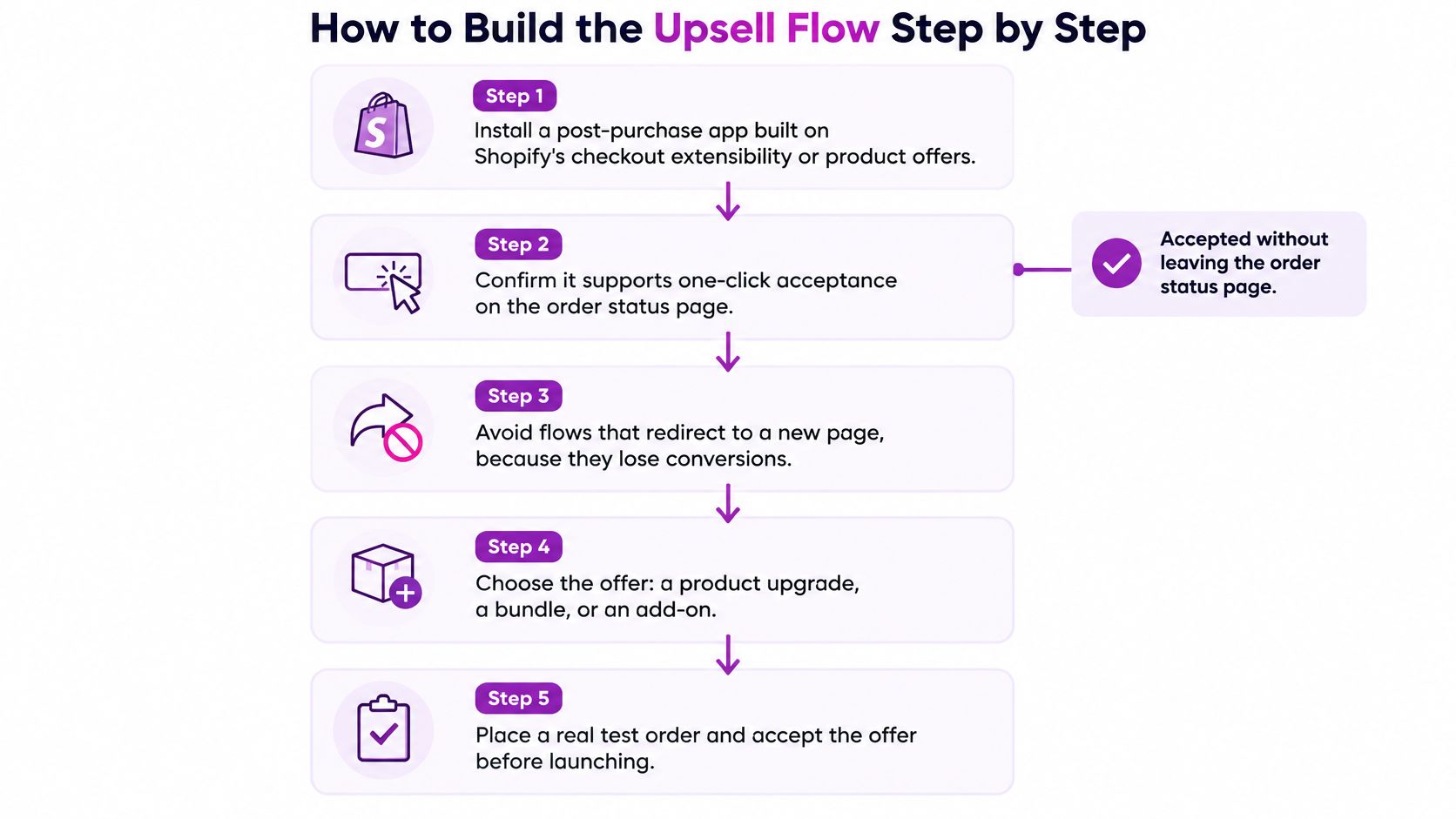
- Install an app that charges the saved card in place. Confirm it runs on Shopify's post-purchase extension so the buyer accepts without leaving the order status page. Then check your payment mix: wallets and installment methods like Apple Pay, Google Pay, Klarna and Affirm don't expose a vaulted card, so those orders never see the offer. Pull your checkout payment data before you project revenue, because a wallet-heavy store has a smaller reachable audience than its order count suggests.
- Shortlist add-ons by margin rather than catalog order. Run the contribution margin on the discounted price, after pick, pack and shipping, before the offer reaches a customer. A product that loses money once those costs land is how a post-purchase program starts costing you.
- Set trigger rules by product, collection, order value and destination. A summer add-on shouldn't reach a winter buyer, and a mattress buyer shouldn't see a phone case. Rules scale; manual review doesn't survive Black Friday.
- Write four lines and stop. One headline, one benefit line, the price, two buttons. Long explanations on a page the customer is trying to leave reduce acceptance rather than raise it.
- Cap the discount so codes can't stack. A welcome code applied after a 20% offer discount can push the add-on under cost. Limit the offer to one automatic discount and exclude it from other promotions.
- Time the second offer. Show it only after the buyer has decided on the first, and only to people who saw that first offer. Two offers at once turns a simple yes into a decision the customer postpones by closing the tab.
- Place a real test order. Use your test gateway, accept the offer, then open the order in the admin. Check that the charge equals the offer price exactly, that the upsell attaches to the same order rather than arriving as a second purchase, and that the refund path and confirmation email both list the added item. The email is the step teams forget and customers notice.
- Launch to a split of eligible orders first. Send half to the offer and hold the rest back. The holdout is what lets you see what the offer added, and you can't reconstruct one after launch.
A healthy first week shows a steady acceptance signal and order totals that match the offer price to the cent. If totals drift, you have a tax, currency or discount-stacking problem, and it's cheaper to fix now than to reconcile a month of orders. Watch how the orders surface in your analytics too: post-purchase charges are commonly under-reported by storefront pixels, which can make a working offer look weak in reporting.
Two platform limits are worth designing around: Shopify caps how many post-purchase offers a buyer can accept in one checkout and generally limits a store to a single post-purchase app, so confirm the current limits in Shopify's documentation before you plan a multi-offer sequence. Treat the app choice as a decision you'll live with for a year, because migrating mid-program means rebuilding triggers, templates and your holdout logic from scratch.
Matching Offers to What the Customer Just Bought
The offer should follow the purchase, not the catalog. A buyer who just paid for one small item is in a different frame of mind from someone who spent a month's budget on a single purchase, and the discount that moves one will often insult the other.
The difference between a cross-sell and an upsell matters most here: a post-purchase page rewards complements, while a true upgrade usually belongs earlier in the funnel where the buyer can still compare.
| Purchase situation | Offer to test | Starting discount | Placement |
|---|---|---|---|
| Single low-priced item | Complementary add-on priced under 30% of order value | 10-15% | First one-click offer |
| Multi-item order | Accessory or refill that fits what was bought | 10% or none | Thank-you page |
| High-ticket order | Protection plan or care kit | 0-5%, bundled at near full price | Second one-click offer, only after a decline |
| Repeat customer | Bundle or upgrade with loyalty pricing | 15-20% | First one-click offer |
| Subscription or restock buyer | Larger pack size | 5-10% | Thank-you page |
Read the rows as starting points and adjust. On a high-ticket order, deep discounts on a care kit read as cheap and undercut the premium signal of the purchase, which is why the discount sits near zero. A repeat customer already trusts you, so loyalty pricing on a bundle can carry a bigger cut than a first-time buyer would ever get.
Edge cases rewrite the rules, and each has a simple fix. Gift orders break the logic entirely, because the buyer isn't the user, so skip the offer or swap in a gift-safe accessory the buyer would plausibly want. Pre-orders with a delayed ship date raise a shipping question, so either state clearly that the add-on ships separately and immediately, or skip it. Destinations where the add-on can't ship, aerosols, liquids, batteries, mean adding a country exclusion to the trigger rule rather than apologising in a support ticket.
For your first test, pick the purchase situation that makes up the largest share of orders and build one offer there. Not the most creative one, the most common one.
Measuring Upsell Revenue Without Double Counting
Start by distrusting the dashboard. An upsell can raise real revenue while looking ineffective in reporting, and it can also inflate attribution if you compare an order export with an events export and treat them as the same number.
Shopify's developer documentation on product offers at checkout sets out the mechanism: pixel-based services such as Google Analytics, Facebook, Pinterest and Snap report only the initial purchase event and value, while script-based implementations fire only on the order status page, so accepted offers can drop out of both. Neither is lying. Both are measuring the first transaction.

Reconcile it as a checklist against one fixed date range:
- Published orders: export Shopify orders for the period and total the revenue, including items accepted on the post-purchase page.
- Payment transactions: confirm the second charge landed on the same order, not a separate one, or your order count and revenue will disagree.
- Pixel and server-side events: compare the purchase event count and value with the order total, and expect a gap. Note the size of the gap rather than chasing it to zero.
- Refunds: pull refunds on upsold items specifically, since a refund on the add-on says something different from a refund on the main order.
- Blended AOV: recalculate with and without accepted offers, then report initial AOV separately from post-purchase revenue per checkout.
Then judge the offer on four numbers, in this order: acceptance rate per offer, incremental AOV against the holdout, refund rate on the add-on, and contribution margin after discount and fulfillment. One ad-platform ROAS figure can't carry that decision, because the platform never saw the second charge.
Here's how to read a result cleanly. If initial AOV holds steady while revenue per checkout rises against the holdout, the offer is adding money. If acceptance is high and refunds on the add-on climb with it, the offer is selling something buyers didn't understand, and the fix is honesty about what they're buying, not a bigger discount.
The gap between Shopify's total and your ad platform's total is a tracking fact, not a performance verdict. Report it, then get on with the offer.
Fixing Low Acceptance, Refund Spikes and Tracking Gaps
Three problems account for most disappointing post-purchase programs, and each has a diagnosable cause.
Low acceptance. Say acceptance lands at 3% over the first fortnight. The offer is usually irrelevant to the purchase, priced too high for an impulse decision, or described in a vague headline like "You might also like". Tighten the trigger to one product, drop the add-on price closer to a tenth of the order value, and rewrite the headline to name the benefit. Test one change at a time.
Acceptance looks fine but refunds climb. This is a clarity problem, not a demand problem. The accept button may read like a free gift, the new total may not be visible before the tap, or the add-on may not match the photo. Rewrite the button to state the action and the price, show the revised order total, and check refunds per offer rather than in aggregate.
The ad platform reports less revenue than Shopify. Nothing is broken. The pixel records the initial order and its value, so offer revenue is missing from the platform view. Reconcile against Shopify orders, keep a separate line for post-purchase revenue, and stop optimising campaign budgets against a number that structurally excludes it.
There's a fourth check worth running: speed. A heavy offer script can slow the order status page, and a slow confirmation screen is the last place you want a buyer waiting. Measure load time before and after launch on a throttled connection.
Change one variable at a time, and wait for a few hundred orders in each arm before you believe the difference.
Launch One Controlled Offer Test This Week
The next step is smaller than it looks. Pick one offer for your largest purchase situation, put it on the first one-click offer, split traffic so a holdout group never sees it, and set a review date based on order volume rather than the calendar. When that date arrives, read acceptance, refunds and incremental AOV together, then take one of three decisions: keep the offer, change one element and rerun, or extend the same offer to the thank-you page.
If you want an outside read on the checkout and offer flow before you spend on traffic, our A/B testing guide for Shopify walks through the split structure. ECORN's Shopify CRO work covers exactly this ground, with a CRO audit that includes recommendations and bug fixing, A/B testing and scaling hypotheses. Single-project work runs at $69 per hour with no minimum or maximum project size, and the Shopify Expertise packages require no commitment.
Tomorrow morning, open the app, choose the offer, and set the holdout split before anything goes live. The split is the part you can't add retroactively.
ECORN works with Shopify and Shopify Plus brands on the unglamorous parts of growth: audit the checkout, fix what's broken, then test the offers that survive scrutiny. If your post-purchase program is live but you can't tell whether it's earning, or you want a second pair of eyes on the measurement before the next campaign, visit ECORN and tell us what you're running.



Ab Test Sample Size
Shopify Social Proof: 7 Apps That Build Buyer Trust
10 Best Shopify Design App Tools for 2026: Pros and Cons
Shopify Local Development: Setup, Workflow and Fixes

Shopify Theme Minimal: How to Design and Build One
Consistent Website Design: A Practical Guide for Stores

Shopify Development Company in USA Hiring Guide
Shopify Inventory Tracking App: How to Set It Up Right
Shopify Volume Pricing: How to Set Up Tiered Discounts
How Does Shopify Work for Sellers? a Practical Guide
Shopify Theme ZIP: How to Upload and Install It
Shopify Plus Organization Admin: Roles and Access Guide
How to Build a Drop Down Menu in Shopify: Steps and Fixes
Shopify Plus Integration Services Guide
Shopify Customer Experience: A 2026 Guide
AI Lead Generation for E-commerce Growth
Shopify Plus Expansion Stores: Limits and Setup
Shopify Theme Update: Safe Steps, Backups and Rollback
Shopify Website Design Packages: What You Actually Get

How to Choose a Shopify Plus Web Design Agency in 2026
Shopify Plus Ecommerce Agency: How to Pick the Right One
Shopify Themes Retina: How to Serve 2x Images

How to Cross Sell on Shopify Without Friction

Best Shopify Theme for Custom Products Compared
Multi Store Inventory Management: A Practical Guide

SEO Consulting for Ecommerce: A Practical Guide
Shopify Theme Updater App: A Safe Update Playbook
Shopify Git Integration: A Developer's Guide to 2026
Headless Ecommerce Development Services Explained

How to Build a Shopify Clothing Website That Converts
How to Launch a Box Subscription Business in 2026

Luxury Skincare Branding Playbook That Converters
11 Best Podcast Ecommerce Shows for Store Growth in 2026
Shopify Developer Hourly Rate: What to Pay in 2026
Critical Shopify Setup Errors That Are Secretly Sabotaging Your Store
Ecommerce Conversion Tracking: The Complete How-To Guide
Shopify Design Agency: How to Pick the Right Partner
Mastering Multi Store Management on Shopify
Scale Shopify Store
10 Shopify App Ideas Worth Building in 2026
Conversion Rate Optimization for Landing Pages: The Playbook
Shopify Plus Automation: A Guide for 2026
10 Social Selling Platforms for Shopify Merchants
Shopify Website Design Examples: 7 Stores Worth Studying
7 Ecommerce Newsletter Examples for Shopify Brands
One Product Shopify Store: Build and Scale
Mobile Pop Up Strategy for Shopify Stores That Converts
Sitemap for Shopify: How to Find, Optimize, and Submit It
7 Single Product Websites Worth Emulating
Product Variants Shopify: The Complete 2026 Guide
Ecommerce Analytics Consulting for Growth
What Is AI Integration for eCommerce
How to Choose the Right eCommerce Website Development Firm
E Business Strategy Implementation
Conversion Tracking Setup for Shopify Stores
BigCommerce vs Shopify Plus Which Enterprise Wins in 2026
Shopify Theme Kit: Setup, Commands, and Migration Guide
Shopify Extension Development: A Practical 2026 Guide
Shopify Speed Score Explained and How to Improve It
Shopify Mobile Optimization: The 2026 Playbook
How to Add Subcategory in Shopify for Better UX
How to Implement Structured Data for Ecommerce in 2026
SEO App Mobile: Shopify Store Optimization Guide
Shopify Plus Support: What It Includes and How to Choose
Google Ads for Shopify: The Complete 2026 Playbook
Shopify New York: How to Find and Hire the Right Agency
Google Search Console for Shopify: The Complete Setup
First Party Data Collection for eCommerce Growth
FAQ Online Store Guide: Build and Measure It Right
Do FB Ads Work for eCommerce in 2026?
One Page Checkout for Shopify: Design and Implementation
Shopify GraphQL vs REST: The 2026 Developer Decision
Shopify Ecommerce Consulting: Strategy, Pricing &
Are Reddit Ads Worth It for eCommerce Brands
Shopify Title and Meta Description: A Practical 2026 Guide

Product Video Best Practices for Shopify Brands
Real-Time Inventory Management: A 2026 Guide
AI Chatbot Integration for Shopify Stores
Affiliate Program Management: A Shopify Guide
10 Best Performance Monitoring Tools for Shopify in 2026
Digital Asset Management for eCommerce Brands in 2026
Every Type of Facebook Ads Explained for eCommerce Growth
Product Information Management Explained for Shopify Brands
Support Ticket System: A Guide for Shopify Stores

10 Best Customer Service Tools for Shopify in 2026

Can I Start a Business with No Money? a 2026 Blueprint

What Sells Good on Etsy: Best Niches for 2026

Shopify Add to Cart Button: A Practical 2026 Guide

Customer Feedback Automation: A Practical eCommerce Guide
Critical Rendering Path: A Guide for Shopify Stores

How to Promote on TikTok for eCommerce in 2026

B2B eCommerce Consulting That Drives Real Revenue
10 Best Practices for Site Navigation in 2026
Return vs Refund for Shopify Stores: A Practical Guide
What Is Customer Lifetime Value and Why It Matters
What Is Voice of Customer Research for eCommerce

SMS Marketing for Ecommerce That Actually Converts

Master How to Improve Email Deliverability in 2026

Top 8 eCommerce Partners NYC for Shopify Brands in 2026
Machine Learning for Ecommerce: Boost Your Shopify Store


newsletter in your inbox