

The advice most Shopify brands get is to install a connector, switch on real-time sync, and stop rekeying orders. That advice breaks the first time the store and the ERP disagree about a SKU, a price, or a warehouse quantity. Faster sync then copies the bad record into the storefront, the warehouse, and finance before anyone sees it.
Shopify ERP integration is the automated exchange between the store and the systems that run finance, inventory, orders, and fulfillment. I would not start with the app. I would start with which system owns each field, and what happens when two records conflict. A native connector is enough for one store, ordinary orders, and one warehouse. It is the wrong default once a second storefront, a 3PL, a marketplace, or a non-standard B2B price list shows up.
What follows is the sequence that keeps those projects from slipping: match the method to the rows you have, assign ownership before you map fields, stay inside Shopify's API cost limits, run a staged pipeline, and refuse to treat a clean first test as a finished integration.
Pick the Right Integration Method for Your Store
The failure I see most often is a team picking a connector on licence price, then discovering the gaps on the first multi-warehouse order. The order lands in the wrong location, tax doesn't match the sales order, and someone is back in a spreadsheet by Friday.
ERP integration connects Shopify with finance, inventory, order management, and fulfillment, so those records stop being rekeyed. A 2025 report from Drexel University's LeBow College of Business and Precisely found that 60% of companies investing in connected-data initiatives, including ERP integrations, had already achieved measurable benefits such as more efficient processes and smoother operations. SoftwarePath analysis cited in that same research found that only 26% of employees typically log into ERP systems during day-to-day work. Putting stock, order status, and customer context into the commerce tools people already use is how merchandising and support see the data.
That payoff only shows up if the method matches the operation. One store with standard orders and one warehouse is a connector job. Several storefronts, a 3PL, or non-standard tax is not.
| Your situation | Native connector | Middleware or custom build |
|---|---|---|
| One store, standard orders, one warehouse | Usually enough | Not needed |
| Multiple storefronts or currencies | Check per-store setup and currency mapping | Middleware to centralize data |
| B2B price lists and tax across jurisdictions | Verify price-list and tax support | Custom orchestration if rules are non-standard |
| 3PL or marketplace fulfillment | Confirm fulfillment status sync | Middleware with exception queues |
| Migrating from a legacy ERP | Phased rollout only | Middleware with dual running during cutover |
Budget the work the licence hides
The licence is the small number. Data cleansing, mapping tests, staff training, and someone watching the exception queue are where the calendar and the invoice move.
U.S. retail figures reported by My Total Retail show that 36% of ERP projects took longer than estimated to go live, with an average delay of 200 days. The same evidence reports that ERP projects cost about one-third more than predicted on average. Scope cleansing, testing, training, and exception handling before you pick a tool, or those days land on your fulfillment team.
Decision rule: Choose the simplest option that covers every row you actually have. Write down any row you can't yet answer. Those unanswered rows are the first items in the pilot, not surprises after go-live.
Assign Data Ownership Before You Map Fields
When Shopify and the ERP disagree, which record wins? Most connector docs never ask. They list products, orders, inventory, and customers, then leave the conflict to whoever notices a wrong shipment.
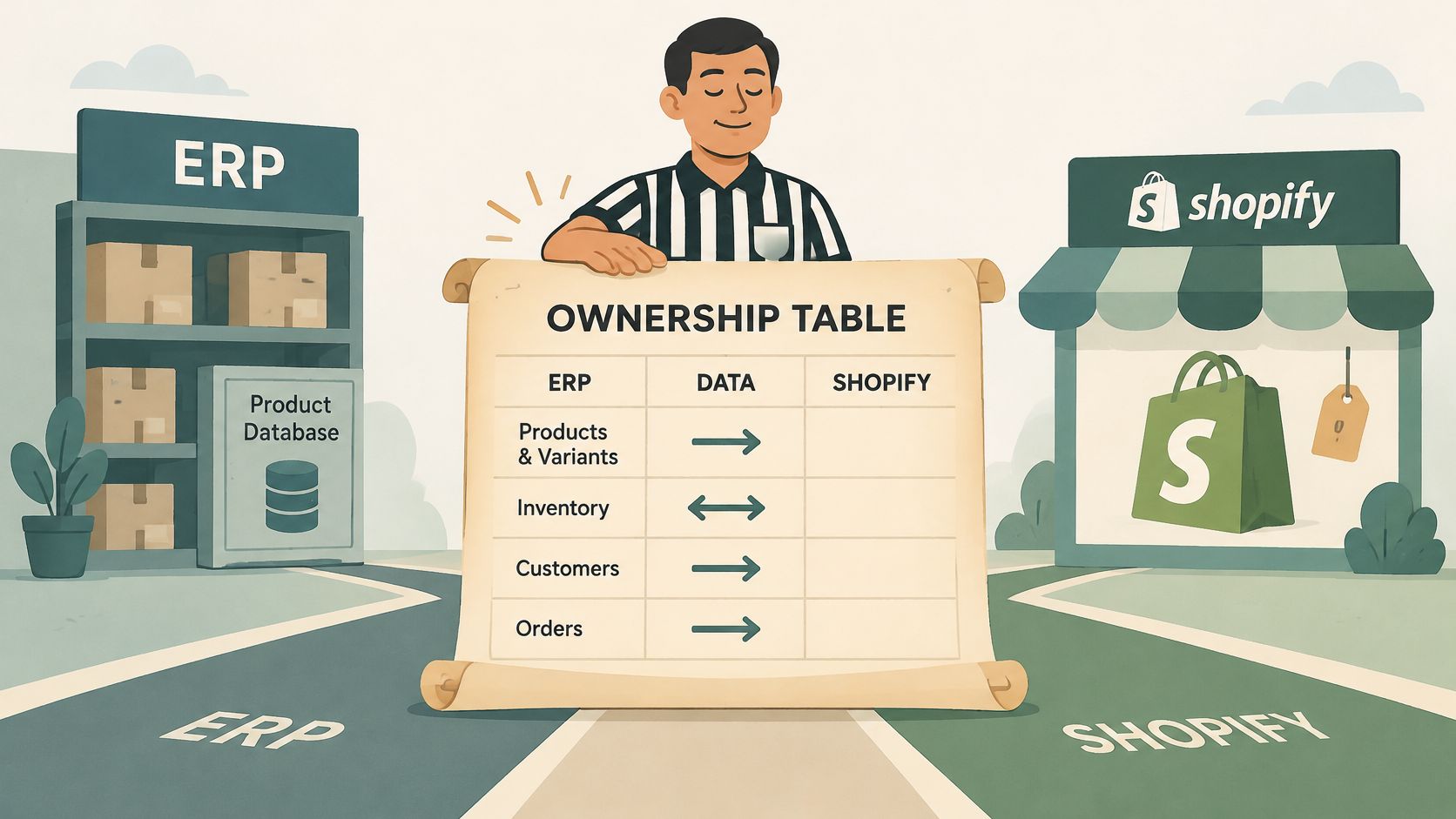
Agree these rules before a single field is mapped. Shopify's notes on data integration challenges come back to the same question: which system should own each field, and what happens when records conflict?
| Object | System of record | Sync direction | Update frequency |
|---|---|---|---|
| Products and variants | PIM or ERP | ERP to Shopify | Scheduled or on change |
| Inventory by location | ERP or WMS | ERP to Shopify | Real time for available-to-sell stock |
| Orders | Shopify | Shopify to ERP | Near real time via webhooks |
| Customers | Shopify or CRM | Two-way with a written conflict rule | Event driven |
| Refunds and tax | ERP (finance) | ERP to Shopify | Event driven |
| Fulfillment status | WMS or 3PL | Back to Shopify | Event driven |
Why identifiers break the flow
The same style can carry three different codes. The ERP item number, the PIM style code, and the Shopify variant SKU look related until an order import rejects the line. Customer identities split the same way: one person checks out as a guest on the DTC store, then places a wholesale order under a company name. Addresses that don't match the warehouse's validation rules stop an otherwise automatic fulfillment.
Real-time sync doesn't fix that. It spreads it. A bad available-to-sell figure pushed in seconds hits every storefront, then the pick ticket, then the invoice. Governance has to exist before you shorten the delay.
Split the clock by the cost of being late. Available-to-sell stock needs a real-time update, because an oversell is a customer problem today. Historical reporting, cost rolls, and catalog copy can move on a schedule. Pushing those on every change only burns API capacity and creates noisy diffs.
If product content is messy, clean it in product information management before the ERP becomes a second catalog.
Before any mapping session ends, each field needs four things:
- One owner: Name the system, and the person who can overrule it.
- A deterministic key: Pair the Shopify ID with the ERP document number, plus an external correlation ID where a 3PL sits in the middle.
- A conflict rule: Last-write-wins is not a rule. Say which side is discarded, and whether a human must approve it.
- An audit trail: Every write records source, timestamp, and the key, so a mismatch can be traced without opening both admins.
Stay Under Shopify API Limits During Sync
Faster sync can spread bad data faster. It can also exhaust Shopify's GraphQL cost bucket and slow valid updates, so tune throughput to the store's limits rather than maximizing request speed.
Shopify meters GraphQL by calculated query cost, not by HTTP request count. A query that requests many product fields can use more capacity than several small queries. Shopify's GraphQL Admin API rate limits document the restore rates below. Each app and store pair has its own bucket, and a single query cannot exceed 1,000 cost points.
| Store plan | Restore rate (cost points per second) | Maximum cost per single query |
|---|---|---|
| Standard | 100 | 1,000 cost points |
| Advanced Shopify | 200 | 1,000 cost points |
| Shopify Plus | 1,000 | 1,000 cost points |
Design the sync around the bucket
Shape each sync job to the fields and timing the ERP needs:
- Request only mapped fields. Omit images, metafields, and translations the ERP does not store. Unneeded fields add query cost without improving the integration.
- Read cost and throttle status in every response. Slow or pause requests before the bucket is depleted.
- Queue work per store. A Plus store's higher restore rate does not increase the capacity available to a standard store.
- Count retries against the same limit. If an ERP outage triggers repeated requests, uncontrolled retries can turn a short interruption into a growing backlog.
- Cache stable reference data, such as locations and payment methods, instead of fetching it for every order.
- Use bulk operations for high-volume reads and imports, rather than walking through records in a paginated loop.
For new integrations, use GraphQL rather than building on the legacy REST Admin API. If you are choosing endpoints, this guide to Shopify API integration patterns can help frame the options.
The variant cap on very large catalogs
Very large catalogs can face daily limits on variant creation, and requests beyond those limits may return HTTP 429. A seasonal catalog update can then stop partway through, leaving products inconsistent until the remaining changes run. Avoid treating a fast initial response as proof the sync is healthy: monitor queue delay, whether the intended records were updated, duplicate writes, and reconciliation differences during peak order volume.
How to Run the Staged Sync Pipeline
Treat the connection as five stages, not one switch. Each stage has a reason, and a usual way teams skip it.
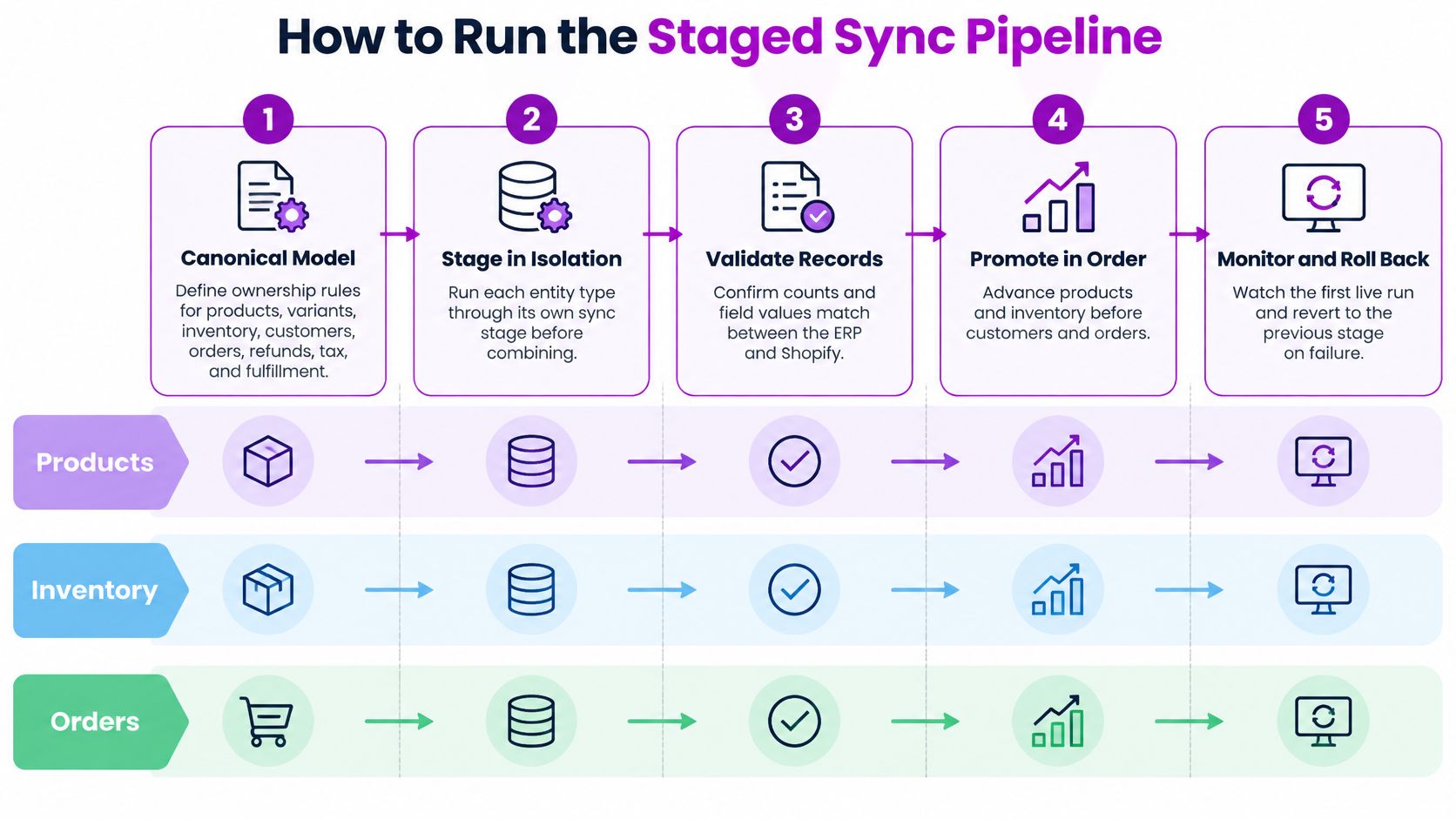
- Define the canonical model. Write ownership for products, variants, inventory, customers, orders, refunds, tax, and fulfillment, using the rules already agreed. The slip is starting to code while two teams still mean different things by "customer."
- Run an idempotent historical backfill. Load history so a second run updates the same records instead of inserting copies. Skipping idempotency turns a timeout-and-retry into duplicate orders and duplicate customers.
- Turn on webhook-driven incremental sync only after the backfill watermark is stored. Webhooks cover changes from that point forward. Turning them on during the backfill double-writes the same orders.
- Reconcile on a schedule with deterministic keys: Shopify IDs, ERP document numbers, and external correlation IDs. Matching on name or email alone produces false mismatches and hides real ones.
- Route every failure to a replayable dead-letter queue. A logged error nobody can reprocess becomes a manual ticket. The queue should keep the payload, the key, and the reason.
Shopify's bulk operations documentation is the right tool for a large catalog or a first migration. Bulk query execution isn't subject to normal GraphQL request-rate limits, can run for up to 10 days, and can report completion through the bulk-operation-finish webhook instead of polling. Paginated reads on a catalog of that size are how you discover the throttle at 2 a.m.
What usually goes wrong on webhooks
Webhooks aren't exactly-once delivery. Shopify can send the same event twice, or your endpoint can acknowledge late and receive it again. Consumers should verify authenticity, persist the event ID, drop duplicates, retry with exponential backoff, and make every write idempotent. A handler that creates a sales order whenever orders/create arrives will create two sales orders the first time the ERP is slow to respond.
What a healthy first day looks like
After the first full day, three things should be true. The backfill count matches the source count for each object. The dead-letter queue is empty, or every item in it has a named owner and a reason. Reconciliation variance is on a dashboard, including money and stock, not buried in a log file someone plans to check next week.
Run products and inventory through their own stages before you combine them with customers and orders. Promoting orders against a half-loaded catalog is how you manufacture the exceptions the queue was built to catch. If the first live slice fails, roll back to the previous stage. Don't patch forward in production.
Test Reconciliation and Fix Sync Failures
A passing test on a quiet dataset isn't a working integration. Duplicate writes, location drift, and tax gaps show up when volume spikes, when a retry fires, or when the ERP is down for an hour. The first clean run hides all three.
Build the acceptance check as a comparison between Shopify and the ERP before anyone calls it live:
- Record counts for products, variants, customers, and orders in the pilot window.
- Monetary totals for gross sales, discounts, shipping, and refunds.
- Inventory by location, not a single summed figure that hides a warehouse that's wrong.
- Tax amounts on domestic and international orders, including a partial refund.
- Fulfillment states, including a split shipment, so "shipped" means the same thing in both systems.
Then run dual processing in shadow mode. Write to both systems, and let only one of them drive picks and invoices, until reconciliation variance is zero or a remaining gap is written down and signed off. An unexplained penny difference is still an unexplained difference.
Load the bad day, not the average day
Model peak order bursts, a bulk catalog update, a retry storm, and a full ERP outage. Watch four numbers: queue latency, synchronization completeness, duplicate-write rate, and reconciliation variance. If you only test the average Tuesday, you have tested the day the integration didn't need to work.
A failed record is replayed from the queue. It isn't patched by hand in one system, because the next sync will overwrite the patch or create a second conflict.
When something is already wrong in production, check in this order:
- Orders missing in the ERP: Look at the dead-letter queue first, not at the store admin.
- Stock that disagrees by location: Read the event log for that location before you adjust a quantity.
- Duplicate customers, or tax that doesn't match on international orders: Open the field mapping. The rule is wrong, not the order.
- Duplicates after a retry: Confirm that event IDs were persisted and that the write itself is idempotent before you delete anything.
Changing the record first destroys the evidence you need to see why the write happened twice.
Confirm Your Integration Plan and Next Step
Go-live starts the operating routine. Assign clear owners to ongoing checks: review reconciliation variance across counts, money, and stock by location each week; check the dead-letter queue daily; and put sync latency and duplicate-write rate on a dashboard operations can read. Set a response time for failed orders. Without a named owner and deadline, queued failures can sit unnoticed.
Rate readiness before the first sync
Score these four areas before enabling incremental sync for live orders. A weak area is a reason to narrow the pilot.
| Readiness item | Ready | Not ready |
|---|---|---|
| Data cleansing | SKUs, addresses, and tax codes match in a sample | Known mismatches remain in the catalog |
| Testing coverage | Counts, money, stock, tax, and split shipments compared | Only one happy-path order tested |
| Rollback plan | The old process can run for one full fulfillment cycle | No recovery path beyond manual fixes |
| Staff training | Support and warehouse teams know the new status meanings | Only the integrator knows the flow |
Define the pilot's success criteria in writing: one store, one warehouse, specific order types, and an acceptable variance. Keep the old process available for one full fulfillment cycle after go-live. Switching off the spreadsheet on day one leaves no fallback if an order fails.
The decision in front of you
List each object governed by your ownership rules and name who approves its fields. A common Shopify and NetSuite pairing still needs clear ownership and tested mappings; familiarity with the systems does not resolve conflicts between them.
If your team lacks capacity for some tasks, hand off those tasks rather than the whole program by default. ECORN is an official Shopify Partner Agency that integrates ERP systems including NetSuite, Sage, Dynamics, AWS, and 1C with eCommerce stores. Its Shopify Expertise service provides Shopify specialists to maintain and enhance a project.
Choose who will build the pilot before the first sync runs: your in-house team, or a partner covering the gaps in your capacity. Decide while the connector is still in test mode, not after it starts writing live orders.
ECORN integrates Shopify stores with ERP systems such as NetSuite, Sage, Dynamics, AWS, and 1C. If your team needs support with data ownership, API limits, or a staged rollout, talk with ECORN about a pilot.



Shopify Cart Page Optimization: 7 Ways That Work
Shopify Post Purchase Upsell: Setup, Timing and Results

Ab Test Sample Size

Shopify Social Proof: 7 Apps That Build Buyer Trust

10 Best Shopify Design App Tools for 2026: Pros and Cons
Shopify Local Development: Setup, Workflow and Fixes

Shopify Theme Minimal: How to Design and Build One

Consistent Website Design: A Practical Guide for Stores

Shopify Development Company in USA Hiring Guide
Shopify Inventory Tracking App: How to Set It Up Right
Shopify Volume Pricing: How to Set Up Tiered Discounts
How Does Shopify Work for Sellers? a Practical Guide

Shopify Theme ZIP: How to Upload and Install It
Shopify Plus Organization Admin: Roles and Access Guide
How to Build a Drop Down Menu in Shopify: Steps and Fixes
Shopify Plus Integration Services Guide

Shopify Customer Experience: A 2026 Guide

AI Lead Generation for E-commerce Growth

Shopify Plus Expansion Stores: Limits and Setup
Shopify Theme Update: Safe Steps, Backups and Rollback

Shopify Website Design Packages: What You Actually Get

How to Choose a Shopify Plus Web Design Agency in 2026

Shopify Plus Ecommerce Agency: How to Pick the Right One

Shopify Themes Retina: How to Serve 2x Images

How to Cross Sell on Shopify Without Friction

Best Shopify Theme for Custom Products Compared
Multi Store Inventory Management: A Practical Guide

SEO Consulting for Ecommerce: A Practical Guide

Shopify Theme Updater App: A Safe Update Playbook
Shopify Git Integration: A Developer's Guide to 2026
Headless Ecommerce Development Services Explained

How to Build a Shopify Clothing Website That Converts

How to Launch a Box Subscription Business in 2026

Luxury Skincare Branding Playbook That Converters

11 Best Podcast Ecommerce Shows for Store Growth in 2026
Shopify Developer Hourly Rate: What to Pay in 2026
Critical Shopify Setup Errors That Are Secretly Sabotaging Your Store
Ecommerce Conversion Tracking: The Complete How-To Guide

Shopify Design Agency: How to Pick the Right Partner
Mastering Multi Store Management on Shopify

Scale Shopify Store

10 Shopify App Ideas Worth Building in 2026

Conversion Rate Optimization for Landing Pages: The Playbook
Shopify Plus Automation: A Guide for 2026
10 Social Selling Platforms for Shopify Merchants

Shopify Website Design Examples: 7 Stores Worth Studying

7 Ecommerce Newsletter Examples for Shopify Brands
One Product Shopify Store: Build and Scale

Mobile Pop Up Strategy for Shopify Stores That Converts

Sitemap for Shopify: How to Find, Optimize, and Submit It

7 Single Product Websites Worth Emulating

Product Variants Shopify: The Complete 2026 Guide

Ecommerce Analytics Consulting for Growth

What Is AI Integration for eCommerce

How to Choose the Right eCommerce Website Development Firm
E Business Strategy Implementation
Conversion Tracking Setup for Shopify Stores
BigCommerce vs Shopify Plus Which Enterprise Wins in 2026
Shopify Theme Kit: Setup, Commands, and Migration Guide

Shopify Extension Development: A Practical 2026 Guide
Shopify Speed Score Explained and How to Improve It

Shopify Mobile Optimization: The 2026 Playbook

How to Add Subcategory in Shopify for Better UX
How to Implement Structured Data for Ecommerce in 2026

SEO App Mobile: Shopify Store Optimization Guide

Shopify Plus Support: What It Includes and How to Choose

Google Ads for Shopify: The Complete 2026 Playbook

Shopify New York: How to Find and Hire the Right Agency

Google Search Console for Shopify: The Complete Setup

First Party Data Collection for eCommerce Growth
FAQ Online Store Guide: Build and Measure It Right
Do FB Ads Work for eCommerce in 2026?

One Page Checkout for Shopify: Design and Implementation
Shopify GraphQL vs REST: The 2026 Developer Decision
Shopify Ecommerce Consulting: Strategy, Pricing &

Are Reddit Ads Worth It for eCommerce Brands

Shopify Title and Meta Description: A Practical 2026 Guide

Product Video Best Practices for Shopify Brands
Real-Time Inventory Management: A 2026 Guide

AI Chatbot Integration for Shopify Stores
Affiliate Program Management: A Shopify Guide
10 Best Performance Monitoring Tools for Shopify in 2026
Digital Asset Management for eCommerce Brands in 2026

Every Type of Facebook Ads Explained for eCommerce Growth
Product Information Management Explained for Shopify Brands
Support Ticket System: A Guide for Shopify Stores

10 Best Customer Service Tools for Shopify in 2026

Can I Start a Business with No Money? a 2026 Blueprint

What Sells Good on Etsy: Best Niches for 2026

Shopify Add to Cart Button: A Practical 2026 Guide

Customer Feedback Automation: A Practical eCommerce Guide

Critical Rendering Path: A Guide for Shopify Stores

How to Promote on TikTok for eCommerce in 2026

B2B eCommerce Consulting That Drives Real Revenue

10 Best Practices for Site Navigation in 2026
Return vs Refund for Shopify Stores: A Practical Guide

What Is Customer Lifetime Value and Why It Matters

What Is Voice of Customer Research for eCommerce

SMS Marketing for Ecommerce That Actually Converts

Master How to Improve Email Deliverability in 2026


newsletter in your inbox